सार्वजनिक जानकारी से बना चयन मार्गदर्शन। केवल संदर्भ हेतु।
Crimson एक उच्च प्रदर्शन वाला JSON पार्सर और सीरियलाइज़र है, जो Dart के लिए डिज़ाइन किया गया है, जिसमें तेज़ी और सरलता का ध्यान रखा गया है। यह न्यूनतम बॉयलरप्लेट के साथ JSON डेटा और Dart ऑब्जेक्ट्स के बीच कुशल रूप से अनुवाद करने में सक्षम है। प्रदर्शन को ध्यान में रखते हुए बनाया गया, यह Android, iOS, Web, macOS, Windows और Linux सहित सभी प्रमुख प्लेटफॉर्मों का समर्थन करता है। Crimson एक स्पष्ट, सुगम API प्रदान करता है जो JSON के साथ काम करने को आसान बनाता है, जो तेज़ डेटा हैंडलिंग की आवश्यकता वाले एप्लिकेशन के लिए आदर्श है। इसकी हल्की प्रकृति के कारण कम ओवरहेड होता है, जिससे यह छोटे प्रोजेक्ट्स और बड़े पैमाने के ऐप्स दोनों के लिए उपयुक्त है।
उपयोग
API से JSON प्रतिक्रियाओं का विश्लेषण करना
Dart ऑब्जेक्ट्स को JSON में सीरियलाइज़ करना
उच्च प्रदर्शन डेटा प्रसंस्करण
क्रॉस-प्लेटफॉर्म ऐप विकास
रियल-टाइम डेटा सिंक्रनाइज़ेशन
हल्का डेटा स्टोरेज
मुख्य विशेषताएँ
अत्यंत तेज़ विश्लेषण और अनुक्रमण
न्यूनतम बॉलरप्लेट कोड
सभी प्रमुख प्लेटफॉर्म का समर्थन करता है
सरल और स्पष्ट एपीआई
कम मेमोरी उपयोग
निर्मित प्रकार सुरक्षा
इनके लिए उपयुक्त
प्रदर्शन-महत्वपूर्ण एप्लिकेशन
मोबाइल और वेब ऐप्स
API क्लाइंट
डेटा-गहन सेवाएं
त्वरित JSON संसाधन की आवश्यकता वाले विकासकर्ता
दक्षता पर ध्यान केंद्रित परियोजनाएँ
विचार योग्य बातें
स्पष्ट मॉडल परिभाषाओं की आवश्यकता होती है
सीमित आंतरिक सत्यापन
कस्टमाइजेशन के बिना जटिल नेस्टेड संरचनाओं के लिए उपयुक्त नहीं
उन्नत उपयोग के मामलों के लिए अतिरिक्त सेटअप की आवश्यकता हो सकती है
संरचित JSON डेटा के लिए सबसे उपयुक्त
मूल README
संबंधित सोर्स रिपॉज़िटरी के मूल README का स्नैपशॉट। नवीनतम सामग्री के लिए रिपॉज़िटरी देखें।
Fast, efficient and easy-to-use JSON parser and serializer for Dart. Crimson does not verify your JSON!
Features
🏎️ Fast: Like really fast. Crimson parses JSON in a single pass.
🌻 Easy to use: Crimson is designed to be easy to learn and use.
💃 Flexible: Crimson can partially parse and serialize JSON.
Now you just need to run pub run build_runner build to generate the necessary code.
import'package:crimson/crimson.dart';
voidmain() {
final jsonBytes = downloadTweets();
final crimson = Crimson(jsonBytes);
final tweets = crimson.readTweetList();
final writer = CrimsonWriter();
writer.writeTweetList(tweets);
final bytes = writer.toBytes();
}
That's it! You can now parse and serialize JSON with ease.
Ignoring JSON fields
Annotate properties with @jsonIgnore to ignore them:
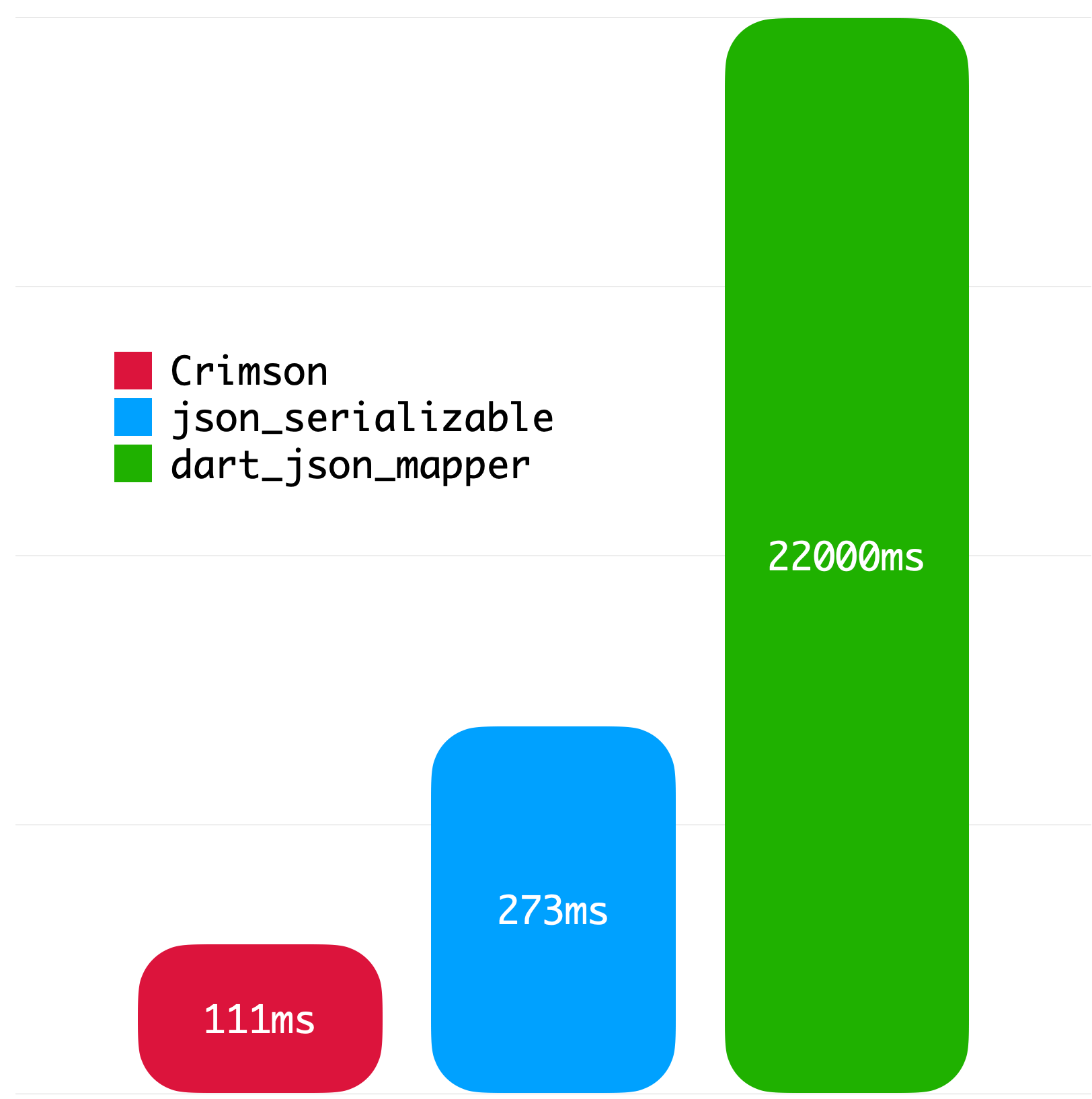
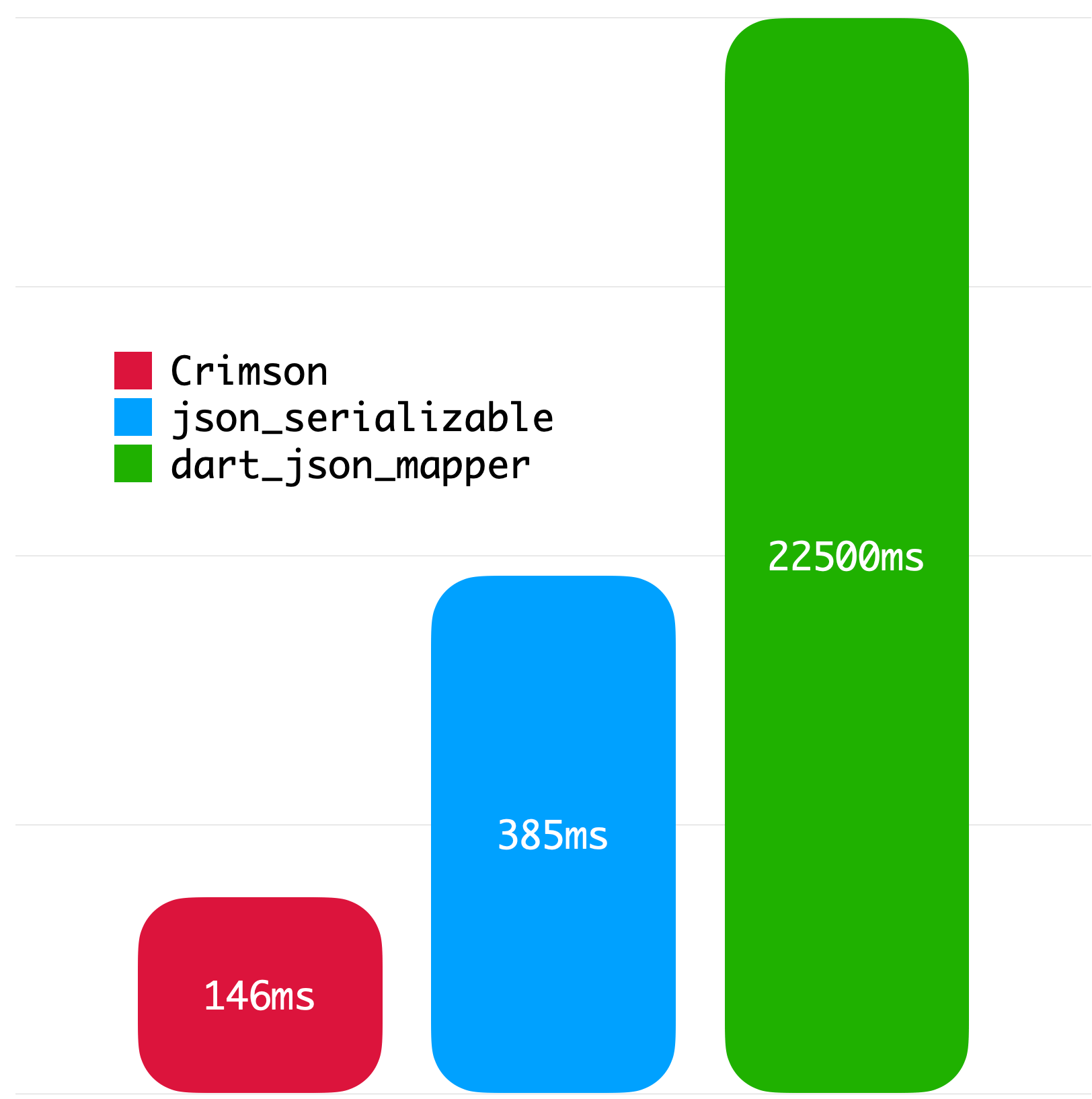
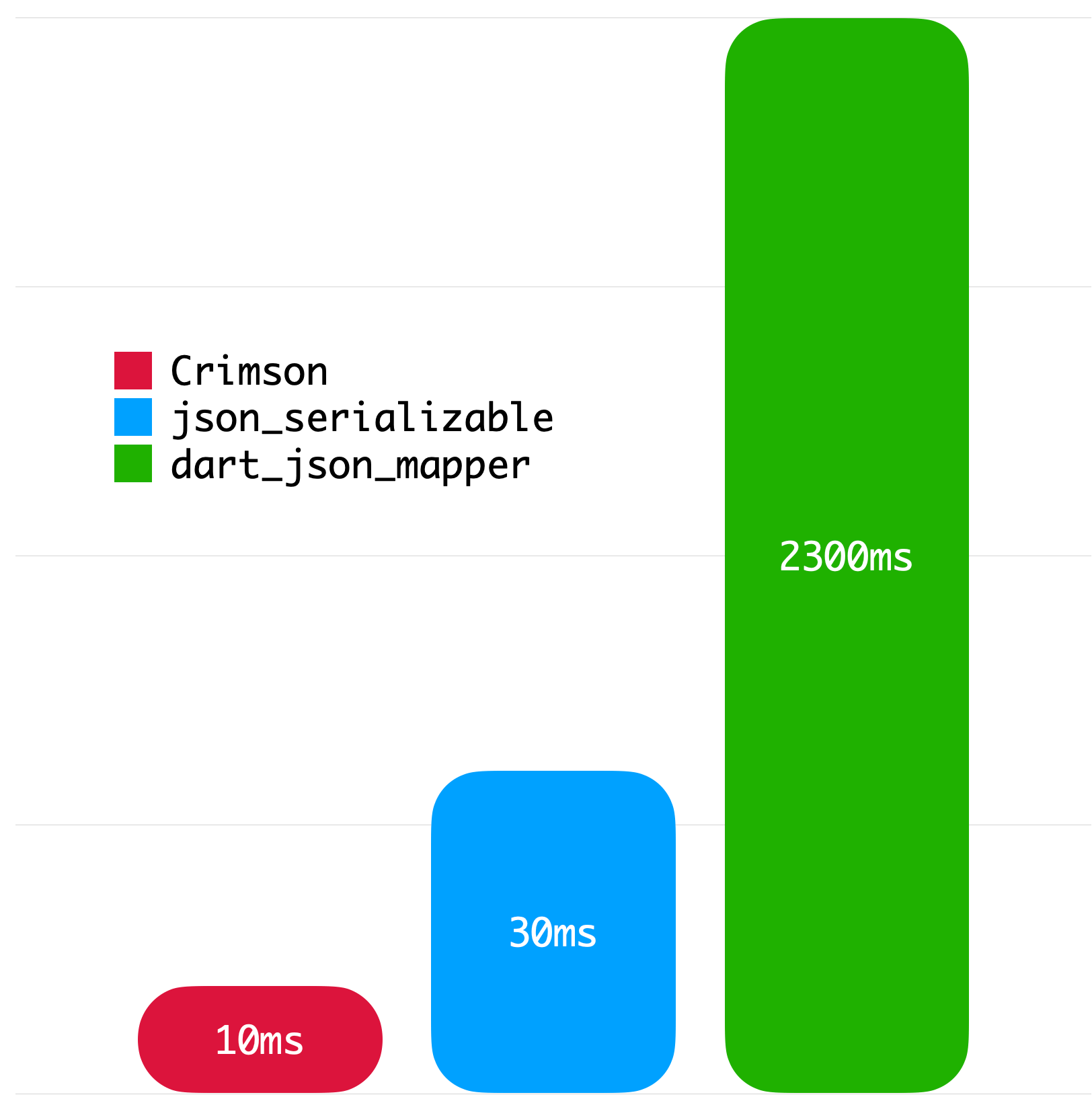
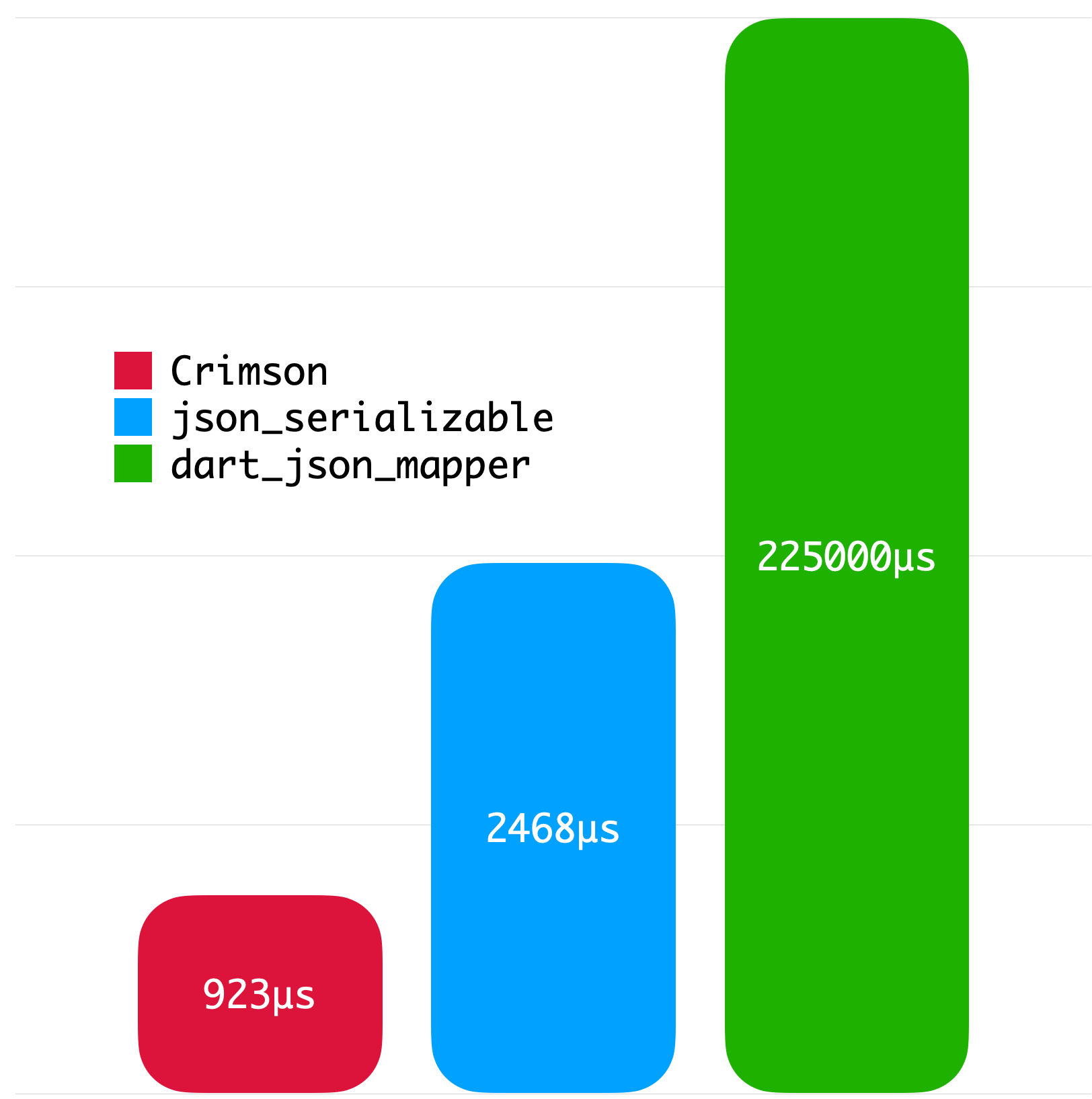
The following benchmarks give you an idea about the JSON parsing performance of Crimson. The benchmarks were run on a MacBook with M1 Pro and 32 GB of RAM using Twitter API data.
Big JSON without whitespace
Big JSON with whitespace
Medium JSON without whitespace
Small JSON without whitespace
License
Copyright2023SimonChoiLicensed under the ApacheLicense, Version2.0 (the "License");
you may not use this file except in compliance with the License.
You may obtain a copy of the License at
http://www.apache.org/licenses/LICENSE-2.0Unlessrequired by applicable law or agreed to in writing, software
distributed under the Licenseis distributed on an "AS IS" BASIS,
WITHOUT WARRANTIES OR CONDITIONS OF ANY KIND, either express or implied.
See the Licensefor the specific language governing permissions and
limitations under the License.