पैकेज, रिपॉज़िटरी और ऐप श्रेणियाँ खोजें

cupertino_onboarding कवर
पैकेज विवरणv1.3.0

cupertino_onboarding

एक iOS-शैली का ओनबोर्डिंग अनुभव प्रदान करने वाला Flutter पैकेज।

AndroidiOSWebmacOSWindowsLinux
30-दिन डाउनलोड
928
लाइक
195
Pub अंक
150

पैकेज इंस्टॉल करें

flutter pub add cupertino_onboarding

पैकेज अवलोकन

सार्वजनिक जानकारी से बना चयन मार्गदर्शन। केवल संदर्भ हेतु।

एक फ्लटर पैकेज जो चिकनी ट्रांज़िशन और मूल जैसे एनिमेशन के साथ आईओएस-स्टाइल ऑनबोर्डिंग अनुभव प्रदान करता है। ऐपल के ऑनबोर्डिंग इंटरफ़ेस की नकल करने के लिए डिज़ाइन किया गया, यह एप्लिकेशन की सुविधाओं को पेश करने के लिए एक साफ़, आधुनिक कैरोसेल प्रदान करता है। यह पैकेज एंड्रॉइड, आईओएस, वेब, मैकओएस, विंडोज़ और लिनक्स जैसे कई प्लेटफ़ॉर्म का समर्थन करता है, जिससे उपकरणों के बीच एक समान UX सुनिश्चित होता है। यह pub add के माध्यम से आसानी से एकीकृत होता है और एप्लिकेशन के लिए एक पॉलिश्ड, प्लेटफ़ॉर्म-विशिष्ट दिखावट प्राप्त करने के लिए आदर्श है। कस्टमाइज़ेबल कंटेंट और स्वाइप गेस्चर उपयोगकर्ता एंगेजमेंट को बढ़ाते हैं।

उपयोग

  • एप्प ओनबोर्डिंग ट्यूटोरियल
  • फीचर परिचय स्क्रीन्स
  • उपयोगकर्ता ओनबोर्डिंग प्रवाह
  • मोबाइल-पहला ऐप लॉन्च
  • क्रॉस-प्लेटफॉर्म ओनबोर्डिंग अनुभव

मुख्य विशेषताएँ

  • iOS-शैली डिज़ाइन
  • चिकने स्वाइप एनीमेशन
  • बहुपлатफॉर्म समर्थन
  • कस्टमाइज़ेबल कंटेंट
  • pub के माध्यम से आसान एकीकरण
  • प्रतिक्रियाशील लेआउट

इनके लिए उपयुक्त

  • iOS-प्रेरित ऐप डिज़ाइन
  • क्रॉस-प्लेटफॉर्म मोबाइल ऐप्स
  • ऑनबोर्डिंग-फोकस्ड एप्लिकेशंस
  • मूल जैसे UI चाहने वाले विकासकर्ता
  • आधुनिक अस्तित्व का लक्ष्य बनाने वाले ऐप्स

विचार योग्य बातें

  • iOS थीम के आगे सीमित कस्टमाइजेशन
  • गैर-iOS ब्रांडिंग के लिए अतिरिक्त स्टाइलिंग की आवश्यकता हो सकती है
  • उपस्थिति के लिए Cupertino विजेट्स पर निर्भर करता है
  • नॉन-स्वाइप-आधारित ऑनबोर्डिंग के लिए अनुपयुक्त
  • सरल, रैखिक ऑनबोर्डिंग फ्लो के लिए सर्वोत्तम

मूल README

संबंधित सोर्स रिपॉज़िटरी के मूल README का स्नैपशॉट। नवीनतम सामग्री के लिए रिपॉज़िटरी देखें।

cupertino_onboarding

style: very good analysis pub.dev badge GitHub build status codecov License: MIT

Flutter package that provides a beautiful, iOS-like, easy onboarding experience with minimal code.

It's designed to easily showcase your app's features and provide a simple way for users to learn about your app.

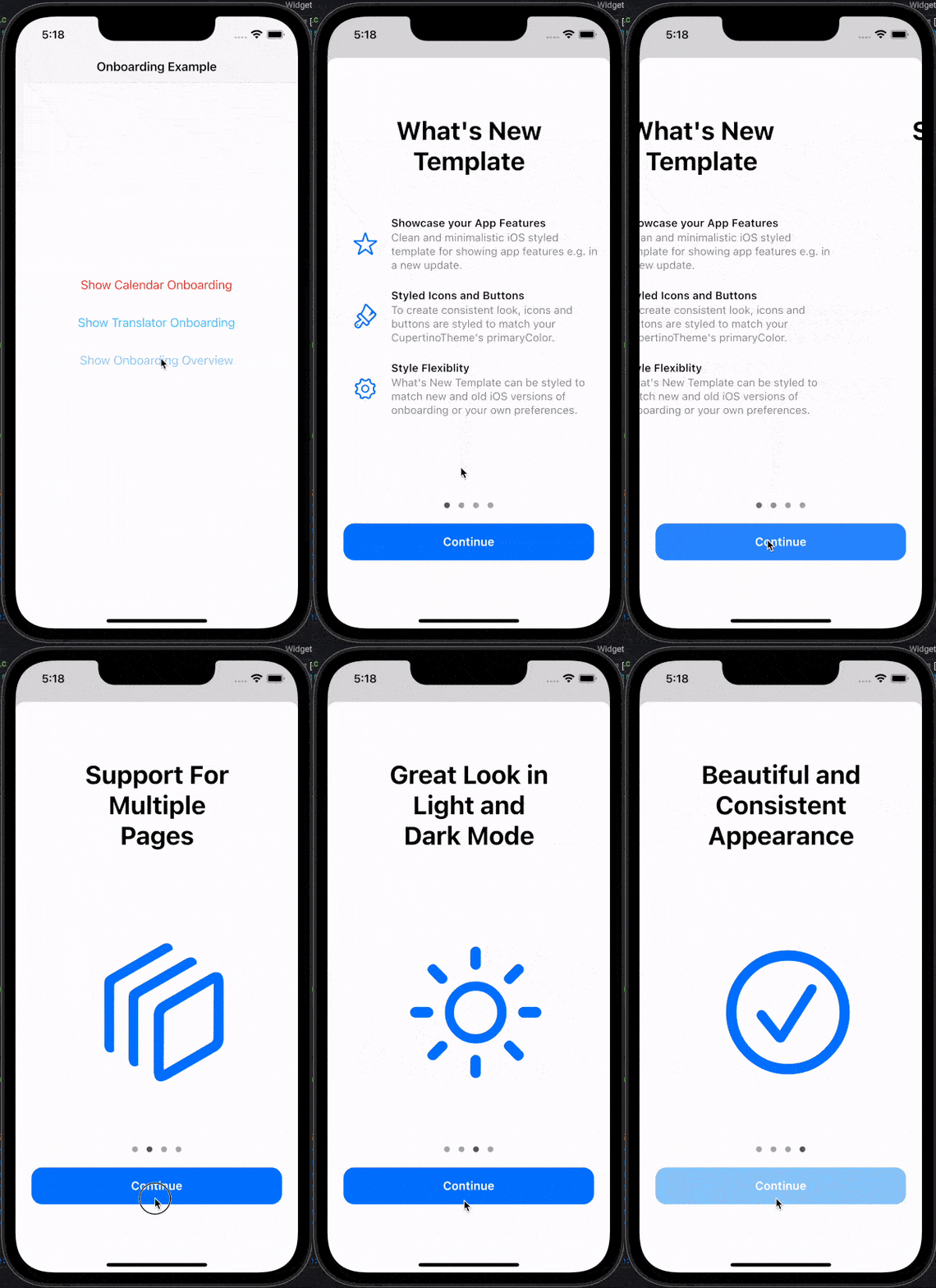
onboarding example calendar example translator example

Getting Started

Add the package to your pubspec.yaml file:

cupertino_onboarding: ^1.2.0

Import the library:

import 'package:cupertino_onboarding/cupertino_onboarding.dart';

Create CupertinoOnboarding widget and pass your pages as parameter:

@override
Widget build(BuildContext context) {
  return CupertinoOnboarding(
    onPressedOnLastPage: () => Navigator.pop(context),
    pages: [
      // To create What's New page like Calendar or Translator
      // examples in the readme, use `WhatsNewPage` widget:

      // Actual code from the Calendar example:
      WhatsNewPage(
        title: const Text("What's New in Calendar"),
        features: [
          // Feature's type must be `WhatsNewFeature`
          WhatsNewFeature(
            icon: Icon(
              CupertinoIcons.mail,
              color: CupertinoColors.systemRed.resolveFrom(context),
            ),
            title: const Text('Found Events'),
            description: const Text(
              'Siri suggests events found in Mail, Messages, and Safari, so you can add them easily, such as flight reservations and hotel bookings.',
            ),
          ),
          WhatsNewFeature(
            icon: Icon(
              CupertinoIcons.time,
              color: CupertinoColors.systemRed.resolveFrom(context),
            ),
            title: const Text('Time to Leave'),
            description: const Text(
              "Calendar uses Apple Maps to look up locations, traffic conditions, and transit options to tell you when it's time to leave.",
            ),
          ),
        ],
      ),

      // To create custom onboarding page, use
      // `CupertinoOnboardingPage` widget:

      // Actual code from the GIF example:
      const CupertinoOnboardingPage(
        title: Text('Support For Multiple Pages'),
        body: Icon(
          CupertinoIcons.square_stack_3d_down_right,
          size: 200,
        ),
      ),
      const CupertinoOnboardingPage(
        title: Text('Great Look in Light and Dark Mode'),
        body: Icon(
          CupertinoIcons.sun_max,
          size: 200,
        ),
      ),
    ],
  );
}

CupertinoOnboarding can be shown as any other widget, but to match native feel, consider using modal_bottom_sheet package or other modal view.

See API reference for more information about customizing look and feel of the onboarding.

Features, bugs and contributions

Feel free to contribute to this project.

Please file feature requests and bugs at the issue tracker.
If you fixed a bug or implemented a feature by yourself, feel free to send a pull request.

Sponsoring

I am working on my packages in my free time.

If this package is helping you, please consider buying me a coffee, so I can keep updating and maintaining this package.

श्रेणियाँ

निर्भरताएँ

निर्भरता सूची 1 आइटम

सोर्स रिपॉज़िटरी

इस पैकेज का उपयोग करने वाले प्रोजेक्ट