पैकेज, रिपॉज़िटरी और ऐप श्रेणियाँ खोजें

cupertino_progress_bar कवर
पैकेज विवरणv0.2.0

cupertino_progress_bar

एक अनिर्देशित प्रगति बार में एक ट्रैक होता है जो बाएं से दाएं भरता है और एक ज्ञात अवधि के साथ एक कार्य की प्रगति दिखाता है।

AndroidiOSWebmacOSWindowsLinux
30-दिन डाउनलोड
5.7 हज़ार
लाइक
18
Pub अंक
150

पैकेज इंस्टॉल करें

flutter pub add cupertino_progress_bar

पैकेज अवलोकन

सार्वजनिक जानकारी से बना चयन मार्गदर्शन। केवल संदर्भ हेतु।

एक अनिर्देशित प्रगति बार जो ट्रैक को बाएं से दाएं भरकर कार्य की प्रगति का दृश्य प्रस्तुत करता है। Cupertino (iOS-शैली) अस्तर के साथ डिज़ाइन किया गया, जो iOS और अन्य प्लेटफॉर्म के लिए डिज़ाइन किए गए Flutter ऐप्स में बिना किसी बाधा के एकीकृत होता है। फ़ाइल अपलोड या लोडिंग अनुक्रम जैसे ज्ञात अवधि वाले कार्यों के पूर्णता स्थिति को दिखाने के लिए आदर्श है। घटक हल्का है और Apple के डिज़ाइन भाषा के साथ संगत है, जबकि कई प्लेटफॉर्मों का समर्थन करता है।

उपयोग

  • अपलोड/डाउनलोड प्रगति दिखाएं
  • फॉर्म में कार्य पूर्णता को प्रदर्शित करना
  • एप्प में लोडिंग स्थिति का दृश्यीकरण
  • मीडिया प्लेबैक प्रगति का ट्रैकिंग
  • एप्लिकेशन प्रारंभ प्रगति दर्शाना

मुख्य विशेषताएँ

  • iOS-शैली का कूपरटी डिज़ाइन
  • बाएं से दाएं भरने का एनीमेशन
  • डिफ़ॉल्ट रूप से अनिर्देशित
  • क्रॉस-प्लेटफ़ॉर्म समर्थन
  • कस्टमाइज़ किए गए ट्रैक और प्रगति रंग
  • सुचारू दृश्य संक्रमण

इनके लिए उपयुक्त

  • iOS-थीम वाले Flutter एप्लिकेशन
  • मोबाइल ऐप में प्रगति सूचकांक
  • सरल, साफ लोडिंग प्रतिक्रिया
  • प्लेटफॉर्म-संगत यूआई की आवश्यकता वाले ऐप्स
  • विकासकर्ता मूल दिखावट और अनुभव को प्राथमिकता देते हैं

विचार योग्य बातें

  • इंटरैक्टिव उपयोगकर्ता इनपुट के लिए उपयुक्त नहीं
  • रंग और आकार के अलावा सीमित कस्टमाइजेशन
  • प्रगति मान के हस्तांतरण की आवश्यकता है
  • उलटी दिशा का समर्थन नहीं करता है
  • निर्मित प्रतिबंध/पुनरारंभ नियंत्रण नहीं है

मूल README

संबंधित सोर्स रिपॉज़िटरी के मूल README का स्नैपशॉट। नवीनतम सामग्री के लिए रिपॉज़िटरी देखें।

Cupertino Progress Bar for Flutter

pub license: BSD build codecov

A progress bar includes a track that fills from left to right to show the progression of a task with a known duration. Progress bars are non-interactive, although they are often accompanied by a button for canceling the corresponding operation.

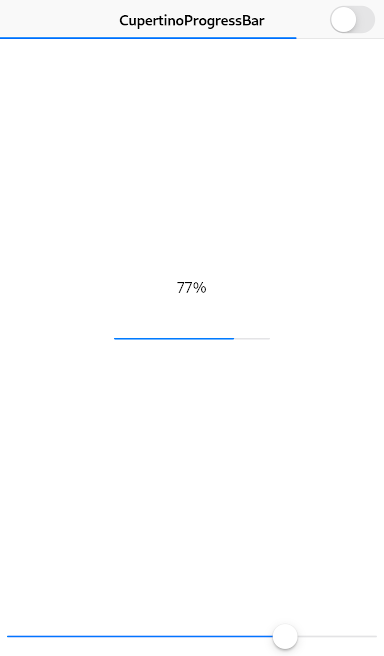
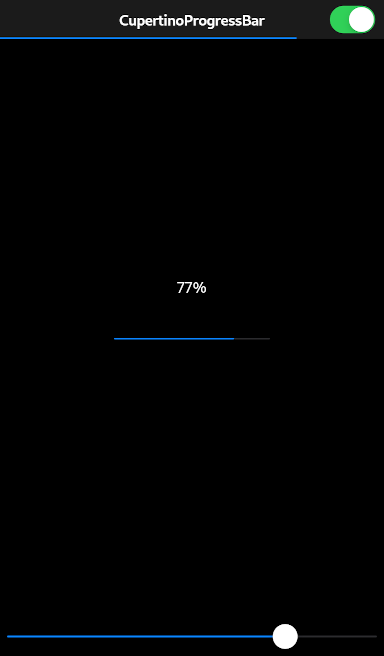
Screenshots

Light Dark
Light CupertinoProgressBar Dark CupertinoProgressBar

Example

CupertinoProgressBar(
  value: 0.77,
)

Guidelines

Always report progress accurately. Don’t display inaccurate progress information just to make your app appear busy. Only use progress bars for tasks that are quantifiable. Otherwise, use an activity indicator.

Use progress bars for tasks with a well-defined duration. Progress bars are great for showing the status of a task, especially when it helps convey how much longer the task needs to complete.

Hide the unfilled portion of track in navigation bars and toolbars. By default, a progress bar’s track includes both filled and unfilled portions. When used in a navigation bar or toolbar, such as to denote a page loading, a progress bar should be configured to hide the unfilled portion of the track.

Consider customizing a progress bar’s appearance to match your app. A progress bar’s appearance can be adjusted to match your app’s design. You can specify, for example, a custom color for both the track and fill.

See also:

Usage

To use this package, add cupertino_progress_bar as a dependency in your pubspec.yaml file.

श्रेणियाँ

सोर्स रिपॉज़िटरी

इस पैकेज का उपयोग करने वाले प्रोजेक्ट