पैकेज, रिपॉज़िटरी और ऐप श्रेणियाँ खोजें

direct_select कवर
पैकेज विवरणv2.0.0

direct_select

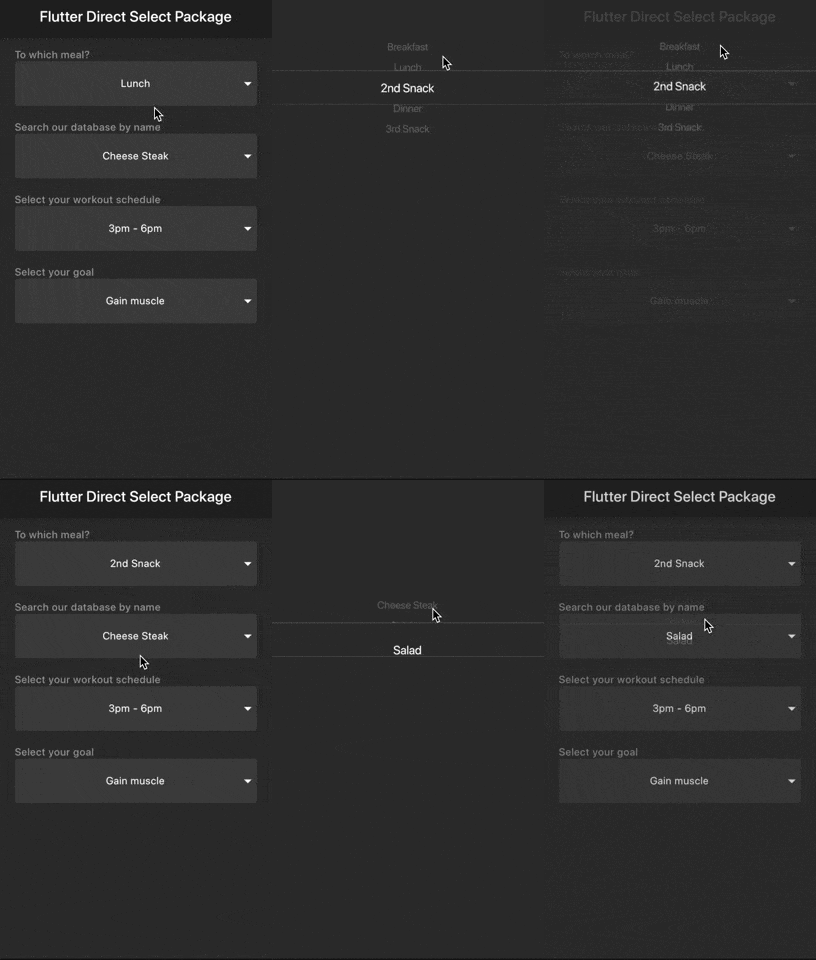
इस पैकेज के साथ आप निम्नलिखित ड्रॉपडाउन में मान को सीधे स्क्रॉल/चुन सकते हैं, जिससे कम प्रयास और समय लगता है।

AndroidiOSWebmacOSWindowsLinux
30-दिन डाउनलोड
660
लाइक
186
Pub अंक
140

पैकेज इंस्टॉल करें

flutter pub add direct_select

पैकेज अवलोकन

सार्वजनिक जानकारी से बना चयन मार्गदर्शन। केवल संदर्भ हेतु।

DirectSelect एक Flutter पैकेज है जो उपयोगकर्ताओं को ड्रॉपडाउन मेनू से मूल्यों को सीधे स्क्रॉल और चुनने की अनुमति देता है, जिससे पारंपरिक पिकर्स की तुलना में कम प्रयास और समय लगता है। यह आइटम चुनने के लिए एक स्पष्ट, गतिविधि-आधारित इंटरफ़ेस प्रदान करता है, जो फॉर्म और डेटा एंट्री में उपयोगकर्ता अनुभव को बढ़ाता है। यह पैकेज Android, iOS, Web, macOS, Windows और Linux जैसे कई प्लेटफॉर्म का समर्थन करता है, जिससे यह क्रॉस-प्लेटफॉर्म एप्लिकेशन के लिए लचीला बनता है। यह मौजूदा Flutter प्रोजेक्ट्स के साथ बिना किसी दिक्कत के एकीकृत होता है और चिकनी एनीमेशन और प्रतिक्रियाशील इंटरैक्शन प्रदान करता है।

उपयोग

  • लंबी सूचियों वाले फॉर्म इनपुट
  • मोबाइल ऐप्स में त्वरित मान चयन
  • डेटा एंट्री में सुधारित उपयोगकर्ता अनुभव
  • क्रॉस-प्लेटफ़ॉर्म पिकर वास्तुकला
  • चयन के लिए टैप काउंट को कम करना

मुख्य विशेषताएँ

  • मानों का चयन करने के लिए सीधे स्क्रॉल करें
  • चिकन एनीमेशन और संक्रमण
  • क्रॉस-प्लेटफॉर्म संगतता
  • Flutter एकीकरण के साथ न्यूनतम सेटअप
  • कस्टमाइज़ किए गए दिखावट और व्यवहार

इनके लिए उपयुक्त

  • कुशल ड्रॉपडाउन की तलाश में विकासकर्मी
  • त्वरित उपयोगकर्ता इनपुट की आवश्यकता वाले ऐप
  • उपयोगकर्ता अनुभव-केंद्रित फॉर्म डिज़ाइन
  • मोबाइल-प्रथम एप्लिकेशन
  • बहु-प्लेटफॉर्म Flutter प्रोजेक्ट

विचार योग्य बातें

  • कस्टम थीम के लिए अतिरिक्त स्टाइलिंग की आवश्यकता हो सकती है
  • बहुत बड़े डेटासेट के साथ प्रदर्शन
  • सीमित आंतरिक सत्यापन
  • जटिल नेस्टेड चयन के लिए उपयुक्त नहीं
  • स्क्रॉल फिजिक्स के सावधानी से निपटना आवश्यक है

मूल README

संबंधित सोर्स रिपॉज़िटरी के मूल README का स्नैपशॉट। नवीनतम सामग्री के लिए रिपॉज़िटरी देखें।

Direct Select

pub package

This package allows you to scroll/select the value directly from the dropdown with less effort and time.

Inspired by Virgil Pana shot

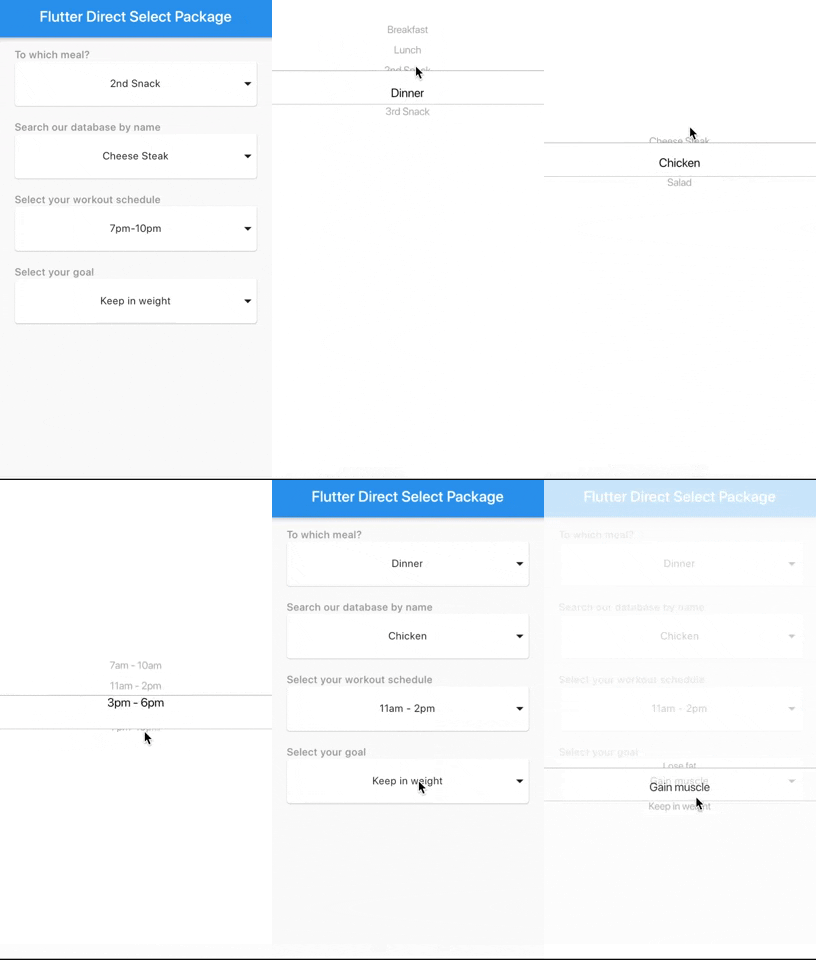
Samples

Light
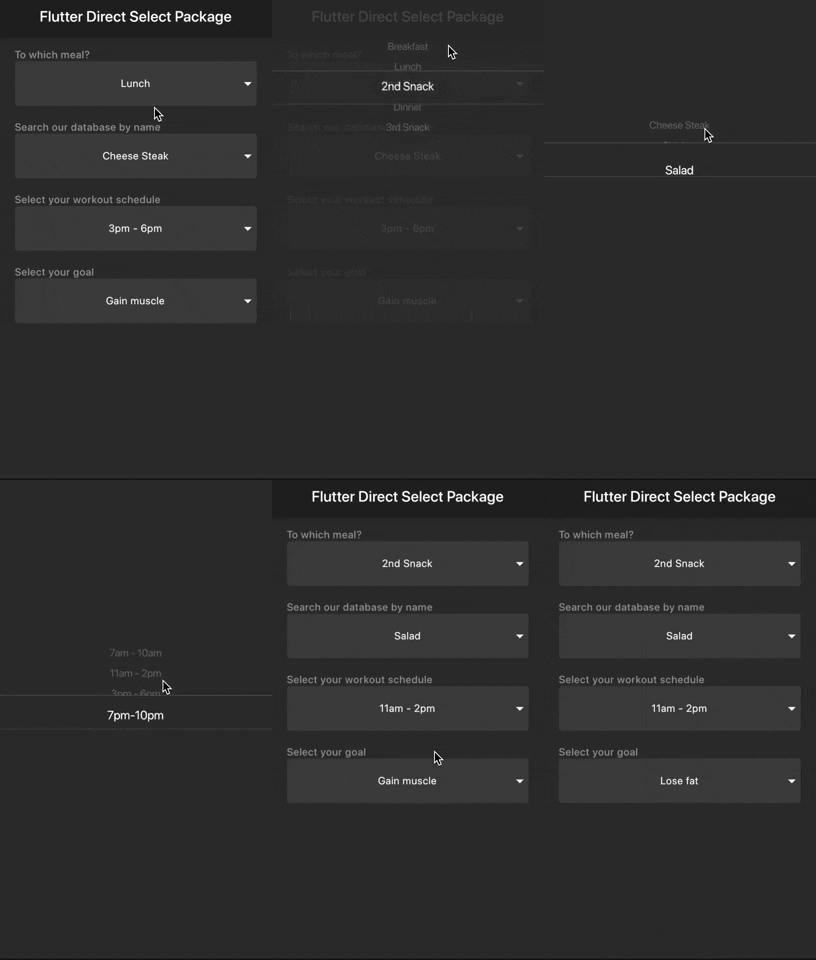
Dark
Getting started

You should ensure that you add the router as a dependency in your flutter project.

dependencies:
  direct_select: "^1.0.3"

You should then run flutter packages upgrade or update your packages in IntelliJ.

Example Project

There is an example project in the example folder. Check it out. Otherwise, keep reading to get up and running.

Usage

Sample 1
import 'package:flutter/material.dart';
import 'package:direct_select/direct_select.dart';

class _MyHomePageState extends State<MyHomePage> {
  final elements1 = [
    "Breakfast",
    "Lunch",
    "2nd Snack",
    "Dinner",
    "3rd Snack",
  ];
  final elements2 = [
    "Cheese Steak",
    "Chicken",
    "Salad",
  ];

  final elements3 = [
    "7am - 10am",
    "11am - 2pm",
    "3pm - 6pm",
    "7pm-10pm",
  ];

  final elements4 = [
    "Lose fat",
    "Gain muscle",
    "Keep in weight",
  ];

  int selectedIndex1 = 0,
      selectedIndex2 = 0,
      selectedIndex3 = 0,
      selectedIndex4 = 0;

  List<Widget> _buildItems1() {
    return elements1
        .map((val) => MySelectionItem(
              title: val,
            ))
        .toList();
  }

  List<Widget> _buildItems2() {
    return elements2
        .map((val) => MySelectionItem(
              title: val,
            ))
        .toList();
  }

  List<Widget> _buildItems3() {
    return elements3
        .map((val) => MySelectionItem(
              title: val,
            ))
        .toList();
  }

  List<Widget> _buildItems4() {
    return elements4
        .map((val) => MySelectionItem(
              title: val,
            ))
        .toList();
  }

  @override
  Widget build(BuildContext context) {
    return Scaffold(
      appBar: AppBar(
        title: Text(widget.title),
      ),
      body: Padding(
        padding: const EdgeInsets.all(15.0),
        child: Center(
          child: Column(
              mainAxisAlignment: MainAxisAlignment.start,
              crossAxisAlignment: CrossAxisAlignment.stretch,
              children: <Widget>[
                Padding(
                  padding: const EdgeInsets.only(left: 10.0),
                  child: Text(
                    "To which meal?",
                    style: TextStyle(
                        color: Colors.grey, fontWeight: FontWeight.w500),
                  ),
                ),
                DirectSelect(
                    itemExtent: 35.0,
                    selectedIndex: selectedIndex1,
                    backgroundColor: Colors.red,
                    child: MySelectionItem(
                      isForList: false,
                      title: elements1[selectedIndex1],
                    ),
                    onSelectedItemChanged: (index) {
                      setState(() {
                        selectedIndex1 = index;
                      });
                    },
                    items: _buildItems1()),
                Padding(
                  padding: const EdgeInsets.only(left: 10.0, top: 20.0),
                  child: Text(
                    "Search our database by name",
                    style: TextStyle(
                        color: Colors.grey, fontWeight: FontWeight.w500),
                  ),
                ),
                DirectSelect(
                    itemExtent: 35.0,
                    selectedIndex: selectedIndex2,
                    child: MySelectionItem(
                      isForList: false,
                      title: elements2[selectedIndex2],
                    ),
                    onSelectedItemChanged: (index) {
                      setState(() {
                        selectedIndex2 = index;
                      });
                    },
                    items: _buildItems2()),
                Padding(
                  padding: const EdgeInsets.only(left: 10.0, top: 20.0),
                  child: Text(
                    "Select your workout schedule",
                    style: TextStyle(
                        color: Colors.grey, fontWeight: FontWeight.w500),
                  ),
                ),
                DirectSelect(
                    itemExtent: 35.0,
                    selectedIndex: selectedIndex3,
                    child: MySelectionItem(
                      isForList: false,
                      title: elements3[selectedIndex3],
                    ),
                    onSelectedItemChanged: (index) {
                      setState(() {
                        selectedIndex3 = index;
                      });
                    },
                    items: _buildItems3()),
                Padding(
                  padding: const EdgeInsets.only(left: 10.0, top: 20.0),
                  child: Text(
                    "Select your goal",
                    style: TextStyle(
                        color: Colors.grey, fontWeight: FontWeight.w500),
                  ),
                ),
                DirectSelect(
                    itemExtent: 35.0,
                    selectedIndex: selectedIndex4,
                    child: MySelectionItem(
                      isForList: false,
                      title: elements4[selectedIndex4],
                    ),
                    onSelectedItemChanged: (index) {
                      setState(() {
                        selectedIndex4 = index;
                      });
                    },
                    items: _buildItems4()),
              ]),
        ),
      ),
    );
  }
}

//You can use any Widget
class MySelectionItem extends StatelessWidget {
  final String title;
  final bool isForList;

  const MySelectionItem({Key key, this.title, this.isForList = true})
      : super(key: key);

  @override
  Widget build(BuildContext context) {
    return SizedBox(
      height: 60.0,
      child: isForList
          ? Padding(
              child: _buildItem(context),
              padding: EdgeInsets.all(10.0),
            )
          : Card(
              margin: EdgeInsets.symmetric(horizontal: 10.0),
              child: Stack(
                children: <Widget>[
                  _buildItem(context),
                  Align(
                    alignment: Alignment.centerRight,
                    child: Icon(Icons.arrow_drop_down),
                  )
                ],
              ),
            ),
    );
  }

  _buildItem(BuildContext context) {
    return Container(
      width: MediaQuery.of(context).size.width,
      alignment: Alignment.center,
      child: Text(title),
    );
  }
}

You can follow me on twitter @diegoveloper

श्रेणियाँ

सोर्स रिपॉज़िटरी

इस पैकेज का उपयोग करने वाले प्रोजेक्ट

अभी कोई डेटा उपलब्ध नहीं है।