सार्वजनिक जानकारी से बना चयन मार्गदर्शन। केवल संदर्भ हेतु।
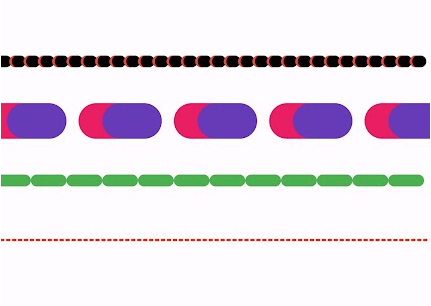
dotted_line_flutter पैकेज डेवलपर्स को फ्लटर एप्लिकेशन में कस्टमाइज़ेबल डॉटेड लाइन्स आसानी से बनाने की अनुमति देता है। यह विभिन्न UI तत्वों के माध्यम से सजावटी या कार्यात्मक डॉटेड लाइन्स जोड़ने का एक सरल और कुशल तरीका प्रदान करता है। अलग-अलग डॉट साइज, स्पेसिंग और रंगों के समर्थन के साथ, यह जटिल कस्टम पेंटिंग के बिना विजुअल डिज़ाइन को बढ़ावा देता है। पैकेज हल्का है और विभिन्न प्लेटफॉर्मों पर फ्लटर प्रोजेक्ट्स में बिना किसी दिक्कत के एकीकृत हो जाता है।
उपयोग
लेआउट में डिकोरेटिव डिवाइडर्स जोड़ना
कार्ड या कंटेनर के लिए डैश्ड बॉर्डर बनाना
डॉटेड पाथ के साथ प्रगति इंडिकेटर डिज़ाइन करना
दृश्य अलगाव के साथ फॉर्म फील्ड को बेहतर बनाना
डॉटेड एक्सेंट के साथ कस्टम UI कंपोनेंट्स बिल्ड करना
मुख्य विशेषताएँ
कस्टमाइज़ की गई बिंदु आकार और अंतराल
विभिन्न रेखा रंगों का समर्थन
मौजूदा विजेट्स के साथ आसान एकीकरण
क्रॉस-प्लेटफॉर्म संगतता
हल्का और कार्यक्षम
लचीले एलाइनमेंट विकल्प
इनके लिए उपयुक्त
दृश्य सुधार की तलाश में UI डिज़ाइनर
फॉर्म या डैशबोर्ड बनाने वाले डेवलपर्स
हल्के दृश्य संकेतों की आवश्यकता वाले प्रोजेक्ट्स
न्यूनतम या आधुनिक डिज़ाइन भावना वाले ऐप्स
Flutter शुरुआती अलग-अलग सजावट विंडो के अन्वेषण कर रहे हैं
विचार योग्य बातें
मूल डॉटेड लाइन पैटर्न तक सीमित
कोई निर्मित एनीमेशन समर्थन नहीं है
गतिशील पंक्ति अपडेट के हस्तचालित संभाल की आवश्यकता है
जटिल स्ट्रोक पैटर्न के लिए उपयुक्त नहीं
Flutter के रेंडरिंग प्रदर्शन पर निर्भर करता है
मूल README
संबंधित सोर्स रिपॉज़िटरी के मूल README का स्नैपशॉट। नवीनतम सामग्री के लिए रिपॉज़िटरी देखें।
Dotted Line Flutter Package
A highly customizable Flutter package for drawing dotted, dashed, and gradient lines in both horizontal and vertical directions. It also supports shadow effects and multiple shapes.
✨ Features
✅ Dotted and Dashed Lines
✅ Gradient Color Support
✅ Customizable Dash Width & Gap
✅ Horizontal & Vertical Orientation
✅ Shadow Effect for Depth
✅ More Shapes (Star, Circle, etc.)
✅ Star Shape
✅ Circle Dotted Line
✅ Custom Dash Shapes
✅ Patterned Dashes (Short-Long)
The direction of the dotted line (horizontal/vertical).
shadowColor
Colors.black54
The color of the shadow.
shadowBlurRadius
4.0
The blur radius of the shadow.
Example
Here's how you can use DottedLine inside a Column or Row widget:
Column(
  children: [
    Text("Above the line"),
    DottedLine(
      colors: [Colors.red, Colors.orange],
      dashWidth: 6.0,
      dashGap: 4.0,
    ),
    Text("Below the line"),
  ],
)
This will create a colorful dotted line between two text widgets.
DottedStar Widget
Overview
DottedStar is a customizable Flutter widget that renders a star shape with a dotted outline using a gradient color effect. It is built using CustomPaint and provides various customization options.
The DottedStar widget uses a CustomPainter class (StarPainter) to draw the dotted outline of a star. It follows these steps:
Creates a star shape using _createStarPath.
Applies a radial gradient to the dots.
Iterates over the path using PathMetrics to place dots at equal intervals.
Draws each dot on the canvas at calculated positions.
DottedText Widget
The DottedText widget is a custom Flutter widget that renders text using dots instead of solid strokes. It provides customization options for dot size, spacing, colors, and text styling.
Features
Render text with a dotted effect
Customizable dot size and spacing
Supports gradient colors
Uses Flutter's CustomPainter for efficient rendering
Installation
To use DottedText, simply add the Dart file to your Flutter project and import it.
DottedWidget is a Flutter custom widget that allows you to create a widget with a customizable dotted border. It supports different shapes, colors, and shadow effects, making it a versatile component for UI design.