सार्वजनिक जानकारी से बना चयन मार्गदर्शन। केवल संदर्भ हेतु।
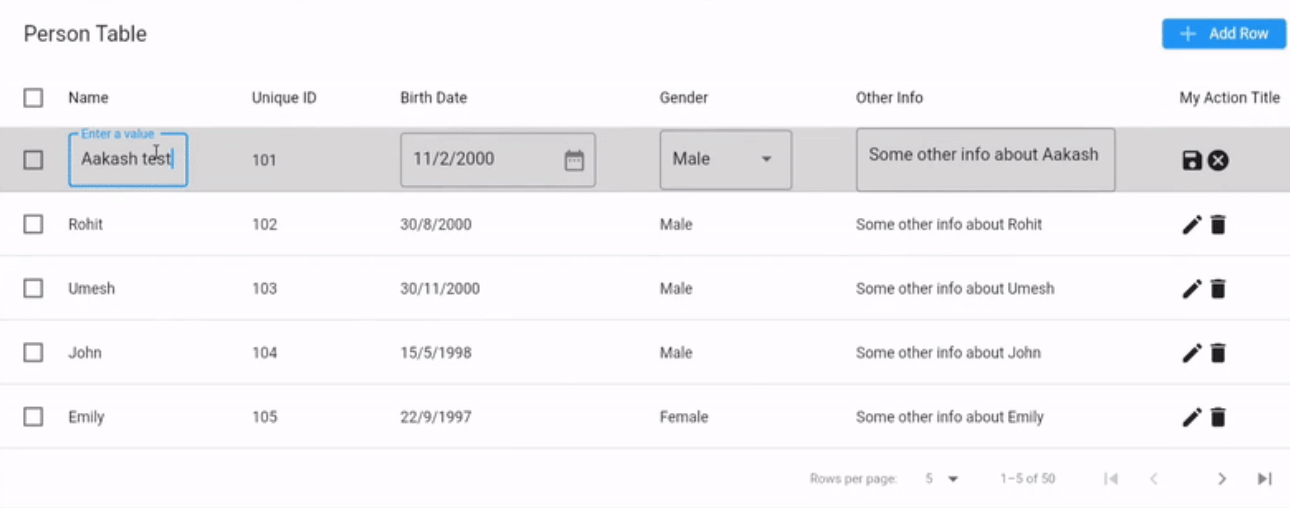
Flutter के लिए एक अत्यधिक कस्टमाइज़ेबल डेटा टेबल पैकेज जो तालिका मानों के वास्तविक समय में संपादन, हटाने, जोड़ने और अद्यतन करने की अनुमति देता है। विभिन्न प्लेटफॉर्मों पर Flutter प्रोजेक्ट्स में बिना किसी बाधा के एकीकृत करने के लिए डिज़ाइन किया गया है, यह संरचित डेटा को प्रबंधित करने के लिए एक सुगम इंटरफ़ेस प्रदान करता है। पैकेज डायनामिक कॉलम और पंक्ति प्रबंधन का समर्थन करता है, जिससे यह फॉर्म, डैशबोर्ड और डेटा एंट्री इंटरफ़ेस के लिए आदर्श है। लचीलापन और उपयोग में आसानी पर ध्यान केंद्रित करते हुए, यह विकासकर्ताओं को विस्तृत बॉयलरप्लेट कोड के बिना इंटरैक्टिव तालिकाएं बनाने में सक्षम बनाता है।
उपयोग
इंटरैक्टिव डेटा एंट्री फॉर्म
रियल-टाइम डैशबोर्ड डेटा प्रबंधन
एप्स में उपयोगकर्ता-संपाद्य स्प्रेडशीट्स
डायनामिक सूची प्रबंधन
उपयोगकर्ता इनपुट के साथ डेटा विज़ुअलाइज़ेशन
प्रशासक पैनल डेटा तालिकाएँ
मुख्य विशेषताएँ
संपाद्य सेल
गतिशील रूप से पंक्तियाँ जोड़ें / हटाएँ
कस्टमाइज़ करने योग्य स्तंभ
तात्कालिक अपडेट
क्रॉस-प्लेटफॉर्म समर्थन
सरल API एकीकरण
इनके लिए उपयुक्त
डेटा-भारी एप्लिकेशन बनाने वाले डेवलपर्स
इंटरैक्टिव तालिकाओं की आवश्यकता वाले UI डिजाइनर
उपयोगकर्ता-चालित डेटा संशोधन की आवश्यकता वाले ऐप्स
त्वरित डेटा इंटरफेस प्रोटोटाइपिंग
Android, iOS, Web, macOS, Windows और Linux के लिए प्रोजेक्ट्स
विचार योग्य बातें
ध्यान से राज्य प्रबंधन की आवश्यकता होती है
जटिल लेआउट के लिए कस्टम स्टाइलिंग की आवश्यकता हो सकती है
बहुत बड़े डेटासेट्स के साथ प्रदर्शन
सीमित आंतरिक सत्यापन
पठन केवल परिदृश्यों के लिए अनअनुकूलित
उन्नत विशेषताओं के लिए बाहरी निर्भरता पर निर्भर करता है
मूल README
संबंधित सोर्स रिपॉज़िटरी के मूल README का स्नैपशॉट। नवीनतम सामग्री के लिए रिपॉज़िटरी देखें।
Dynamic_Table
A fully customizable data table for your flutter project in which you can edit, delete, add and update values in the table.
Invoked when the user selects or unselects every row, using the
checkbox in the heading row.
void Function(int)? onPageChanged
Invoked when the user switches to another page.
The value is the index of the first row on the currently displayed page.
void Function(int?)? onRowsPerPageChanged
Invoked when the user selects a different number of rows per page.
If this is null, then the value given by [rowsPerPage] will be used
and no affordance will be provided to change the value.
bool Function(int, List<dynamic>)? onRowEdit
Called when the user clicks on the edit icon of a row.
Return true to allow the edit action, false to prevent it.
If the action is allowed, the row will be editable.
boolonRowEdit(int index, List<dynamic> row){
//Do some validation on row and return false if validation failsif (index%2==1) {
ScaffoldMessenger.of(context).showSnackBar(
constSnackBar(
content: Text("Cannot edit odd rows"),
),
);
returnfalse; // The row will not open in editable mode
}
returntrue; // The row will open in editable mode
}
bool Function(int, List<dynamic>)? onRowDelete
Called when the user clicks on the delete icon of a row.
Return true to allow the delete action, false to prevent it.
If the delete action is allowed, the row will be deleted from the table.
boolonRowDelete(int index, List<dynamic> row){
//Do some validation on row and return false if validation failsif (row[0] == null) {
ScaffoldMessenger.of(context).showSnackBar(
constSnackBar(
content: Text("Name cannot be null"),
),
);
returnfalse;
}
returntrue;
}
Called when the user clicks on the save icon of a row.
Return List<dynamic> newValue to allow the save action, null to prevent it.
The newValue must be a list of the same length as the column.
If the save action is allowed, the row will be saved to the table.
The oldValue is the value of the row before the edit.
The newValue is the value of the row after the edit.
List<dynamic>? onRowSave(int index, List<dynamic> oldValue, List<dynamic> newValue) {
//Do some validation on new value and return null if validation failsif (newValue[0] == null) {
ScaffoldMessenger.of(context).showSnackBar(
constSnackBar(
content: Text("Name cannot be null"),
),
);
returnnull;
}
// Do some modification to `newValue` and return `newValue`
newValue[0] = newValue[0].toString().toUpperCase(); // Convert name to uppercase// Save new data to you list
myData[index] = newValue;
return newValue;
}
Available Methods
First create a GlobalKey of DynamicTableState.
Pass the key to DynmaicTable constructor.
final tableKey = GlobalKey<DynamicTableState>();
DynamicTable(key:tableKey);
addRow()
tableKey.currentState?.addRow();
Add new empty row at the 0th position in the table. The showActions parameter must be true because the row will be added in editing mode and to save the row we need actions.