सार्वजनिक जानकारी से बना चयन मार्गदर्शन। केवल संदर्भ हेतु।
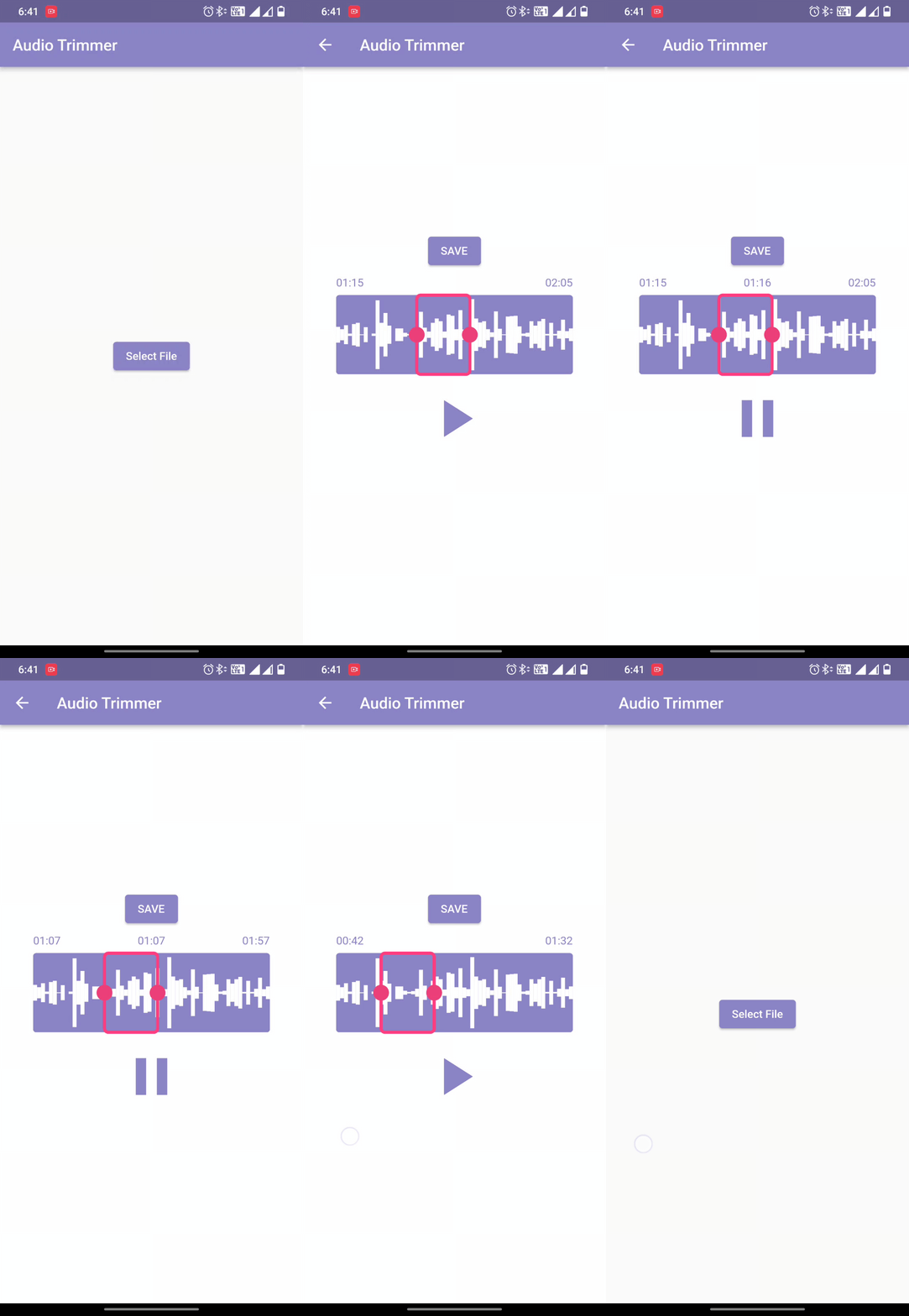
Easy Audio Trimmer एक Flutter पैकेज है जिसे ऑडियो काटने के कार्यों को सरल बनाने के लिए डिज़ाइन किया गया है। यह उपयोगकर्ताओं को ऑडियो फ़ाइलों को प्राप्त करने, निर्दिष्ट शुरुआत और अंत समय के बीच काटने और परिणामी क्लिप को डिवाइस के फ़ाइल सिस्टम में सहेजने की अनुमति देता है। यह पैकेज Android, iOS और macOS का समर्थन करता है, जिससे यह क्रॉस-प्लेटफ़ॉर्म ऑडियो संपादन एप्लिकेशन के लिए उपयुक्त है। सरल APIs के साथ, यह जटिल सेटअप के बिना आवश्यक मूल ऑडियो संशोधन वाले एप्लिकेशन में एकीकरण को सरल बनाता है।
उपयोग
ऑडियो क्लिप निर्माण
पॉडकास्ट संपादन
वॉइस मेमो ट्रिमिंग
एप में ऑडियो प्रसंस्करण
सोशल मीडिया सामग्री तैयारी
मुख्य विशेषताएँ
सरल एपीआई काटने के लिए
फ़ाइल सिस्टम भंडारण
प्लेटफॉर्म के अनुकूल समर्थन
शुरू/समाप्त समय चयन
ऑडियो फ़ाइल प्राप्त करना
इनके लिए उपयुक्त
ऑडियो ऐप बनाने वाले डेवलपर्स
आवाज रिकॉर्डिंग वाले शैक्षिक उपकरण
त्वरित संपादन की आवश्यकता वाले सामग्री निर्माता
ऑडियो विशेषताओं वाले मोबाइल ऐप्स
हल्के ऑडियो संपादन की आवश्यकता वाले ऐप्स
विचार योग्य बातें
Android और iOS पर फ़ाइल की अनुमति की आवश्यकता है
मूल ट्रिमिंग संचालनों तक सीमित
कोई ऑडियो फॉर्मेट परिवर्तन नहीं
मूल प्लेटफ़ॉर्म ऑडियो हैंडलिंग पर निर्भर करता है
बड़े फ़ाइलों के लिए अतिरिक्त त्रुटि संभाल की आवश्यकता हो सकती है
मूल README
संबंधित सोर्स रिपॉज़िटरी के मूल README का स्नैपशॉट। नवीनतम सामग्री के लिए रिपॉज़िटरी देखें।
Welcome to Easy Audio Trimmer! This is a Flutter package that allows you to easily trim audio files within your Flutter app.
Features
Trim audio files within your Flutter app
Specify the start and end times for the trimmed audio file
Audio playback control.
Retrieving and storing audio file.
Trimmed audio files are saved on the device
Easy to use with a simple function call
Compatible with most audio file formats (mp3, wav, aac, etc.)
While running on the Android platform if it gives an error that the minSdkVersion needs to be 24, or on iOS platform that the Podfile platform version should be 11, first go to pubspec.lock file and see if the version of ffmpeg_kit_flutter has -LTS suffix. This should fix all issues for iOS platform.
On Android, if you still face the same issue, try adding the following to the <project_directory>/android/app/src/main/AndroidManifest.xml:
"We would like to thank the contributors to the Video Trimmer repository for their invaluable assistance in creating this project. We used code from the Video Trimmer tool to implement the trimming and editing features in this project, and we are grateful for the opportunity to use it in our work. Thank you to the team behind Video Trimmer for their valuable contributions."
License
Copyright (c) 2022 Mayur Pitroda
Permission is hereby granted, free of charge, to any person obtaining a copy
of this software and associated documentation files (the "Software"), to deal
in the Software without restriction, including without limitation the rights
to use, copy, modify, merge, publish, distribute, sublicense, and/or sell
copies of the Software, and to permit persons to whom the Software is
furnished to do so, subject to the following conditions:
The above copyright notice and this permission notice shall be included in all
copies or substantial portions of the Software.
THE SOFTWARE IS PROVIDED "AS IS", WITHOUT WARRANTY OF ANY KIND, EXPRESS OR
IMPLIED, INCLUDING BUT NOT LIMITED TO THE WARRANTIES OF MERCHANTABILITY,
FITNESS FOR A PARTICULAR PURPOSE AND NONINFRINGEMENT. IN NO EVENT SHALL THE
AUTHORS OR COPYRIGHT HOLDERS BE LIABLE FOR ANY CLAIM, DAMAGES OR OTHER
LIABILITY, WHETHER IN AN ACTION OF CONTRACT, TORT OR OTHERWISE, ARISING FROM,
OUT OF OR IN CONNECTION WITH THE SOFTWARE OR THE USE OR OTHER DEALINGS IN THE
SOFTWARE.