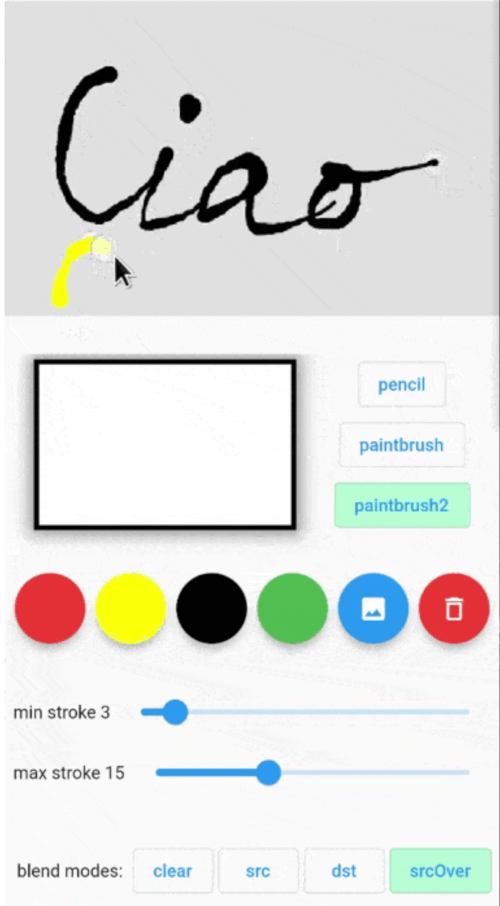
विभिन्न ब्रश और विभिन्न मिश्रण मोड के साथ अंगुली से पेंट करने की अनुमति देने वाला पेंटिंग पैकेज। परिणाम एक बिटमैप या बिंदुओं की सूची के रूप में पढ़ा जा सकता है, जिसका उपयोग नक्शे पर किया जा सकता है।
सार्वजनिक जानकारी से बना चयन मार्गदर्शन। केवल संदर्भ हेतु।
एक फ्लटर पैकेज जो कस्टमाइज़ेबल ब्रश और ब्लेंड मोड के साथ इंटरैक्टिव फिंगर पेंटिंग की अनुमति देता है। यह उपयोगकर्ताओं को स्क्रीन पर सीधे डिजिटल कलाकृति बनाने की अनुमति देता है, जो कई प्लेटफॉर्मों पर टच इनपुट का समर्थन करता है। चित्रित परिणाम को बिटमैप छवि के रूप में या बिंदुओं की सूची के रूप में निर्यात किया जा सकता है, जिसका उपयोग नक्शा या डेटा प्रसंस्करण जैसे अन्य उद्देश्यों के लिए किया जा सकता है। रचनात्मक एप्लिकेशन, ड्राइंग टूल्स, या गेस्चर-आधारित इनपुट आवश्यक होने वाले इंटरैक्टिव मानचित्र के लिए आदर्श है।
उपयोग
डिजिटल स्केचिंग
इंटरैक्टिव मानचित्र अनोटेशन
हस्तगत कला एप्स
शैक्षिक ड्राइंग टूल्स
कस्टम सिग्नेचर कैप्चर
मुख्य विशेषताएँ
कई ब्रश प्रकार
मिश्रण मोड समर्थन
बिटमैप निर्यात
बिंदु सूची आउटपुट
क्रॉस-प्लेटफॉर्म संगतता
इनके लिए उपयुक्त
कलाकार और डिज़ाइनर
शैक्षिक ऐप विकासकर्ता
मानचित्र अंतरक्रिया सुविधाएँ
स्पर्श-आधारित उपयोगकर्ता इंटरफेस
रचनात्मक प्रोटोटाइपिंग
विचार योग्य बातें
कम क्षमता वाले उपकरणों पर प्रदर्शन में भिन्नता हो सकती है
उपयोग के लिए स्पर्श इनपुट की आवश्यकता होती है
2D कैनवास रेंडरिंग तक सीमित
कोई निर्मित अनुक्रमण/पुनरावृत्ति कार्यक्षमता नहीं है
जटिल गतियों के लिए अतिरिक्त तर्क की आवश्यकता हो सकती है
मूल README
संबंधित सोर्स रिपॉज़िटरी के मूल README का स्नैपशॉट। नवीनतम सामग्री के लिए रिपॉज़िटरी देखें।
Painting package that let you finger paint with different brushes and different blend modes. The result can be read as a bitmap or list of Points to be used ie on a Map.
Features
Getting started
The usage is simple: put the Painter() widget into your widget tree then use PainterController()
to control its parameters and to get current painting image and/or drawn points.
insert Painter() widget somewhere in your widget tree:
Painter(
controller: painterController,
backgroundColor: Colors.green.withOpacity(0.4),
size: constSize(300, 300),
child: Image.asset(...),
onDrawingEnded: (Uint8List bytes) async{
...
},
// the child could be ie a Google Map// PS: the [backgroundColor] and child are not rendered in the resulting image
child: Image.asset('assets/...'),
),
Get and set Painter parameters (see PainterController below).
backgroundColor
false
Colors.transparent
Color of the active painting area.
size
false
Size of painting area. If not set it takes the child area. If also the child is not set, it will take the available size from the parent.
child
false
Child Widget to put as the background of the painting area
onDrawingEnded
false
Callbackd that returns the last drawing as Uint8List filled with uncompressed BMP 32 bpp format. Here it's possible to get the drawn point with controller.getPoints()
📜 PainterController
Method
return type
Description
getState()
PenState?
Get the penType, strokeColor, strokeMinWidth, strokeMaxWidth, blendMode.
getImageBytes()
Uint8List?
Get current drawing image as uncompressed 32bit BMP Uint8List.
getPoints()
List<Offset>?
Get the point list drawn.
clearContent({Color? clearColor})
Clear current drawings with [clearColor] color. Default is transparent.
setPenType(PenType type)
Set pen type: pencil, paintbrush, paintbrush2.
setBlendMode(ui.BlendMode mode)
Set the painting blending mode. ui.BlendMode.dstOut can be used as an eraser pen.
setStrokeColor(Color color)
Set stroke color.
setMinStrokeWidth(double width)
Set the minimum stroke width.
setMaxStrokeWidth(double width)
Set the maximum stroke width.
setBlurSigma(double sigma)
Set the blur. 0 means no blur.
setBackgroundImage(Uint8List image)
Set the background image. The painting will not modify this image.
📜 PenState
Method
Default
Description
penType
PenType.paintbrush
enum with pencil, paintbrush, paintbrush2. pencil: constant stroke width using strokeMinWidth paintBrush: variable stroke width. Near strokeMinWidth when moving slowly, near strokeMaxWidth when moving fast. paintBrush2: variable stroke width. Near strokeMaxWidth when moving slowly, near strokeMinWidth when moving fast.