सार्वजनिक जानकारी से बना चयन मार्गदर्शन। केवल संदर्भ हेतु।
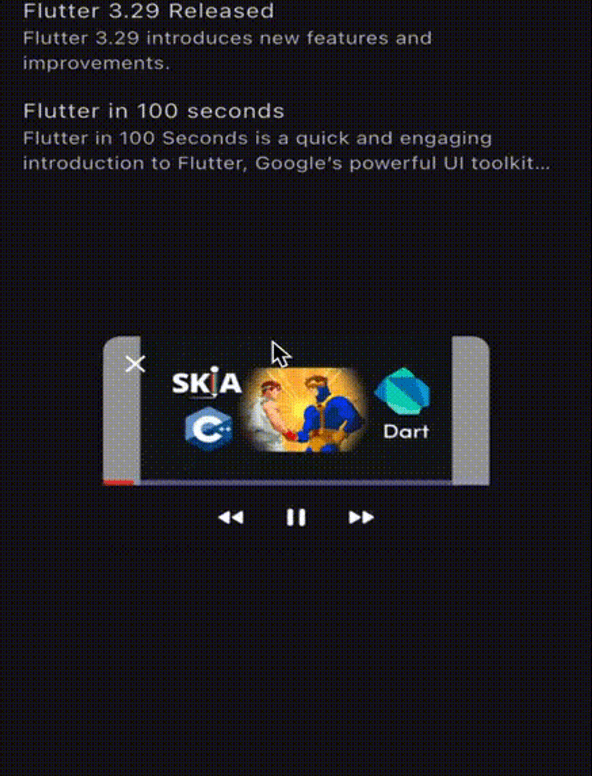
Floating View एक Flutter प्लगइन है जो पिक्चर-इन-पिक्चर जैसी कार्यक्षमता सक्षम करता है, जिससे विजेट्स अन्य सामग्री के ऊपर तैर सकते हैं — यूट्यूब के कॉलेप्सिंग विंडो व्यवहार के समान। यह Android, iOS, Web, macOS, Windows और Linux सहित कई प्लेटफॉर्मों का समर्थन करता है। डेवलपर्स बेहतर उपयोगकर्ता अनुभव के लिए खींचने योग्य, आकार बदलने योग्य और इंटरैक्टिव फ्लोटिंग विंडोज बना सकते हैं जो लगातार UI तत्वों की आवश्यकता वाले ऐप्स में उपयोगी होते हैं। प्लगइन को एक सरल कमांड-लाइन इंस्टॉलेशन के माध्यम से मौजूदा Flutter प्रोजेक्ट्स में आसानी से एकीकृत किया जा सकता है।
उपयोग
स्थायी चैट विजेट का कार्यान्वयन करना
मीडिया प्लेबैक के लिए फ्लोटिंग कंट्रोल्स बनाना
छोटे ओवरले पैनल के साथ बहुकार्यक्रम सक्षम करना
हमेशा दिखाई देने वाले नेविगेशन टूल्स
इंटरैक्टिव फ्लोटिंग मेनू का डिज़ाइन करना
मुख्य विशेषताएँ
खींचें और बदलें आकार वाले फ्लोटिंग विंडोज
क्रॉस-प्लेटफॉर्म समर्थन (Android, iOS, Web, macOS, Windows, Linux)
Flutter के विजेट सिस्टम के साथ सरल एकीकरण
कस्टमाइज़ेबल दिखावट और व्यवहार
स्पर्श और पॉइंटर इंटरैक्शन का समर्थन करता है
इनके लिए उपयुक्त
मीडिया ऐप बनाने वाले डेवलपर्स
स्थायी UI ओवरले वाले ऐप्स
बहुकार्यता या उत्पादकता-केंद्रित एप्लिकेशन
नवीन इंटरैक्शन पैटर्न की तलाश में UI डिजाइनर
पिक्चर-इन-पिक्चर कार्यक्षमता की आवश्यकता वाले प्रोजेक्ट
विचार योग्य बातें
कुछ ओएस में प्लेटफॉर्म-विशिष्ट अनुमतियों की आवश्यकता हो सकती है
जटिल नेस्टेड विजेट्स के साथ प्रदर्शन प्रभाव
कुछ प्लेटफॉर्मों पर सीमित नैटिव एनिमेशन समर्थन
पूर्ण-स्क्रीन लेआउट के साथ संभावित UI टकराव
जीवनचक्र घटनाओं के सावधानीपूर्वक निपटारा करने की आवश्यकता होती है
मूल README
संबंधित सोर्स रिपॉज़िटरी के मूल README का स्नैपशॉट। नवीनतम सामग्री के लिए रिपॉज़िटरी देखें।
FloatingView Package
The FloatingView package enables you to create a floating window similar to YouTube's floating video feature. This allows the window to float on the screen and be draggable while scrolling.
Note:FloatingView will disappear when changing routes. To display it across routes, wrap your desired route screen with the FloatingView and use the same controller. The controller can be passed down in the widget tree or stored in state management solutions such as BLoC, Provider, etc. The FloatingView will be passed down across the screen using the Hero widget, which is currently the only option available.
Initialize the controller and store the widget you want to display, such as a video, screen, or text. Here is an example of using FloatingView with a Video Player or a simple screen:
Note:controller.initialize() will run the previous onDispose() method to clear the previous controller data if you initialize another FloatingView while having an active one.
Using the APIs:
You can use the passed-down controller to control the FloatingView state like this: