सार्वजनिक जानकारी से बना चयन मार्गदर्शन। केवल संदर्भ हेतु।
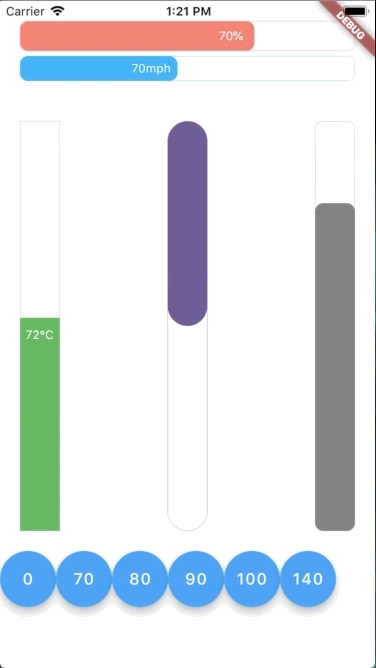
एक जीवंत Flutter पैकेज जो क्षैतिज और लंबवत दिशाओं में एनीमेटेड प्रगति बार प्रदान करता है। एक प्रतिक्रियाशील शैली के साथ डिज़ाइन किया गया, यह प्रगति मानों को चिकनी तरीके से अपडेट करता है और सभी प्रमुख प्लेटफॉर्मों पर वास्तविक समय के दृश्य प्रतिक्रिया का समर्थन करता है। लोडिंग इंडिकेटर, कार्य पूर्णता ट्रैकिंग, या किसी भी UI तत्व के लिए उपयुक्त जिसमें गतिशील प्रगति दृश्यीकरण की आवश्यकता हो। पैकेज हल्का, कस्टमाइज़ किया जा सकता है, और Flutter ऐप्स में बिना किसी दिक्कत के एकीकृत हो सकता है।
उपयोग
लोडिंग स्क्रीन
कार्य पूर्णता संकेतक
फॉर्म प्रगति ट्रैकिंग
इंटरैक्टिव ट्यूटोरियल
गेम प्रगति बार
मुख्य विशेषताएँ
क्षैतिज और लंबवत अभिविन्यास समर्थन
प्रतिक्रियाशील एनिमेशन अपडेट
रंगीन और कस्टमाइज़ करने योग्य डिज़ाइन
क्रॉस-प्लेटफ़ॉर्म सुविधा
स्मूथ ट्रांजिशन एनीमेशन
pub के माध्यम से सरल एकीकरण
इनके लिए उपयुक्त
इंटरैक्टिव यूआई बनाने वाले डेवलपर्स
दृश्य प्रगति प्रतिक्रिया की आवश्यकता वाले ऐप्स
एनिमेटेड इंडिकेटर्स की तलाश कर रहे डिजाइनर
क्रॉस-प्लेटफॉर्म Flutter प्रोजेक्ट्स
सरल सेटअप के साथ धमाकेदार विजुअल्स चाहने वाले उपयोगकर्ता
विचार योग्य बातें
डार्क मोड के लिए अतिरिक्त स्टाइलिंग की आवश्यकता हो सकती है
उच्च आवृत्ति अद्यतन पर प्रदर्शन प्रभाव
मूल गुणों के अलावा सीमित कस्टमाइजेशन
अत्यधिक बड़े प्रगति मानों के लिए अनअनुकूलित
फ्लटर के एनिमेशन इंजन की स्थिरता पर निर्भर करता है
मूल README
संबंधित सोर्स रिपॉज़िटरी के मूल README का स्नैपशॉट। नवीनतम सामग्री के लिए रिपॉज़िटरी देखें।
Flutter Animation Progress Bar
This colorful Flutter widget package aims to show an animation progress bar in reactive style. It also supports both vertical and horizontal bar.
Flutter Create Contest
This package is also a submission to Flutter Create contest. The basic rule of this contest is to measure the total Dart file size less or equal 5KB.
After unzipping the compressed file, run following command to update dependencies:
In this table, you can find all attributes provided by this package:
Attribute
Default value
Description
currentValue
0
Set the current value for progress bar. This value should be in stateful so that whenever setState() has been called, the progress bar will trigger an animation from latest currentValue to new currentValue
maxValue
100
Max value to be displayed as progress bar. Current value can be greater than max value
size
30
The bar height if direction in Axis.horizontal. The bar width if direction in Axis.vertical
animatedDuration
const Duration(milliseconds: 300)
Set the duration for an animation cycle
direction
Axis.horizontal
The bar can be in Axis.horizontal or Axis.vertical direction
verticalDirection
VerticalDirection.down
With vertical direction, the bar can be VerticalDirection.up or VerticalDirection.down direction
borderRadius
8
Set the bar border radius
border
null
Set the bar border style by BoxBorder
backgroundColor
const Color(0x00FFFFFF)
Set the bar background color
progressColor
const Color(0xFFFA7268)
Set the bar progressing color
progressGradient
null
Set the bar progressing gradient. Overrides progressColor
changeColorValue
null
Set a value that progress color should be changed to [0---blue----[70]-red-100]
changeProgressColor
const Color(0xFF5F4B8B)
Color that progressing color will be changed to, whenever currentValue greater than changeColorValue
displayText
null
Text to display belonging with currentValue. Examples: % -> 20% °F -> 80°F