सार्वजनिक जानकारी से बना चयन मार्गदर्शन। केवल संदर्भ हेतु।
flutter_flavor एक विकासकर्ता उपकरण है जो विभिन्न ऐप स्वाद के निर्माण की अनुमति देता है, जिससे विभिन्न परिवेशों—जैसे विकास, स्टेजिंग और उत्पादन—के लिए अलग-अलग कॉन्फ़िगरेशन और बिल्ड बनाए जा सकते हैं, जब तक ऐप स्टोर में प्रकाशित नहीं किया जाता। इससे API एंडपॉइंट, लॉगिंग स्तर और ब्रांडिंग जैसे पर्यावरण-विशिष्ट सेटिंग्स को प्रबंधित करना आसान हो जाता है, बिना कोड की दोहराव के। यह पैकेज Flutter के बिल्ड सिस्टम के साथ सभी समर्थित प्लेटफॉर्मों (Android, iOS, Web, macOS, Windows और Linux) पर बिना किसी अंतर के एकीकृत होता है। यह टीमों को टेस्टिंग और डिप्लॉयमेंट के लिए साफ और कॉन्फ़िगरेबल वर्कफ्लो बनाए रखने में मदद करता है।
उपयोग
बहुत से वातावरणों का प्रबंधन करें
बिल्ड कॉन्फ़िगरेशन को कस्टमाइज़ करना
रिलीज़ से पहले परीक्षण
विकास/प्री-प्रोडक्शन/उत्पादन सेटिंग्स को अलग करना
CI/CD पाइपलाइन को सुव्यवस्थित करना
मुख्य विशेषताएँ
परिवेश-विशिष्ट विन्यास
क्रॉस-प्लेटफ़ॉर्म समर्थन
Flutter के साथ आसान एकीकरण
बिल्ड-समय स्वाद अंतर
न्यूनतम बॉयलरप्लेट
इनके लिए उपयुक्त
विकास टीमें
CI/CD वर्कफ़्लो
बहु-पर्यावरण एप्लिकेशन
रिलीज के अनुसार ऐप कस्टमाइजेशन
विभिन्न डेप्लॉयमेंट चरणों का उपयोग करने वाली टीमें
विचार योग्य बातें
बिल्ड स्क्रिप्ट में सेटअप की आवश्यकता है
स्वाद के नाम को प्लेटफॉर्म के बीच सुसंगत होना चाहिए
सीमित रनटाइम स्विचिंग
उपयोगकर्ता के सामने स्वाद चयन के लिए नहीं बनाया गया है
टीम सदस्यों के बीच समन्वय की आवश्यकता है
मूल README
संबंधित सोर्स रिपॉज़िटरी के मूल README का स्नैपशॉट। नवीनतम सामग्री के लिए रिपॉज़िटरी देखें।
flutter_flavor
Flavors helps us to create builds for different instances of our app. For example, we can create a flavor for development, a flavor for production and another flavor for a demo of the app. In this way we can create different flavors, and thus have different instances of our apps before publishing it on the App Store and Google Play.
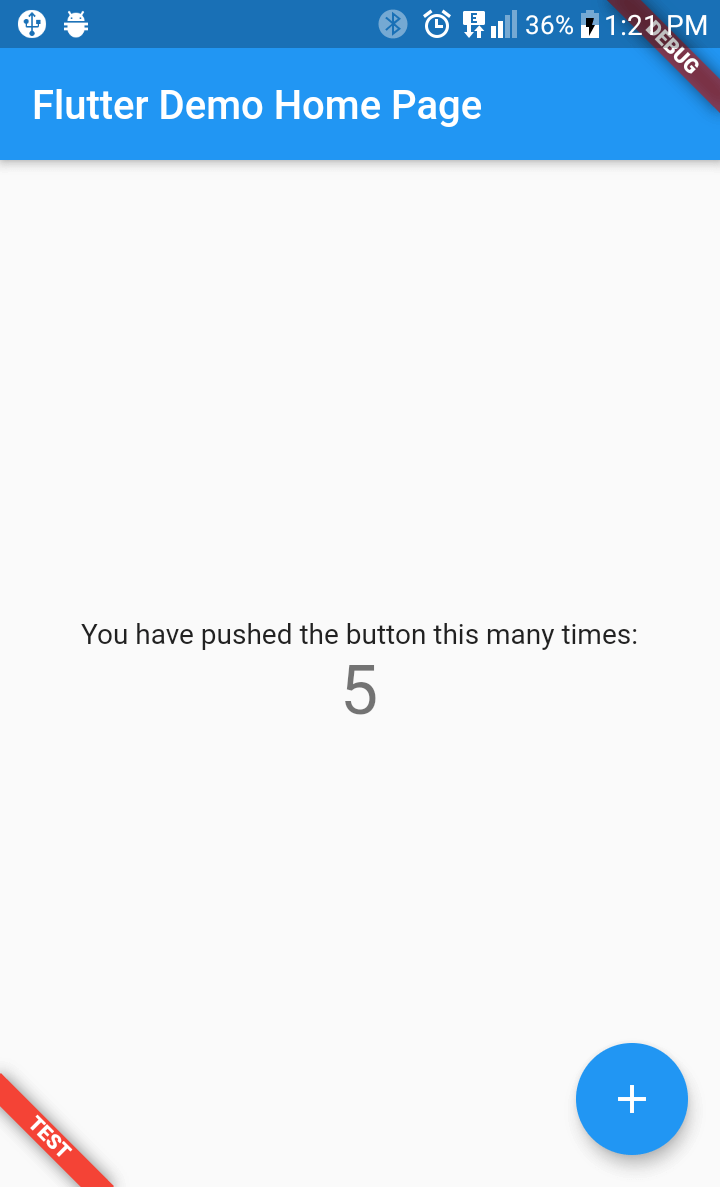
flutter_favor allows you to quickly configure and define dynamic variables for each flavor in your project. The flavors, as well as their names; they are dynamically defined by the developer or development team. In the configuration of a flavor you can set the name of each flavor, as well as the color and location of its banner. When attribute name is undefined or empty, the banner is hidden.
You can also configure the banners independently. The aforementioned attributes are globally configured in FlavorConfig, but can be changed in the FlavorBanner.
Screenshot
PROD
DEV
TEST
Note By default the banner is shown in BannerLocation.topStart and is visibility only when the attribute name of configuration is defined and not empty.