पैकेज, रिपॉज़िटरी और ऐप श्रेणियाँ खोजें

flutter_funding_choices कवर
पैकेज विवरणv1.1.0

flutter_funding_choices

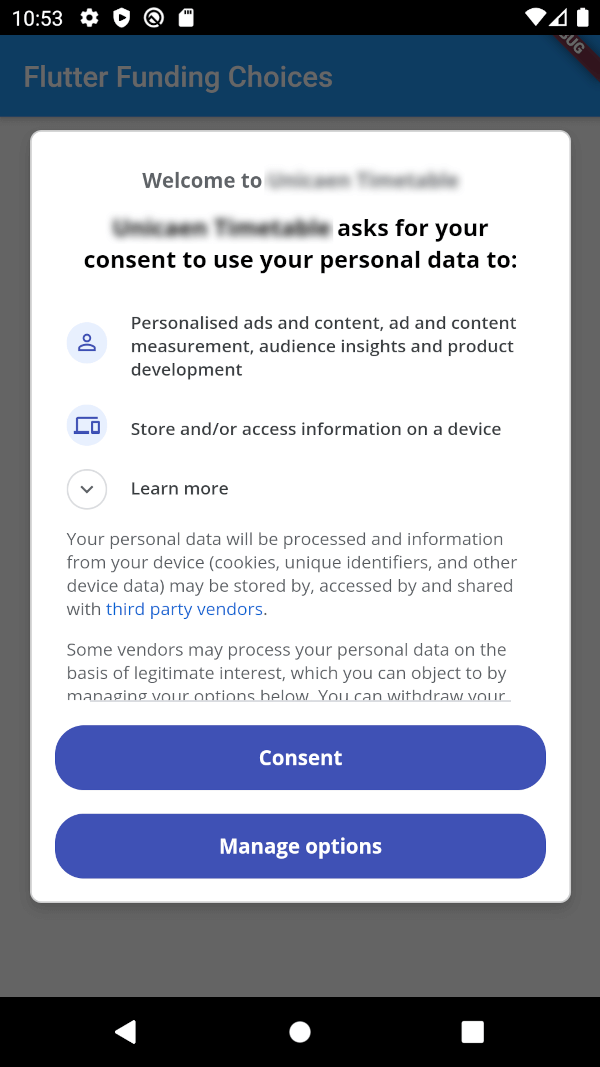
Funding Choices का फ्लटर इम्प्लीमेंटेशन, एक गूगल सेवा जो AdMob में व्यक्तिगत विज्ञापनों के लिए उपयोगकर्ता की सहमति प्राप्त करने की अनुमति देती है।

AndroidiOS
30-दिन डाउनलोड
76
लाइक
55
Pub अंक
150

पैकेज इंस्टॉल करें

flutter pub add flutter_funding_choices

पैकेज अवलोकन

सार्वजनिक जानकारी से बना चयन मार्गदर्शन। केवल संदर्भ हेतु।

Flutter Funding Choices एक Flutter पैकेज है जो Google के Funding Choices API को एकीकृत करता है, जिससे ऐप्स AdMob में व्यक्तिगत विज्ञापनों के लिए उपयोगकर्ता सहमति के अनुरोध कर सकते हैं। यह पैकेज Android और iOS प्लेटफॉर्म पर आवश्यक सहमति डायलॉग प्रदर्शित करके गोपनीयता नियमों का पालन करने का एक बिना रुकावट वाला तरीका प्रदान करता है। इस पैकेज के द्वारा सहमति स्थिति की जाँच और सहमति प्रवाह को चालू करने के लिए सरल विधियाँ प्रदान की जाती हैं। यह GDPR और अन्य गोपनीयता मानकों का पालन सुनिश्चित करता है जबकि मौजूदा विज्ञापन सेवा कार्यप्रणाली के साथ सुगमता बनाए रखता है।

उपयोग

  • व्यक्तिगत विज्ञापनों के लिए उपयोगकर्ता सहमति के अनुरोध
  • GDPR और गोपनीयता नियमों का पालन करना
  • Flutter ऐप्स में AdMob के साथ एकीकरण
  • Android और iOS पर सहमति डायलॉग प्रदर्शित करना
  • विज्ञापन व्यक्तिगत प्र préferen ces का प्रबंधन

मुख्य विशेषताएँ

  • ऑफिशियल गूगल फंडिंग चॉइसेज इंटीग्रेशन
  • Android और iOS दोनों के लिए समर्थन
  • सहमति जाँच और डायलॉग के लिए सरल API
  • सहमति स्थिति का स्वचालित निपटान
  • हल्का और एकीकरण में आसान

इनके लिए उपयुक्त

  • AdMob का उपयोग करने वाले Flutter ऐप्स
  • यूरोपीय संघ के उपयोगकर्ताओं का लक्ष्य बनाने वाले विकासकर्ता
  • GDPR पालन करने वाले ऐप्स
  • विज्ञापन व्यक्तिगतीकरण प्रबंधित कर रहे प्रकाशक
  • गोपनीयता पर ध्यान केंद्रित मोबाइल ऐप विकसक

विचार योग्य बातें

  • AdMob सेटअप की आवश्यकता है
  • व्यक्तिगत विज्ञापन दिखाने से पहले सहमति प्राप्त करना आवश्यक है
  • Google के फंडिंग चॉइस सेवा तक सीमित
  • सहमति प्रबंधन के लिए अतिरिक्त UI की आवश्यकता हो सकती है
  • व्यक्तिगत विज्ञापन के अनुपयोगी परिदृश्य के लिए अनुपयुक्त

मूल README

संबंधित सोर्स रिपॉज़िटरी के मूल README का स्नैपशॉट। नवीनतम सामग्री के लिए रिपॉज़िटरी देखें।

Flutter Funding Choices

Flutter Funding Choices is an unofficial Flutter implementation of Funding Choices, a Google service that allows to request user consent for personalized ads in AdMob.

Prerequisites

You must have linked your FundingChoices account to your Admob account. See this documentation on Google Support.

Installation

Android

Your app must use Android Embedding V2. Also, you need to add an app id in your AndroidManifest.xml (in the application tag) :

<?xml version="1.0" encoding="utf-8"?>
<manifest xmlns:android="http://schemas.android.com/apk/res/android"
   package="fr.skyost.example">

   <application
       <!--
         Some attributes here...
        -->
    >
       <meta-data
           android:name="com.google.android.gms.ads.APPLICATION_ID"
           android:value="YOUR-APP-ID"/>
       <!--
         Activities, ...
        -->
   </application>

</manifest>

You can obtain your app ID by following these instructions.

iOS

You need to add an app id in your Info.plist :

<key>GADApplicationIdentifier</key>
<string>YOUR-APP-ID</string>

You can obtain your app ID by following these instructions. You may also need to handle Apple's App Tracking Transparency message by putting this in your Info.plist :

<key>NSUserTrackingUsageDescription</key>
<string>This identifier will be used to deliver personalized ads to you.</string>

Feel free to configure the message as you want.

How to use

There are three methods :

  • FlutterFundingChoices.requestConsentInformation() : Allows to get current user consent information (whether you need to show the consent form, whether the user wants personalized ads, ...).
  • FlutterFundingChoices.showConsentForm() : Loads and shows the consent form. You must check first that there is a consent form (with isConsentFormAvailable on the returned object of the previous method).
  • FlutterFundingChoices.reset() : Resets the consent information.

You typically want to use it like this on Android :

@override
void initState() {
  super.initState();
  WidgetsBinding.instance.addPostFrameCallback((_) async {
    ConsentInformation consentInfo = await FlutterFundingChoices.requestConsentInformation();
    if (consentInfo.isConsentFormAvailable && consentInfo.consentStatus == ConsentStatus.required) {  
      await FlutterFundingChoices.showConsentForm();
      // You can check the result by calling `FlutterFundingChoices.requestConsentInformation()` again !
    }
  });
}

Contributions

You have a lot of options to contribute to this project ! You can :

श्रेणियाँ

सोर्स रिपॉज़िटरी

इस पैकेज का उपयोग करने वाले प्रोजेक्ट

अभी कोई डेटा उपलब्ध नहीं है।