
श्रेणियाँ, पैकेज और रिपॉज़िटरी खोजें

flutter_image_slideshow कवर
पैकेज विवरणv0.1.6

flutter_image_slideshow

एक सरल छवि स्लाइडशो विशेषता। मुख्य रूप से छवि विशेषता के लिए, लेकिन अन्य विशेषताओं का उपयोग भी किया जा सकता है।

AndroidiOSWebmacOSWindowsLinux
30-दिन डाउनलोड
7.1 हज़ार
लाइक
202
Pub अंक
160

पैकेज इंस्टॉल करें

flutter pub add flutter_image_slideshow

पैकेज अवलोकन

सार्वजनिक जानकारी से बना चयन मार्गदर्शन। केवल संदर्भ हेतु।

एक हल्का फ्लटर विजेट जो चित्र प्रदर्शन के लिए सुचारू संक्रमण के साथ बनाया गया है। मुख्य रूप से छवियों को दिखाने के लिए डिज़ाइन किया गया, इसमें फ्लैशशो में कस्टम विजेट्स का समर्थन भी है। गैलरी, उत्पाद प्रदर्शन या परिचय पृष्ठों के लिए आदर्श। पैकेज क्रॉस-प्लेटफॉर्म है, और यह एंड्रॉइड, आईओएस, वेब, मैकओएस, विंडोज़ और लिनक्स पर बिना किसी दिक्कत के काम करता है। एक ही निर्भरता के माध्यम से सरल एकीकरण प्रदान करता है और स्लाइड्स और एनीमेशन को प्रबंधित करने के लिए साफ एपीआई प्रदान करता है।

उपयोग

  • इमेज गैलरी
  • उत्पाद कैरोसेल
  • ऑनबोर्डिंग स्क्रीन्स
  • डिजिटल साइनेज
  • प्रस्तुति इंटरफेस

मुख्य विशेषताएँ

  • स्मूथ स्लाइडिंग ट्रांजिशन
  • कस्टम विजेट्स के लिए समर्थन
  • प्लेटफॉर्म के अनुकूलता
  • सरल सेटअप के साथ पब एड का उपयोग करें
  • निर्धारित स्वचालित प्रस्तुति और अवधि

इनके लिए उपयुक्त

  • दृश्य सामग्री प्रदर्शन बना रहे विकासकर्ता
  • इंटरैक्टिव इमेज प्रस्तुतियों की आवश्यकता वाले ऐप्स
  • स्लाइड शो के लिए न्यूनतम सेटअप वाले प्रोजेक्ट्स

विचार योग्य बातें

  • बड़े छवि सेट के लिए अनुकूलन की आवश्यकता हो सकती है
  • जटिल एनीमेशन के लिए सीमित कस्टमाइजेशन
  • उच्च प्रदर्शन वीडियो स्लाइडशो के लिए आदर्श नहीं

मूल README

संबंधित सोर्स रिपॉज़िटरी के मूल README का स्नैपशॉट। नवीनतम सामग्री के लिए रिपॉज़िटरी देखें।

flutter_image_slideshow

A simple image slideshow widget. Mainly intended for image widget, but other widgets can also be used.

Getting Started

In the pubspec.yaml of your flutter project, add the following dependency:

dependencies:
  flutter:
    sdk:
  flutter_image_slideshow: any

In your library add the following import:

  import 'package:flutter_image_slideshow/flutter_image_slideshow.dart';

Usage

These are The ImageSlideshow properties.

/// The widgets to display in the [ImageSlideshow].
///
/// Mainly intended for image widget, but other widgets can also be used.
List<Widget> children

/// Width of the [ImageSlideshow].
double width

/// Height of the [ImageSlideshow].
double height

/// The page to show when first creating the [ImageSlideshow].
int initialPage

/// The color to paint the indicator.
Color indicatorColor

/// The color to paint behind th indicator.
Color indicatorBackgroundColor

/// Called whenever the page in the center of the viewport changes.
ValueChanged<int> onPageChanged

/// Auto scroll interval.
///
/// Do not auto scroll with null or 0.
int autoPlayInterval

/// Loops back to first slide.
bool isLoop

/// Radius of circle indicator.
double indicatorRadius

/// Disable page changes by the user.
bool disableUserScrolling

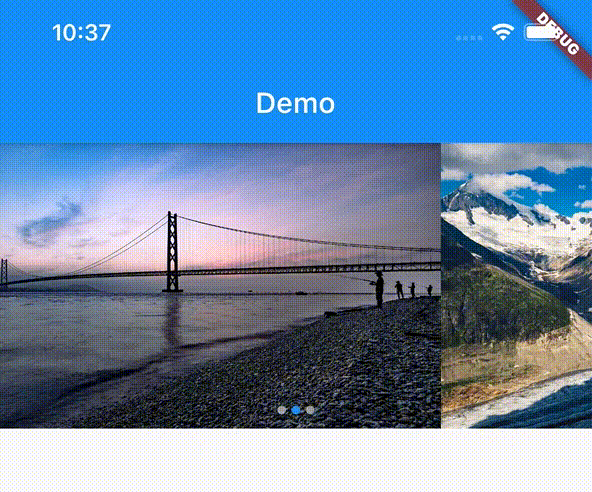
Example

Create the ImageSlideshow widget. And pass the parameters.

import 'package:flutter/material.dart';
import 'package:flutter_image_slideshow_test/flutter_image_slideshow.dart';

void main() {
  runApp(MyApp());
}

class MyApp extends StatelessWidget {
  @override
  Widget build(BuildContext context) {
    return MaterialApp(
      home: Scaffold(
        appBar: AppBar(
          title: Text('Demo'),
        ),
        body: ImageSlideshow(

          /// Width of the [ImageSlideshow].
          width: double.infinity,

          /// Height of the [ImageSlideshow].
          height: 200,

          /// The page to show when first creating the [ImageSlideshow].
          initialPage: 0,

          /// The color to paint the indicator.
          indicatorColor: Colors.blue,

          /// The color to paint behind th indicator.
          indicatorBackgroundColor: Colors.grey,

          /// The widgets to display in the [ImageSlideshow].
          /// Add the sample image file into the images folder
          children: [
            Image.asset(
              'images/sample_image_1.jpg',
              fit: BoxFit.cover,
            ),
            Image.asset(
              'images/sample_image_2.jpg',
              fit: BoxFit.cover,
            ),
            Image.asset(
              'images/sample_image_3.jpg',
              fit: BoxFit.cover,
            ),
          ],

          /// Called whenever the page in the center of the viewport changes.
          onPageChanged: (value) {
            print('Page changed: $value');
          },

          /// Auto scroll interval.
          /// Do not auto scroll with null or 0.
          autoPlayInterval: 3000,

          /// Loops back to first slide.
          isLoop: true,
        ),
      ),
    );
  }
}

श्रेणियाँ

सोर्स रिपॉज़िटरी

इस पैकेज का उपयोग करने वाले प्रोजेक्ट

अभी कोई डेटा उपलब्ध नहीं है।