पैकेज, रिपॉज़िटरी और ऐप श्रेणियाँ खोजें

flutter_persistent_keyboard_height कवर
पैकेज विवरणv1.0.5

flutter_persistent_keyboard_height

कीबोर्ड की ऊंचाई प्राप्त करने के लिए Flutter पैकेज। सही ऊंचाई के साथ स्टिकर/इमोजी मॉडल को दिखाने के लिए उपयोग किया जा सकता है।

AndroidiOS
30-दिन डाउनलोड
52
लाइक
33
Pub अंक
150

पैकेज इंस्टॉल करें

flutter pub add flutter_persistent_keyboard_height

पैकेज अवलोकन

सार्वजनिक जानकारी से बना चयन मार्गदर्शन। केवल संदर्भ हेतु।

एक फ्लटर पैकेज जो स्क्रीन कीबोर्ड की ऊंचाई को निरंतर प्रदान करता है, जिससे सही UI समायोजन संभव होता है। यह टिकट या इमोजी मॉडल के तत्वों को कीबोर्ड के संबंध में स्थित करने के लिए विशेष रूप से उपयोगी है। पैकेज दोनों एंड्रॉइड और आईओएस प्लेटफॉर्म पर काम करता है, जिससे सुनिश्चित होता है कि व्यवहार समान रहे। यह कीबोर्ड स्थिति परिवर्तनों को सुनता है और धारा के माध्यम से वर्तमान ऊंचाई प्रदान करता है, जिससे इसे प्रतिक्रियाशील लेआउट में आसानी से एकीकृत किया जा सकता है।

उपयोग

  • कीबोर्ड दिखाई देने पर UI लेआउट को समायोजित करना
  • कीबोर्ड के ऊपर मोडल्स को स्थिति दें
  • इनपुट के दौरान सामग्री को दिखाई देने में सुनिश्चित करें
  • गतिशील इनपुट क्षेत्र के साथ चैट इंटरफेस बनाना
  • वास्तविक समय की कीबोर्ड जागरूकता के साथ फॉर्म बनाना

मुख्य विशेषताएँ

  • रियल-टाइम कीबोर्ड ऊंचाई मॉनिटरिंग
  • क्रॉस-प्लेटफ़ॉर्म समर्थन (Android और iOS)
  • प्रतिक्रियाशील अपडेट के लिए प्रवाह-आधारित API
  • न्यूनतम सेटअप और एकीकरण
  • एनिमेशन के दौरान भी ऊंचाई का सटीक पता लगाएं

इनके लिए उपयुक्त

  • चैट ऐप डेवलपर्स
  • फॉर्म बिल्डर्स
  • कीबोर्ड संवेदनशीलता के आवश्यकता वाले UI घटक
  • इनपुट-भारी इंटरफेस बनाने वाले डेवलपर्स
  • कीबोर्ड के पास फ्लोटिंग एक्शन बटन वाले ऐप्स

विचार योग्य बातें

  • मेमोरी लीक से बचने के लिए स्ट्रीम के सही निपटान की आवश्यकता होती है
  • विभाजित कीबोर्ड जैसे किन्हीं किनारे के मामलों के लिए अतिरिक्त तर्क की आवश्यकता हो सकती है
  • स्थिर कीबोर्ड ऊंचाई परिदृश्य के लिए उपयुक्त नहीं
  • प्लेटफॉर्म-विशिष्ट कीबोर्ड इवेंट पर निर्भर करता है
  • कई उपकरणों और OS संस्करणों पर परीक्षण किया जाना चाहिए

मूल README

संबंधित सोर्स रिपॉज़िटरी के मूल README का स्नैपशॉट। नवीनतम सामग्री के लिए रिपॉज़िटरी देखें।

flutter_persistent_keyboard_height Pub version

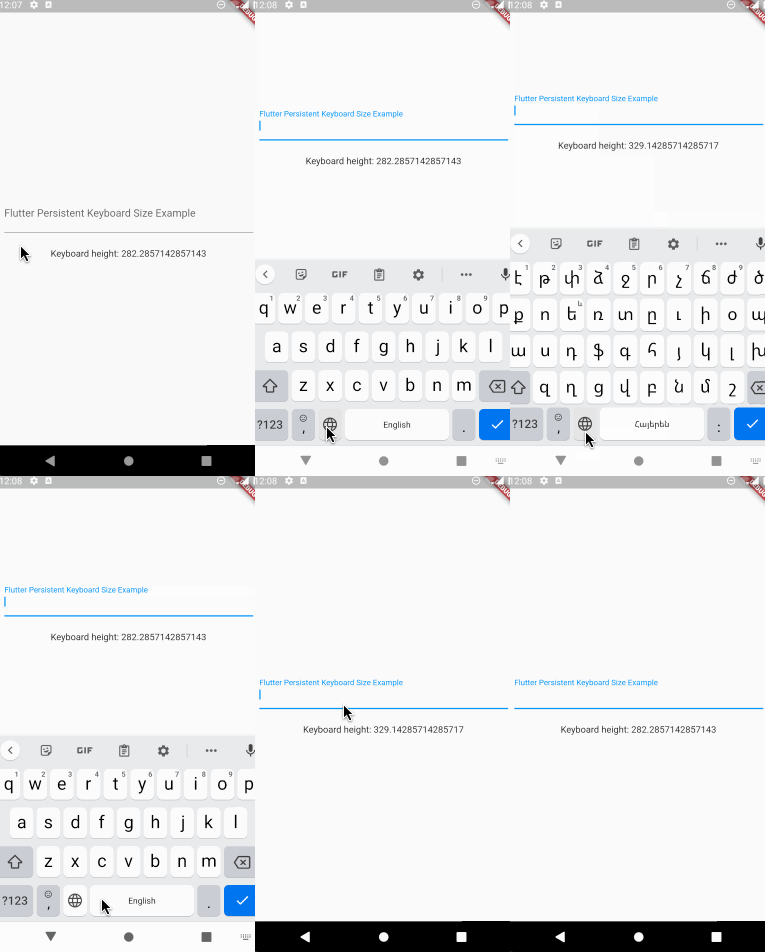
Flutter package to get keyboard height. The height is persisted during app sessions and keyboard states (you can use the height when keyboard is closed).

Usage

Registering the provider

First thing you need to do is wrap a widget from children of which you want to get the keyboard height with PersistentKeyboardHeightProvider. Add it to the builder of your app widget (perhaps MaterialApp) if you want to get keyboard height from all widgets.

class MyApp extends StatelessWidget {
  const MyApp({Key? key}) : super(key: key);

  @override
  Widget build(BuildContext context) {
    return MaterialApp(
      title: 'Flutter Persistent Keyboard Height Example',
      home: const FlutterPersistentKeyboardHeightExample(),
      builder: (context, child) => PersistentKeyboardHeightProvider(
        child: child!,
      ),
    );
  }
}
Getting the keyboard height

In order to get keyboard height use the PersistentKeyboardHeight inherited widget:

Widget build(BuildContext context) {
  final keyboardHeight = PersistentKeyboardHeight.of(context).keyboardHeight;

  return Scaffold(
    body: Column(
      mainAxisAlignment: MainAxisAlignment.center,
      children: [
        const Padding(
          padding: EdgeInsets.all(16.0),
          child: TextField(
            decoration: InputDecoration(
              labelText: 'Flutter Persistent Keyboard Size Example',
            ),
          ),
        ),
        const SizedBox(height: 8),
        Text('Keyboard height: $keyboardHeight'),
      ],
    ),
  );
}
Using a custom storage provider

By default, the package uses shared_preferences to preserve the keyboard height but if you want to use a custom solution for preserving the height you can do that by implementing the IPersistentKeyboardHeightStorageProvider interface and passing an instance of the class to PersistentKeyboardHeightProvider:

class CustomPersistentKeyboardHeightStorageProvider
    implements IPersistentKeyboardHeightStorageProvider {
  const CustomPersistentKeyboardHeightStorageProvider();

  @override
  Future<double> getHeight() {
    // read the height from storage
  }

  @override
  Future<void> setHeight(double height) {
    // save the height to storage
  }
}

class MyApp extends StatelessWidget {
  const MyApp({Key? key}) : super(key: key);

  @override
  Widget build(BuildContext context) {
    return MaterialApp(
      title: 'Flutter Persistent Keyboard Height Example',
      home: const FlutterPersistentKeyboardHeightExample(),
      builder: (context, child) => PersistentKeyboardHeightProvider(
        child: child!,
      ),
    );
  }
}

Check out the example directory for a complete example app.

The development process

The first version of this package was developed in two livestreams. Unfortunately, my voice disappeared at the middle of the first livestream but the second livestream is okay. In case you want to check them out, here are the links: Part 1, Part 2.

Thanks to

श्रेणियाँ

निर्भरताएँ

निर्भरता सूची 2 आइटम

सोर्स रिपॉज़िटरी

इस पैकेज का उपयोग करने वाले प्रोजेक्ट

अभी कोई डेटा उपलब्ध नहीं है।