सार्वजनिक जानकारी से बना चयन मार्गदर्शन। केवल संदर्भ हेतु।
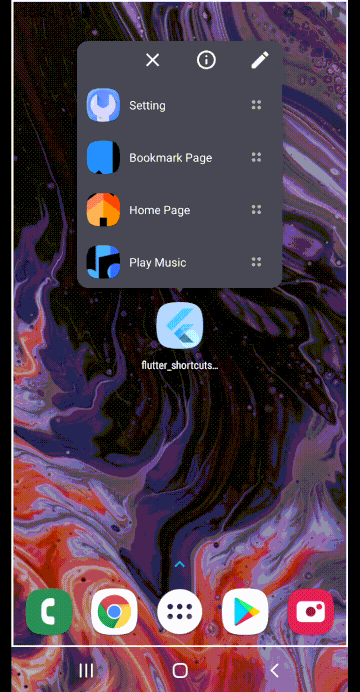
Flutter Shortcuts एक प्लगइन है जो डेवलपर्स को Android और iOS के होम स्क्रीन पर ऐप और चैट शॉर्टकट बनाने की अनुमति देता है। यह उपयोगकर्ताओं को अपने डिवाइस के होम स्क्रीन से ऐप में विशिष्ट फीचर्स या चैट तक त्वरित पहुँच प्रदान करता है, जिससे उपयोगकर्ता अनुभव और भागीदारी में सुधार होता है। प्लगइन फ्लटर ऐप्स में बिना किसी दिक्कत के एकीकृत होता है और दोनों प्लेटफॉर्म-विशिष्ट शॉर्टकट प्रकारों का समर्थन करता है। डेवलपर्स शॉर्टकट को कोड द्वारा या कॉन्फ़िगरेशन के माध्यम से स्टैटिक रूप से परिभाषित कर सकते हैं, जिससे संदर्भ-आधारित कार्यों को आसानी से लागू किया जा सकता है। यह नेटिव OS शॉर्टकट क्षमताओं का उपयोग करके खोजने और उपयोग करने में सुविधा प्रदान करता है।
उपयोग
एप में फीचर्स तक त्वरित पहुंच
चर्चा थ्रेड में सीधे नेविगेट करें
उपयोगकर्ता उत्पादकता में सुधार करना
होम स्क्रीन से डीप लिंकिंग सक्षम करें
संदर्भ कार्राइयों का समर्थन करना
मुख्य विशेषताएँ
स्थिर और डायनामिक शॉर्टकट का समर्थन करता है
क्रॉस-प्लेटफॉर्म (Android और iOS)
Flutter के साथ आसान एकीकरण
मूल ओएस शॉर्टकट रेंडरिंग
कोड या मैनिफेस्ट के माध्यम से कॉन्फ़िगर किया जा सकता है
संदर्भ-जागरूक शॉर्टकट निर्माण
इनके लिए उपयुक्त
त्वरित फीचर पहुँच की आवश्यकता वाले ऐप्स
संदेश या चैट एप्लिकेशन
उत्पादकता उपकरण
उपयोगकर्ता-केंद्रित डिज़ाइन कार्यान्वयन
Android और iOS के लिए विकासकर्ता
विचार योग्य बातें
पूर्ण कार्यक्षमता के लिए प्लेटफॉर्म-विशिष्ट सेटअप की आवश्यकता होती है
डायनामिक शॉर्टकट को रिफ्रेश लॉजिक की आवश्यकता हो सकती है
Android की तुलना में iOS पर सीमित कस्टमाइजेशन
अनुमति और उपयोगकर्ता सहमति का हस्ताक्षर
भौतिक उपकरणों पर परीक्षण की सिफारिश की जाती है
मूल README
संबंधित सोर्स रिपॉज़िटरी के मूल README का स्नैपशॉट। नवीनतम सामग्री के लिए रिपॉज़िटरी देखें।
Push a new shortcut item. If there is already a dynamic or pinned shortcut with the same ID, the shortcut will be updated and pushed at the end of the shortcut list.
Pushes a list of shortcut item. If there is already a dynamic or pinned shortcut with the same ID, the shortcut will be updated and pushed at the end of the shortcut list.
If you feel that a hook is missing, feel free to open a pull-request.
For a custom-hook to be merged, you will need to do the following:
Describe the use-case.
Open an issue explaining why we need this hook, how to use it, ...
This is important as a hook will not get merged if the hook doens't appeal to
a large number of people.
If your hook is rejected, don't worry! A rejection doesn't mean that it won't
be merged later in the future if more people shows an interest in it.
In the mean-time, feel free to publish your hook as a package on https://pub.dev.
A hook will not be merged unles fully tested, to avoid breaking it inadvertendly
in the future.