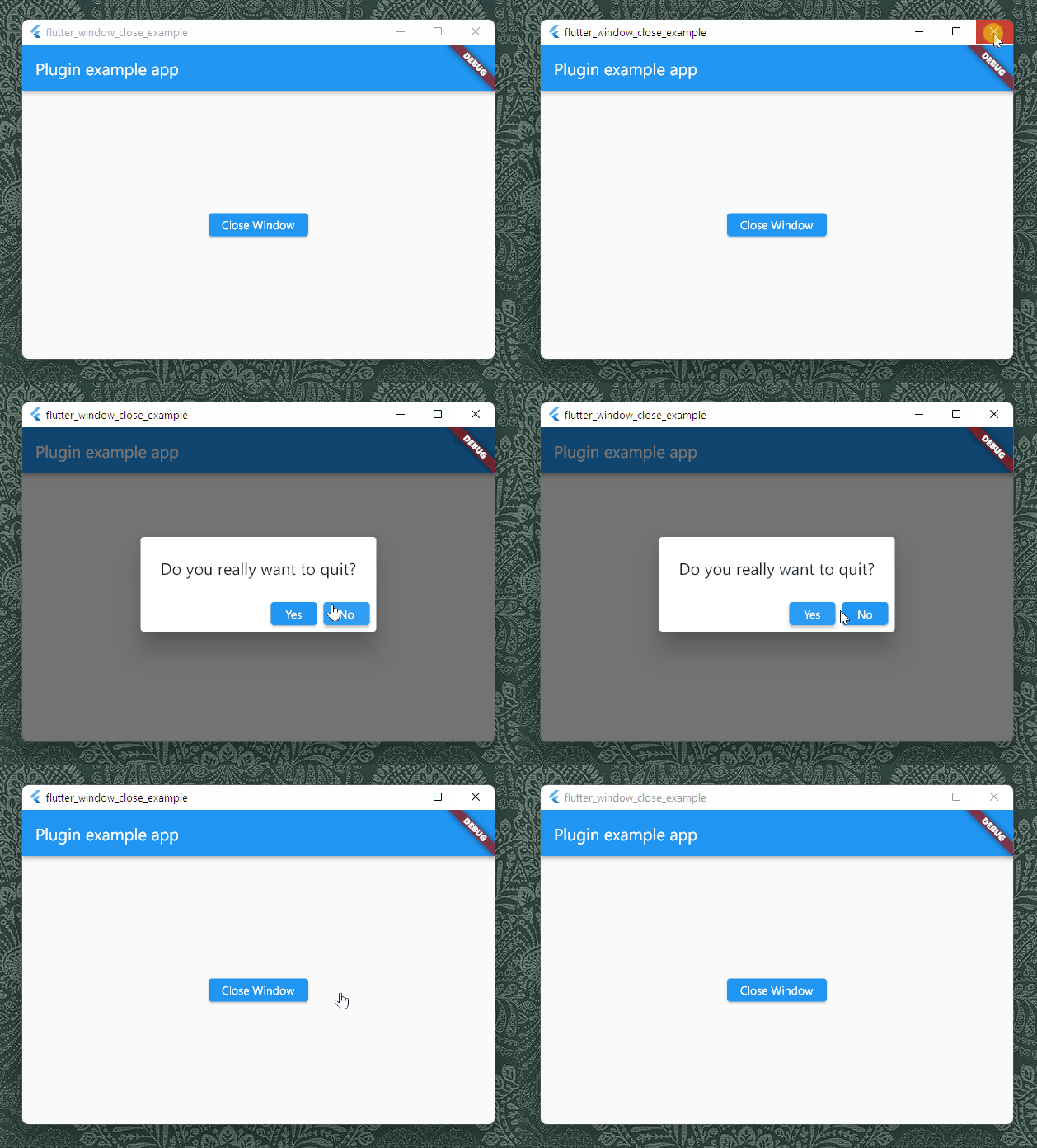
सार्वजनिक जानकारी से बना चयन मार्गदर्शन। केवल संदर्भ हेतु।
flutter_window_close पैकेज डेस्कटॉप प्लेटफॉर्म पर फ्लटर एप्लिकेशन को विंडो बंद करने के इवेंट को रोकने और निकलने से पहले उपयोगकर्ता को पुष्टि करने के लिए अनुमति देता है। यह ऐसे एप्लिकेशन के लिए विशेष रूप से उपयोगी है जिन्हें असेव्ड डेटा को सहेजने की आवश्यकता होती है या अनचाहे बंद होने से बचाने की आवश्यकता होती है। यह एक सरल API प्रदान करता है जिसके माध्यम से उपयोगकर्ता विंडो बंद करने की कोशिश करने पर चलने वाले कॉलबैक को रजिस्टर कर सकते हैं, जिससे विकासकर्ता को कस्टम डायलॉग दिखाने या सफाई कार्य करने की अनुमति मिलती है। यह पैकेज macOS, Windows, Linux और Web को सपोर्ट करता है, जिससे यह एक ग्रेसफुल शटडाउन हैंडलिंग की आवश्यकता वाले क्रॉस-प्लेटफॉर्म डेस्कटॉप एप्लिकेशन के लिए आदर्श है।
उपयोग
अनचाहे ऐप बंद करने से रोकें
निकासी से पहले असेव्ड डेटा को सहेजें
पुष्टि डायलॉग प्रदर्शित करना
डेस्कटॉप पर शांतिपूर्ण बंद करना
कस्टम एग्जिट लॉजिक
वेब और डेस्कटॉप संगतता
मुख्य विशेषताएँ
विंडो बंद करने के इवेंट को रोकता है
कई डेस्कटॉप प्लेटफॉर्म का समर्थन करता है
सरल कॉलबैक एपीआई
क्रॉस-प्लेटफॉर्म डेस्कटॉप समर्थन
वैकल्पिक पुष्टि डायलॉग
वेब और नेटिव एंटीग्रेशन
इनके लिए उपयुक्त
डेस्कटॉप फ्लटर ऐप्स
अनसेव डेटा वाले ऐप्स
उपयोगकर्ता-मुखी डेस्कटॉप एप्लिकेशन
निकास नियंत्रण की आवश्यकता वाले विकासकर्ता
पुष्टि प्रतीक्षा आवश्यक एप्लिकेशन
क्रॉस-प्लेटफॉर्म डेस्कटॉप प्रोजेक्ट्स
विचार योग्य बातें
मोबाइल प्लेटफॉर्म पर अनुप्रयोग नहीं होता है
प्लेटफॉर्म-विशिष्ट सेटअप की आवश्यकता है
सिस्टम-स्तरीय बंद करने के व्यवहार के साथ टकराने की संभावना है
डेस्कटॉप और वेब तक सीमित
कार्य प्रबंधक से ऐप समाप्ति का निपटान नहीं करता है
उपयोगकर्ता अनुभव कार्यान्वयन पर निर्भर करता है
मूल README
संबंधित सोर्स रिपॉज़िटरी के मूल README का स्नैपशॉट। नवीनतम सामग्री के लिए रिपॉज़िटरी देखें।
flutter_window_close lets your Flutter app has a chance to confirm if the user
wants to close your app. It works on desktop platforms including Windows, macOS
and Linux.
Getting Started
It is very common that an app would prompt a message like "Do you really want to
quit" when users click on the close button, in order to notify that there are
still undone tasks and the users may lose their data if they want to quit
anyway. It prevents the users from losing data unwillingly.
To let a Flutter desktop app to support that, the plug-in listens to the events
from the window hosting Flutter's view, and send the events to Flutter. What you
need to do is to assign an anonymous function that can answer if the window
should be closed. For example, you can show an alert dialog to ask what the
current user is willing to do:
It does not support mobile platforms, since there is no such event for closing
windows. You can use a custom
WillPopScope
to capture if a user is leaving your app with a back key.
macOS
There could be some issues while using the package on macOS. Each platform has
its paradigm and the developer framework macOS sees window objects in a
different way from Windows and Linux.
On Windows and Linux, windows are more like controllers in MVC pattern , and
when it comes to Flutter, there would be always a root window in the process of
an app, and our plugin could easily know which is the window to listen to. In
the code level, we use
GetActiveWindow
while we can use
gtk_widget_get_ancestor
or
gtk_widget_get_toplevel.
On the contrary, windows are more like views on macOS. An app can have multiple
windows, and the app can stay still open event all windows are closed. We can
also create an object with multiple IBOutlets to multiple windows. Flutter macOS
does not tell plugins which window is the one running Flutter as well.
The plugin listens to the first window in the
windows
list of the singleton
NSApplication
object. It works if you have only one window in your macOS Flutter app. If you
just create a new app using the official template for macOS, you may need not to
change anything. However, if your app has multiple windows, the behavior of the
plugin might be unexpectable.
Flutter Web
We can do little when a user is closing the tab or window hosting your Flutter
Web app. The only way to let a user to confirm if he or she really want to close
is to set the return value of the
onbeforeunload
event. You can use the setWebReturnValue method to set the return value.