पैकेज, रिपॉज़िटरी और ऐप श्रेणियाँ खोजें

पैकेज विवरणv4.2.0

google_places_autocomplete_text_field

Flutter के लिए पूरी तरह से कस्टमाइज़ करने योग्य Google Places सुझाव TextFormField, iOS, Android और Web के लिए।

AndroidiOSmacOSWindowsLinux
30-दिन डाउनलोड
3.1 हज़ार
लाइक
38
Pub अंक
160

पैकेज इंस्टॉल करें

flutter pub add google_places_autocomplete_text_field

पैकेज अवलोकन

सार्वजनिक जानकारी से बना चयन मार्गदर्शन। केवल संदर्भ हेतु।

Google Places सुझाव के लिए एक कस्टमाइज़ करने योग्य Flutter टेक्स्ट फील्ड, जो iOS, Android और वेब प्लेटफॉर्म का समर्थन करता है। यह उपयोगकर्ताओं को Google Places API द्वारा संचालित वास्तविक समय सुझाव के साथ स्थान खोजने और चुनने की अनुमति देता है। यह विशेष रूप से पते या स्थान इनपुट की आवश्यकता वाले फॉर्म में बेहतर एकीकरण के लिए डिज़ाइन किया गया है, जिसमें स्टाइलिंग और व्यवहार में लचीलापन है। उपयोगकर्ता द्वारा दिए गए पतों से सटीक भौगोलिक स्थिति डेटा की आवश्यकता वाले ऐप्स के लिए आदर्श है।

उपयोग

  • फॉर्म में पता इनपुट
  • यात्रा ऐप में स्थान चयन
  • डिलीवरी पता एंट्री
  • स्थान-आधारित सेवाएं
  • उपयोगकर्ता प्रोफ़ाइल सेटअप

मुख्य विशेषताएँ

  • वास्तविक समय के सुझाव स्थान
  • कस्टमाइज़ेबल यूआई और स्टाइलिंग
  • क्रॉस-प्लेटफॉर्म समर्थन (iOS, Android, Web)
  • Google Places API के साथ एकीकरण
  • निर्मित त्रुटि प्रबंधन और सत्यापन

इनके लिए उपयुक्त

  • स्थान इनपुट की आवश्यकता वाले मोबाइल और वेब एप्लिकेशन
  • डिलीवरी या मैपिंग वाले ऐप्स
  • सटीक पते दर्ज करने की आवश्यकता वाले फॉर्म
  • Google Places API का उपयोग करने वाले विकासकर्मी
  • स्वचालित पूर्ण करने वाले उपयोगकर्ता अनुभव प्राथमिकता वाले प्रोजेक्ट

विचार योग्य बातें

  • Google Places API की की आवश्यकता है
  • प्रश्नों के आधार पर उपयोग लागत हो सकती है
  • इंटरनेट कनेक्टिविटी पर निर्भर है
  • सुझाव सूची के रूप के लिए सीमित कस्टमाइजेशन
  • उच्च लोड के दौरान प्रतिक्रिया समय में संभावित लेटेंसी
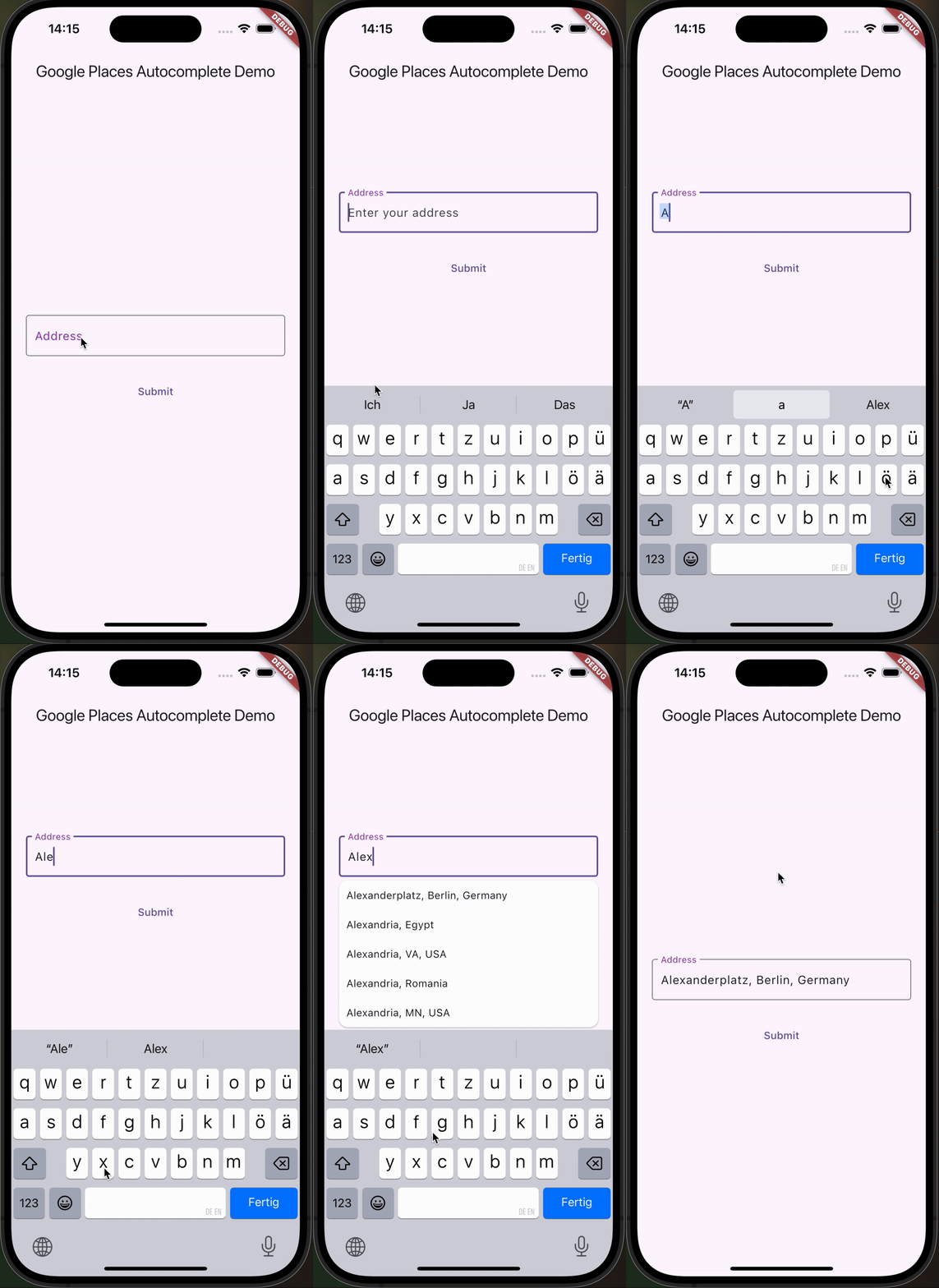
मूल README

संबंधित सोर्स रिपॉज़िटरी के मूल README का स्नैपशॉट। नवीनतम सामग्री के लिए रिपॉज़िटरी देखें।

google_places_autocomplete_text_field

This Flutter package helps you build a TextField that provides autocompletion suggestions from the new Google Places API.

Go check it out on pub.dev!

Add the dependency to pubspec.yml ➕

dependencies:
  flutter:
    sdk: flutter
  google_places_autocomplete_text_field: <last-version>

Integrate the Google AutoComplete TextField Widget in your code 🧩

    GooglePlacesAutoCompleteTextFormField(
        textEditingController: controller,
        config: const GoogleApiConfig(
          apiKey: 'YOUR_GOOGLE_API_KEY',
          // only needed if you build for the web
          proxyURL: 'https://your-proxy.com/',
          countries: ['de'], // optional, by default the list is empty (no restrictions)
          fetchPlaceDetailsWithCoordinates: true,  // if you require the coordinates from the place details
          debounceTime: 400, // defaults to 600 ms
          locationRestriction: LocationConfig.circle(
            circleCenter: const Coordinates(latitude: 52.5200, longitude: 13.4050),
            circleRadiusInKilometers: 1000,
          ), // either this or locationBias (or nothing)
          placeTypeRestriction: PlaceType.city, // if you want specific place types
        ),
        onPredictionWithCoordinatesReceived: (prediction) {
         // this method will return latlng with place detail
        print("Coordinates: (${prediction.lat},${prediction.lng})");
        // the place details are returned on the prediction as well
        print("Address: ${prediction.formattedAddress}");
        print("Components: ${prediction.addressComponents}");
        }, // this callback is called when fetchPlaceDetailsWithCoordinates is true
        onSuggestionClicked: (prediction) {
         controller.text = prediction.description;
          controller.selection = TextSelection.fromPosition(TextPosition(offset: prediction.description.length));
        }
    )

Integrate the Google AutoComplete TextField Widget in your Web code 🌐

In case you're building for the web, you need to pass the widget a proxy URL, otherwise you will receive a CORS-Error, as there are calls to the Google Maps API being made from the frontend. If you are not Google, your domain will probably be different, thus leading to the CORS-Error. If you are Google: how ya doin 😏? I'd love to do an internship.

Customization Option

You can customize the GooglePlacesAutoCompleteTextFormField as you would with any other TextFormField.

श्रेणियाँ

निर्भरताएँ

निर्भरता सूची 3 आइटम

सोर्स रिपॉज़िटरी

इस पैकेज का उपयोग करने वाले प्रोजेक्ट

अभी कोई डेटा उपलब्ध नहीं है।