पैकेज, रिपॉज़िटरी और ऐप श्रेणियाँ खोजें

पैकेज विवरणv2.0.0

import_lint

Import Lint पैकेज आयात Lint नियमों को परिभाषित करता है और Dart कोड में पाए गए Lint की रिपोर्ट करता है।

AndroidiOSmacOSWindowsLinux
30-दिन डाउनलोड
10.2 हज़ार
लाइक
28
Pub अंक
150

पैकेज इंस्टॉल करें

flutter pub add import_lint

पैकेज अवलोकन

सार्वजनिक जानकारी से बना चयन मार्गदर्शन। केवल संदर्भ हेतु।

Import Lint पैकेज डार्ट कोड में सुसंगत और साफ आयात अभ्यासों को लागू करने के लिए एक सेट लिंट नियम प्रदान करता है। यह आयात कथनों का विश्लेषण करता है और अनप्रयुक्त आयात, आवश्यकता से अधिक आयात या गलत आयात क्रम जैसी समस्याओं की रिपोर्ट करता है। डार्ट विश्लेषण उपकरण के साथ एकीकरण के माध्यम से, यह प्रोजेक्ट में कोड गुणवत्ता और पठनीयता बनाए रखने में मदद करता है। इस पैकेज का उपयोग आयात पैटर्न को मानकीकृत करने और स्रोत फ़ाइलों में भारी बढ़ावे को कम करने के लिए टीमों के लिए विशेष रूप से उपयोगी है।

उपयोग

  • समान आयात शैली का प्रभावी रूप से अनुपालन
  • अप्रयुक्त या अतिरिक्त आयात का पता लगाना
  • कोड पढ़ने में आसानी बढ़ाना
  • टीम-वाइड कोडिंग मानक बनाए रखना
  • विकास के दौरान आयात स्वचालित सफाई

मुख्य विशेषताएँ

  • कस्टमाइज़ करने योग्य आयात lint नियम
  • Dart विश्लेषण सर्वर के साथ एकीकरण
  • वास्तविक समय लिंट रिपोर्टिंग
  • कई प्लेटफॉर्म का समर्थन करता है
  • ओपन-सोर्स और कम्युनिटी द्वारा बनाए गए

इनके लिए उपयुक्त

  • Dart और Flutter विकास टीमें
  • कड़ी कोड गुणवत्ता की आवश्यकता वाले प्रोजेक्ट
  • स्वचालित लिंटिंग के लिए CI/CD पाइपलाइंस
  • कोड हाइजीन पर ध्यान केंद्रित विकासकर्मी

विचार योग्य बातें

  • विश्लेषण_options.yaml में कॉन्फ़िगरेशन की आवश्यकता है
  • पुराने कोडबेस के लिए समायोजन की आवश्यकता हो सकती है
  • Dart SDK संस्करण सुसंगतता पर निर्भर करता है
  • स्वतंत्र प्रारूपक नहीं है, बल्कि मौजूदा उपकरणों के पूरक है

मूल README

संबंधित सोर्स रिपॉज़िटरी के मूल README का स्नैपशॉट। नवीनतम सामग्री के लिए रिपॉज़िटरी देखें।

cover

Why import_lint?

The import_lint package defines rules to restrict imports and performs static analysis. It was inspired by eslint/no-restricted-paths.

😻 Usage

  1. Add import_lint as a dev_dependencies in pubspec.yamls.
flutter pub add --dev import_lint

or

dart pub add --dev import_lint
  1. You have lints configured in an analysis_options.yaml file at the root of your project.
  • target: Define the file paths of the targets to be restricted using glob patterns.
  • from: Define the paths that are not allowed to be used in imports using glob patterns.
  • except: Define the exception paths for the 'from' rule using glob patterns.

Example of analysis_options.yaml

plugins:
  import_lint: <version number>

import_lint:
  rules:
    example_rule:
      target: "package:example/target/*.dart"
      from: "package:example/from/*.dart"
      except: ["package:example/from/except.dart"]
    self_rule:
      target: "package:example/self/*.dart"
      from: "package:example/self/*.dart"
      except: []
    only_rule:
      target: "package:example/*[!only]/*.dart"
      from: "package:example/only_from/*.dart"
      except: []
    package_rule:
      target: "package:example/**/*.dart"
      from: "package:import_lint/*.dart"
      except: []
    # add custom rules...

Note: import_lint requires Dart 3.10 or later (analyzer plugin support was added in Dart 3.10 / Flutter 3.38). The top-level plugins: section is the new analyzer plugin system. After any change to the plugins: section, the Dart Analysis Server must be restarted to see the effects (VS Code: Dart: Restart Analysis Server).

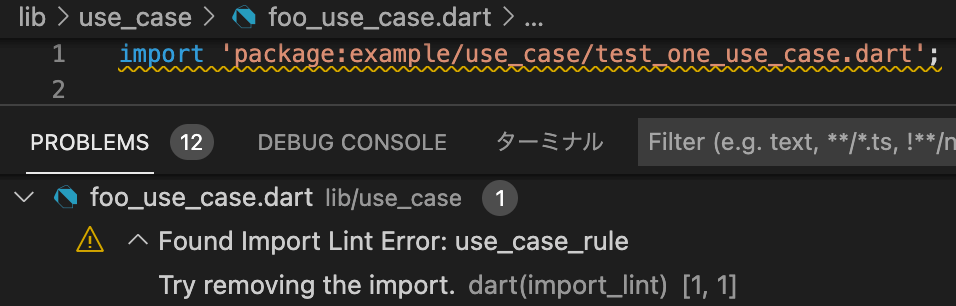
By adding import_lint plugin to get the warnings directly in your IDE by configuring.

vscode

  1. run import_lint(CLI Support)
flutter run import_lint

or

dart run import_lint

Example

example/analysis_options.yaml

plugins:
  import_lint:
    path: ..

import_lint:
  rules:
    example_rule:
      target: "package:example/target/*.dart"
      from: "package:example/from/*.dart"
      except: ["package:example/from/except.dart"]
    self_rule:
      target: "package:example/self/*.dart"
      from: "package:example/self/*.dart"
      except: []
    only_rule:
      target: "package:example/*[!only]/*.dart"
      from: "package:example/only_from/*.dart"
      except: []
    package_rule:
      target: "package:example/**/*.dart"
      from: "package:import_lint/*.dart"
      except: []

files

example/lib

output

$ dart run import_lint

Analyzing...
   warning • /example/lib/not/1.dart:1:8 • package:example/only_from/1.dart • only_rule
   warning • /example/lib/target/1.dart:2:8 • package:example/from/test.dart • example_rule
   warning • /example/lib/self/1.dart:1:8 • package:example/self/2.dart • self_rule
   warning • /example/lib/package/1.dart:1:8 • package:import_lint/import_lint.dart • package_rule

4 issues found.

Option

Rule Severities

To change the severity of a rule, add a severity key to the rule configuration.

  • warning (default)
  • error (exit code 1 when lint is found)
import_lint:
  severity: "error"
  rules: ...

Note on IDE severity: The severity: "error" setting is honored by dart run import_lint (exit code 1). In the IDE, analysis_server_plugin registers a fixed warning severity. To see import_lint errors as errors in the IDE, add this to analysis_options.yaml:

analyzer:
  errors:
    import_lint: error

Contribution

Welcome PRs!

To develop locally, clone the repo and enable the plugin from a local path in your host project's analysis_options.yaml:

plugins:
  import_lint:
    path: /path/to/your/import-lint
    diagnostics:
      import_lint: true

For CLI use (dart run import_lint), also add it under dev_dependencies:

dev_dependencies:
  import_lint:
    path: /path/to/your/import-lint

Then run dart pub get in the host project and restart the Dart Analysis Server. No separate tools/analyzer_plugin directory is needed — the plugin entry point is lib/main.dart in this package.

श्रेणियाँ

निर्भरताएँ

निर्भरता सूची 8 आइटम

सोर्स रिपॉज़िटरी

इस पैकेज का उपयोग करने वाले प्रोजेक्ट

अभी कोई डेटा उपलब्ध नहीं है।