सार्वजनिक जानकारी से बना चयन मार्गदर्शन। केवल संदर्भ हेतु।
बुद्धिमत्ता पैकेज एक Flutter प्लगइन है जो iOS ऐप्स को Apple के AppIntents फ्रेमवर्क के साथ एकीकृत करने में सक्षम बनाता है, जिससे Siri, शॉर्टकट ऐप और Apple इंटेलिजेंस के साथ गहरे अंतरक्रिया की अनुमति मिलती है। यह उपयोगकर्ताओं को आवाज़ कमांड या शॉर्टकट के माध्यम से ऐप कार्यों को सक्रिय करने की अनुमति देता है, जिससे पहुंच और स्वचालन में सुधार होता है। प्लगइन अपने ऐप कार्यों को Apple के पारिस्थितिकी तंत्र में उपलब्ध कराने की प्रक्रिया को सरल बनाता है, जिसमें इंटेंट्स, पैरामीटर और परिणामों को परिभाषित करने के लिए Dart-स्तरीय API प्रदान करता है। यह विशेष रूप से iOS के लिए डिज़ाइन किया गया है और Apple के AppIntents निर्देशों का पालन करने की आवश्यकता होती है।
उपयोग
एप्लिकेशन कार्यों के लिए Siri ध्वनि निर्देश सक्षम करें
शॉर्टकट ऐप के साथ एकीकरण करें
Apple Intelligence विशेषताओं का समर्थन करें
उपयोगकर्ताओं को कार्यों को स्वचालित करने की अनुमति दें
Apple पारिस्थितिकी तंत्र में ऐप की खोज में सुधार करें
मुख्य विशेषताएँ
Apple AppIntents एकीकरण के साथ निरंतर
इरादों को परिभाषित करने के लिए Dart API
Siri और शॉर्टकट का समर्थन करता है
iOS-केवल प्लेटफॉर्म संगतता
Flutter pub add के साथ आसान सेटअप
इनके लिए उपयुक्त
Apple Intelligence के लिए iOS विकासकर्ता
वॉइस कमांड सपोर्ट की आवश्यकता वाले ऐप्स
ऑटोमेशन-फोकस्ड एप्लिकेशन
iOS पर Flutter का उपयोग करने वाले विकासकर्ता
गहरे Siri एकीकरण के लिए बनाई गई ऐप्स
विचार योग्य बातें
iOS 17+ की आवश्यकता है
Apple के पारिस्थितिकी तंत्र तक सीमित
Xcode में AppIntents कॉन्फ़िगरेशन की आवश्यकता है
Android के साथ असंगत
Apple के विकसित AppIntents फ्रेमवर्क पर निर्भर
मूल README
संबंधित सोर्स रिपॉज़िटरी के मूल README का स्नैपशॉट। नवीनतम सामग्री के लिए रिपॉज़िटरी देखें।
Intelligence
Add support for Apple's AppIntents framework to your Flutter application. For details on how to add integration with Siri, Shortcuts app, and Apple Intelligence, see Recipes.
Installation
Copy and paste the following snippet into your shell when in the target project directory.
dart pub add intelligence
Usage
To add support for AppIntents framework, you will have to perform one-time setup which differs for different use-cases. See Recipes for more details.
iOS Configuration
After installing the package, you need to set the minimum iOS version to 16.0 on XCode.
For more details, follow these steps:
Open the iOS project in Xcode
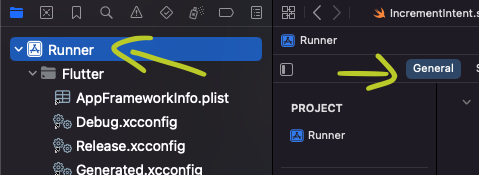
Click on Runner & then general tab
Under the General tab & minimum deployments section, set the iOS version to atleast 16.0
Once set up, the plugin will let you act on each App Intent trigger.
E.g. while setting the selection listener in a Stateful widget: