सार्वजनिक जानकारी से बना चयन मार्गदर्शन। केवल संदर्भ हेतु।
intention पैकेज एक सरल Flutter प्लगइन है जो Android Intent के हैंडलिंग को सरल बनाने के लिए डिज़ाइन किया गया है। यह Flutter ऐप्स और मूल एंड्रॉइड घटकों के बीच बेहतर संचार की अनुमति देता है, जिससे विकासकर्ता गतिविधियों को शुरू करने, प्रसारण भेजने और इंटेंट्स के प्रबंधन के लिए न्यूनतम कोड का उपयोग कर सकते हैं। डेटा साझा करने, बाहरी ऐप्स खोलने या ईमेल या संदेश भेजने जैसे सिस्टम कार्यों को सक्रिय करने के लिए आदर्श है। प्लगइन Android के जटिल Intent API को उपयोग में आसान Dart विधियों में अभिव्यक्त करता है, जिससे शुरुआती उपयोगकर्ताओं के लिए भी उपलब्ध होता है। स्पष्ट दस्तावेज़ीकरण और सक्रिय रखरखाव के साथ, यह Flutter और Android के मूल कार्यक्षमता के बीच एक विश्वसनीय सेतु के रूप में काम करता है।
उपयोग
एप्प्स के बीच सामग्री साझा करना
बाहरी एप्लिकेशन लॉन्च करना
ब्रॉडकास्ट इंटेंट भेजना
सिस्टम सेटिंग्स खोलें
डीप लिंक का हैंडलिंग
उपकरण कार्रवाई को ट्रिगर करना
मुख्य विशेषताएँ
Android Intents के लिए सरल Dart इंटरफ़ेस
गोपनीय और स्पष्ट इंटेंट्स का समर्थन करता है
Flutter कार्यप्रवाह के साथ आसान एकीकरण
न्यूनतम बॉयलरप्लेट कोड
सक्रिय गिटहब भंडार
स्पष्ट दस्तावेज़
इनके लिए उपयुक्त
एंड्रॉइड के लिए फ्लटर विकासकर्मी
Android-विशिष्ट क्रियाओं की आवश्यकता वाले ऐप्स
साझाकरण और गहन लिंकिंग सुविधाएँ
Android एकीकरण सीखने वाले शुरुआती लोग
विचार योग्य बातें
Android-केवल कार्यक्षमता
Android प्लेटफॉर्म तक सीमित
उन्नत उपयोग के लिए Android SDK ज्ञान की आवश्यकता है
कोई iOS समर्थन नहीं
कुछ इंटेंट्स के लिए अतिरिक्त अनुमतियों की आवश्यकता हो सकती है
मूल README
संबंधित सोर्स रिपॉज़िटरी के मूल README का स्नैपशॉट। नवीनतम सामग्री के लिए रिपॉज़िटरी देखें।
Warning I've stopped maintaining this project !
intent
A simple flutter plugin to deal with Android Intents - your one stop solution for Android Intents, written with :heart:.
Show some :heart: by putting :star:
intent tries to help you in launching another android activity using Android Intents. This Dart API replicates Android Intent API, so for detailed information on how to use it efficiently, when to send what kind of data, you may be interested in taking a look here, which explains things more elaborately.
intent is your one stop solution for handling different Android Intents from Flutter app.
It provides an easy to use Dart API, which can be used to launch different kind of Android Activities
You can view / create documents
Pick document(s) from Document Tree
Open default Assist Activity
Perform a Web Search
Request definition of a certain string to default Assist Activity
Open image for editing / viewing
Share text / multimedia to another activity
Send Email to specific user, while also setting CC & BCC
Share multiple documents at a time
Sync system content
Translate text
Set Wallpaper
Open any URL
Open Dialer for calling a specific number
Can pick a contact from your default phone activity
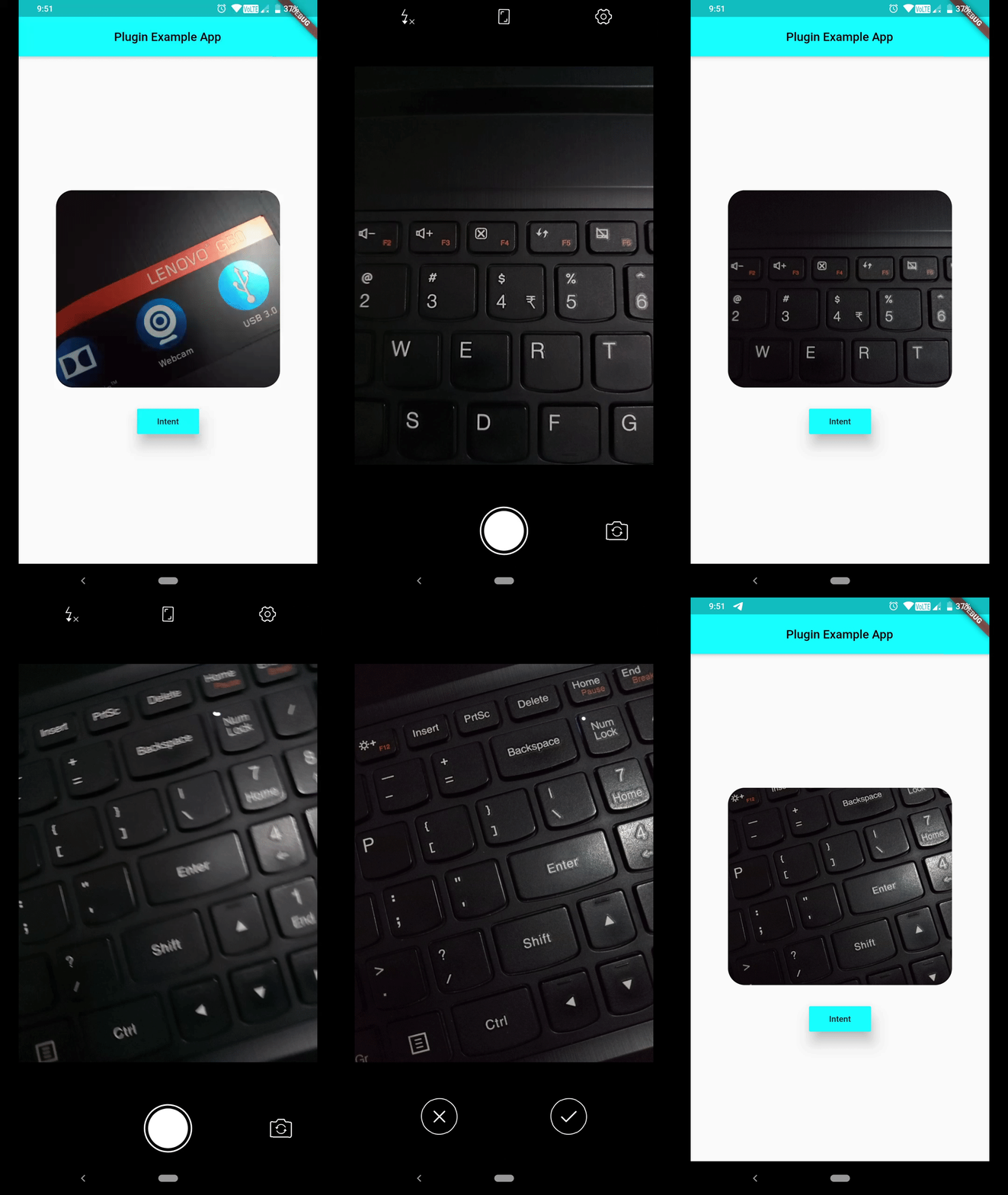
Can capture a photo using default Camera Activity
latest addition
Newest Addition: You can pass extra data's type information, while invoking Intent.putExtra(String extra, dynamic data, {String type}) as optional named param type. You don't even need to hardcode type names as Strings, rather a class named TypedExtra has been given to developers, which has all currently supported type names as static variables. Consider using them. And last but not least, this is not a breaking change !!!
But if you're interested in creating a chooser i.e. all eligible candidates shown up system, which can handle this intent, make sure you set createChooser named parameter to true, which is by default false.
Send Email to certain ID while setting Content and CC/ BCC :
Path to captured image can be grabbed from Intent().startActivityForResult().then(() { ... } ), which will be provided in form of List<String>, open file using that path, File(data[0]). Now you can work on that image file.
        Intent()
                ..setAction(Action.ACTION_IMAGE_CAPTURE)
                ..startActivityForResult().then((data) => print(data[0]), // gets you path to image captured
                onError: (e) => print(e));
If you're not interested in showing default activity launch animation, set following flag.
If you request for certain Activity and no eligible candidate was found, you'll receive one error message, which you can listen for using Future.catchError((e) {},) method.
PlatformException(Error, android.content.ActivityNotFoundException: NoActivity found to handle Intent { act=android.intent.action.SYSTEM_TUTORIAL }, null)
Currently a limited number of Actions are provided in Action class, but you can always use a string constant as an Action, which will help you in dealing with many more Activities.