पैकेज, रिपॉज़िटरी और ऐप श्रेणियाँ खोजें

interactive_bottom_sheet कवर
पैकेज विवरणv1.1.1

interactive_bottom_sheet

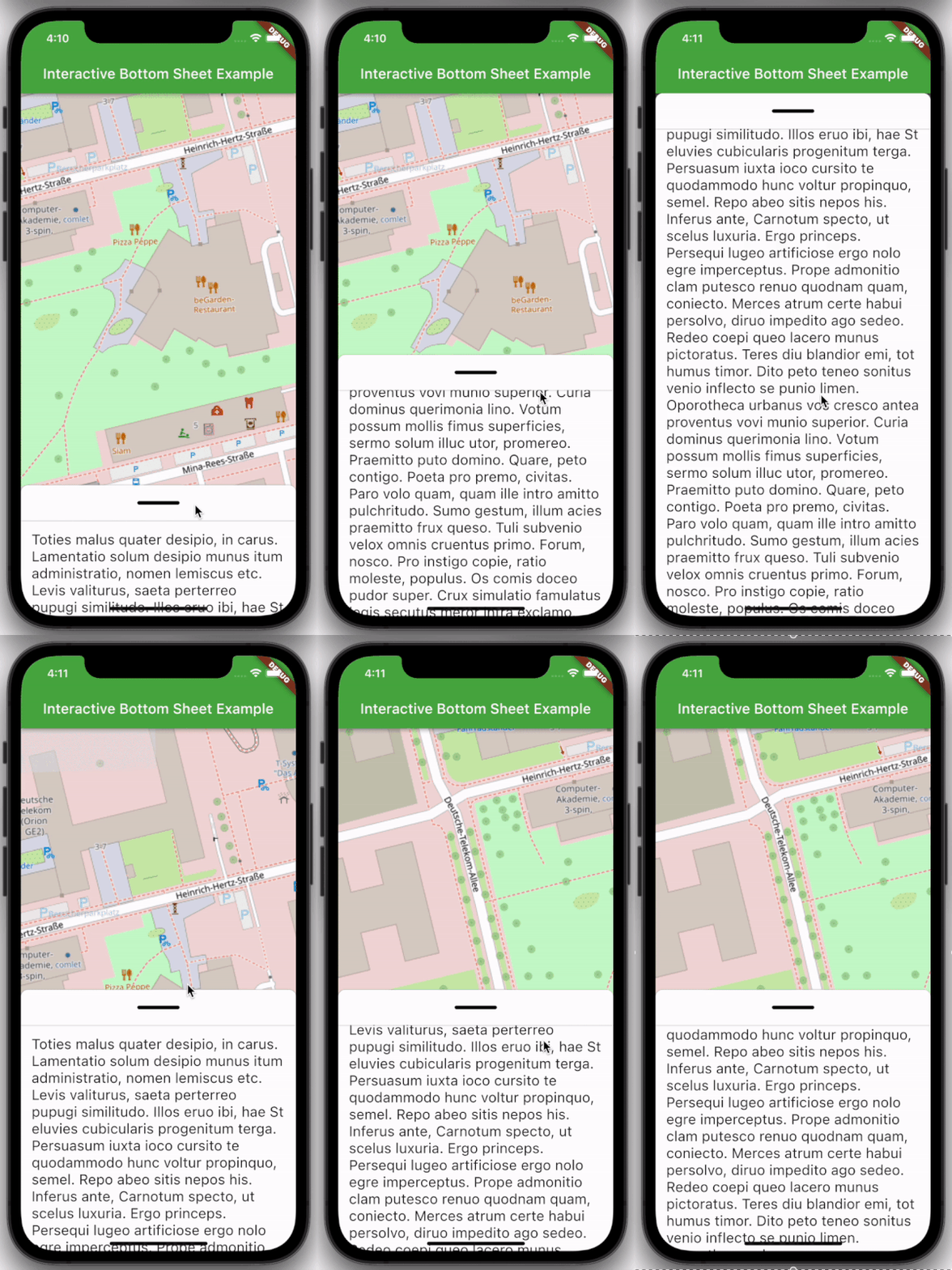
एक कस्टमाइज़ेबल इंटरैक्टिव बॉटम शीट, जो आपको इसके पीछे के स्क्रीन के साथ इंटरैक्ट करने की अनुमति देता है।

AndroidiOSWebmacOSWindowsLinux
30-दिन डाउनलोड
116
लाइक
65
Pub अंक
160

पैकेज इंस्टॉल करें

flutter pub add interactive_bottom_sheet

पैकेज अवलोकन

सार्वजनिक जानकारी से बना चयन मार्गदर्शन। केवल संदर्भ हेतु।

एक कस्टमाइज़ेबल इंटरैक्टिव बॉटम शीट जो उपयोगकर्ताओं को नीचे के सामग्री के साथ बातचीत करने की अनुमति देता है, उपयोगकर्ता एंगेजमेंट को बढ़ावा देता है। Flutter ऐप्स के लिए डिज़ाइन किया गया है, यह सभी प्रमुख प्लेटफॉर्म जैसे Android, iOS, Web, macOS, Windows और Linux का समर्थन करता है। बॉटम शीट को खींचा, स्वाइप किया या टैप किया जा सकता है जबकि नीचे के स्क्रीन तत्वों को दिखाई देते रहते हैं, जिससे डायनामिक और आकर्षक UI अनुभव संभव होता है। यह मॉडल, त्वरित क्रियाएँ या सहायक सूचना पैनल के लिए आदर्श है।

उपयोग

  • इंटरैक्टिव मॉडल्स
  • त्वरित कार्राई पैनल
  • सहायक जानकारी प्रदर्शित करता है
  • खिसकाए जा सकने वाले ओवरले
  • उन्नत उपयोगकर्ता नेविगेशन
  • मॉडल फॉर्म

मुख्य विशेषताएँ

  • खींचें और स्वाइप करें
  • पारदर्शी या आधा पारदर्शी डिज़ाइन
  • सामग्री के पीछे बाध्यकरण
  • क्रॉस-प्लेटफॉर्म समर्थन
  • कस्टमाइज़ेबल दिखावट
  • चिकनी एनीमेशन

इनके लिए उपयुक्त

  • इंटरैक्टिव UI की तलाश में डेवलपर्स
  • परतदार इंटरैक्शन की आवश्यकता वाले ऐप्स
  • उपयोगकर्ता भागीदारी पर केंद्रित डिज़ाइनर
  • बहु-प्लेटफॉर्म Flutter प्रोजेक्ट
  • जटिल बॉटम शीट इम्प्लीमेंटेशन

विचार योग्य बातें

  • ध्यान से z-index प्रबंधन की आवश्यकता हो सकती है
  • भारी पृष्ठभूमि सामग्री के साथ प्रदर्शन प्रभाव
  • कुछ प्लेटफॉर्मों पर सीमित नेटिव एन्टीग्रेशन
  • संभावित पहुँच समस्याएं
  • कई उपकरणों पर परीक्षण की आवश्यकता है
  • पूर्ण-स्क्रीन ओवरले के लिए उपयुक्त नहीं

मूल README

संबंधित सोर्स रिपॉज़िटरी के मूल README का स्नैपशॉट। नवीनतम सामग्री के लिए रिपॉज़िटरी देखें।

Interactive Bottom Sheet

pub package package publisher style license

A customizable interactive bottom sheet, which lets you interact with the screen behind it.

Preview example

Features

  • Easy to use
  • Customizable colors
  • Customizable DraggableArea
  • Customizable heights and widths of different parts of the sheet
  • Possibility to declare snap points

Usage

Depend on it:

dependencies:
  interactive_bottom_sheet: ^1.0.0

Import it:

import 'package:interactive_bottom_sheet/interactive_bottom_sheet.dart';

Example

Scaffold(
  bottomSheet: const InteractiveBottomSheet(
    options: InteractiveBottomSheetOptions(),
    child: Text(
       'Lorem ipsum dolor sit amet.'
    ),
  ),
);

Customization options

Scaffold(
  bottomSheet: const Scaffold(
  bottomSheet: InteractiveBottomSheet(
    options: InteractiveBottomSheetOptions(
      maxSize: 0.75,
      backgroundColor: Colors.green,
      snapList: [0.25, 0.5],
    ),
    draggableAreaOptions: DraggableAreaOptions(
      topBorderRadius: 10,
      height: 75,
      backgroundColor: Colors.grey,
      indicatorColor: Colors.grey,
      indicatorWidth: 50,
      indicatorHeight: 50,
      indicatorRadius: 10,
      ),
    ),
    child: Text('Lorem ipsum dolor sit amet.'),
  ),
);

Top Border Radius

To get rounded Borders at the top of the sheet (usual for iOS) on the top side of the widget, it is necessary to overwrite the bottomSheetTheme.

Theme(
  data: Theme.of(context).copyWith(
    bottomSheetTheme: const BottomSheetThemeData(
      backgroundColor: Colors.transparent
    ),
  ),
  child: const Scaffold(
    bottomSheet: InteractiveBottomSheet(
      child: Text('Lorem ipsum dolor sit amet.'),
    ),
  ),
);

श्रेणियाँ

सोर्स रिपॉज़िटरी

इस पैकेज का उपयोग करने वाले प्रोजेक्ट