पैकेज, रिपॉज़िटरी और ऐप श्रेणियाँ खोजें

keymap कवर
पैकेज विवरणv0.0.92

keymap

एक पुनर्उपयोगी कीबोर्ड शॉर्टकट विजेट जिसमें लचीला, सरल यूआई और फोकस हैंडलिंग है।

AndroidiOSmacOSWindowsLinux
30-दिन डाउनलोड
1.1 हज़ार
लाइक
34
Pub अंक
140

पैकेज इंस्टॉल करें

flutter pub add keymap

पैकेज अवलोकन

सार्वजनिक जानकारी से बना चयन मार्गदर्शन। केवल संदर्भ हेतु।

Keymap एक Flutter पैकेज है जो कीबोर्ड शॉर्टकट के लिए न्यूनतम और लचीले UI के साथ दोहराया जा सकने वाला विजेट प्रदान करता है। यह फोकस प्रबंधन का समर्थन करता है और Android, iOS, macOS, Windows और Linux जैसे कई प्लेटफॉर्म पर काम करता है। इस पैकेज के माध्यम से विकासकर्ता कीबोर्ड संयोजनों को आसानी से परिभाषित कर सकते हैं और बॉइलरप्लेट कोड के बिना उपयोगकर्ता इनपुट के प्रति प्रतिक्रिया कर सकते हैं। उच्च दक्षता वाले कीबोर्ड नेविगेशन या हॉटकीज की आवश्यकता वाले एप्लिकेशन के लिए उपयुक्त, यह सहज शॉर्टकट प्रबंधन के माध्यम से एक्सेसिबिलिटी और उपयोगकर्ता अनुभव को बढ़ाता है।

उपयोग

  • डेस्कटॉप एप्लिकेशन में कीबोर्ड शॉर्टकट कार्यान्वयन करना
  • उत्पादकता उपकरणों में सुलभता को बढ़ाना
  • गेम कंट्रोल्स के लिए हॉटकीज बनाना
  • प्रतिक्रियाशील वेब और डेस्कटॉप इंटरफ़ेस बनाना
  • फॉर्म में त्वरित नेविगेशन सक्षम करें

मुख्य विशेषताएँ

  • लचीला और कम डिज़ाइन वाला उपयोगकर्ता इंटरफेस डिज़ाइन
  • बिल्ट-इन फोकस हैंडलिंग
  • क्रॉस-प्लेटफ़ॉर्म समर्थन
  • पुनर्उपयोगी शॉर्टकट परिभाषाएं
  • की संयोजन मैपिंग के लिए सरल API

इनके लिए उपयुक्त

  • डेस्कटॉप एप्लिकेशन डेवलपर्स
  • एक्सेसिबिलिटी-फोकस्ड प्रोजेक्ट्स
  • उत्पादकता टूल निर्माता
  • वेब और बहु-प्लेटफॉर्म फ्लटर एप्लिकेशन
  • कीबोर्ड नेविगेशन की आवश्यकता वाले UI

विचार योग्य बातें

  • जटिल विजेट्स में हस्ताक्षर फोकस प्रबंधन की आवश्यकता होती है
  • कस्टम आउटपुट के लिए अतिरिक्त स्टाइलिंग की आवश्यकता हो सकती है
  • सीमित निर्मित दृश्य प्रतिक्रिया
  • मोबाइल-केवल उपयोग के मामलों के लिए अनअनुकूलित
  • प्लेटफॉर्म-विशिष्ट कीबोर्ड इवेंट हैंडलिंग पर निर्भर करता है

मूल README

संबंधित सोर्स रिपॉज़िटरी के मूल README का स्नैपशॉट। नवीनतम सामग्री के लिए रिपॉज़िटरी देखें।

Keymap

A keymap widget letting a developer easily allow end users to use keyboard shortcuts and an associated help screen overlay to any app.

This is pre-alpha and the API will probably change in the future.

Getting started

pub package

dependencies:
  keymap: <latest-version>

Features

  • Easily add keyboard shortcuts to any widget tree
  • Clear, readable help screen
  • Allows rich text introductions with images using the Markdown format
  • Handles focus, passing up unhandled key events
  • Respects application theme colors and fonts

Usage

Add a KeyMap widget to your tree in the build method

@override
Widget build(BuildContext context) {
  return KeyboardWidget(
    bindings: [
      KeyAction.fromString('A','increment the counter', () {
        setState(() {
          count++;
        });}, isControlPressed: true),
      KeyAction(LogicalKeyboardKey.keyD, 'decrement the counter', () {
        setState(() {
          count--;
        });
      }, isAltPressed: true, isControlPressed: true),
    ],
    child: Column(
      children: [
        const Text('Up arrow for adding, down arrow to subtract'),
        Text('count: $count'),
      ],
    ),
  );
}

You can optionally set the number of columns for the text shown in the help screen

  @override
  Widget build(BuildContext context) {
    return KeyboardWidget(
      columnCount: 2,
      child: Scaffold(

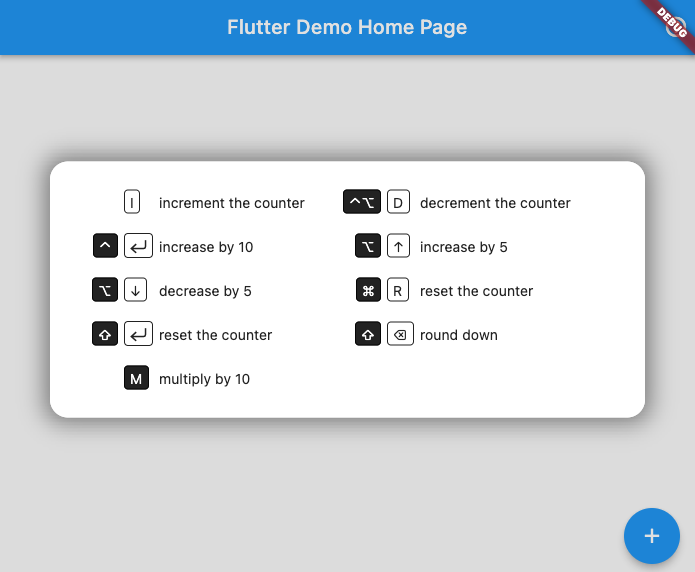
This creates keyboard shortcuts that call the referenced methods and a help screen that can be called up by pressing F1 (or any key you choose):

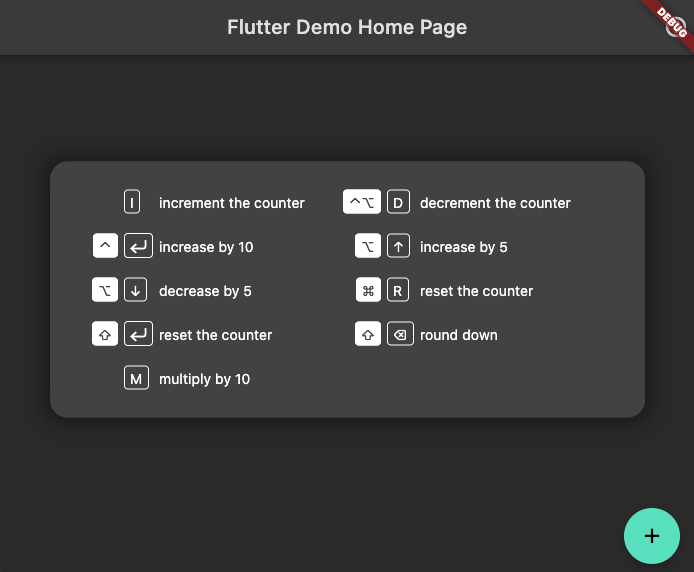
It will shift colors to match your app's theme (here in dark mode)

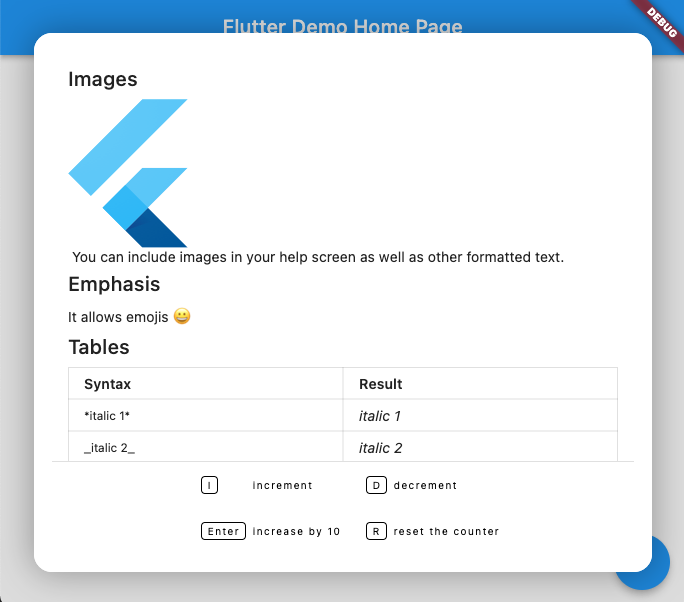
You can add rich text (using Markdown format) above the keyboard map. A code sample showing how to do this can be found in the examples directory

श्रेणियाँ

निर्भरताएँ

निर्भरता सूची 1 आइटम

सोर्स रिपॉज़िटरी

इस पैकेज का उपयोग करने वाले प्रोजेक्ट