पैकेज, रिपॉज़िटरी और ऐप श्रेणियाँ खोजें

liquid_container कवर
पैकेज विवरणv1.1.1

liquid_container

होवर प्रभाव के साथ तरल बटन कंटेनर। अपने एप्लिकेशन में तरल प्रभाव आसानी से जोड़ें

AndroidiOSWebmacOSWindowsLinux
30-दिन डाउनलोड
93
लाइक
15
Pub अंक
160

पैकेज इंस्टॉल करें

flutter pub add liquid_container

पैकेज अवलोकन

सार्वजनिक जानकारी से बना चयन मार्गदर्शन। केवल संदर्भ हेतु।

LiquidContainer एक Flutter पैकेज है जो कंटेनर विजेट्स पर तरल, तरल-जैसा होवर प्रभाव जोड़ता है। यह उपयोगकर्ता के होवर के समय रिपल या लहर की गति का नकल करके UI इंटरैक्टिविटी को बढ़ाता है, आधुनिक, गतिशील इंटरफेस के लिए उपयुक्त है। पैकेज हल्का है और आसानी से एकीकृत किया जा सकता है, जो Android, iOS, Web, macOS, Windows और Linux सहित सभी प्रमुख प्लेटफॉर्म को समर्थन देता है। बटन, कार्ड या किसी भी ऐसे इंटरैक्टिव UI तत्व के लिए आदर्श जहां दृश्य प्रतिक्रिया उपयोगकर्ता अनुभव को बेहतर बनाती है।

उपयोग

  • इंटरैक्टिव बटन
  • एनिमेटेड UI तत्व
  • आधुनिक ऐप इंटरफेस
  • होवर-आधारित नेविगेशन
  • गेमिफाइड ऐप घटक
  • फॉर्म में विजुअल फीडबैक

मुख्य विशेषताएँ

  • स्मूथ तरल होवर एनीमेशन
  • प्लेटफॉर्म के अनुकूलता
  • मौजूदा विजेट्स के साथ सरल एकीकरण
  • कस्टमाइज़ किए गए रिपल इफेक्ट्स
  • हल्का और कार्यक्षम
  • स्पर्श और माउस इंटरैक्शन का समर्थन करता है

इनके लिए उपयुक्त

  • तरल एनिमेशन की तलाश में डिज़ाइनर
  • इंटरैक्टिव ऐप्स बनाने वाले डेवलपर्स
  • आधुनिक अस्थायी लक्ष्यों वाले ऐप्स
  • आकर्षक UI की आवश्यकता वाले प्रोटोटाइप
  • शैक्षिक या गेमिंग एप्लिकेशन

विचार योग्य बातें

  • कम क्षमता वाले उपकरणों पर प्रदर्शन प्रभावित हो सकता है
  • जटिल प्रभावों के लिए सीमित कस्टमाइजेशन विकल्प
  • हल्के एनिमेशन के लिए सबसे उपयुक्त
  • उच्च आवृत्ति के इंटरैक्शन क्षेत्रों के लिए सुझाव नहीं है
  • दृश्य अव्यवस्था से बचने के लिए सावधानीपूर्वक डिज़ाइन की आवश्यकता होती है

मूल README

संबंधित सोर्स रिपॉज़िटरी के मूल README का स्नैपशॉट। नवीनतम सामग्री के लिए रिपॉज़िटरी देखें।

liquid_container

Platform Pub Package License: MIT Donate


Demo

Liquid button container. The physics of the Hover effect is not indistinguishable from a drop of water

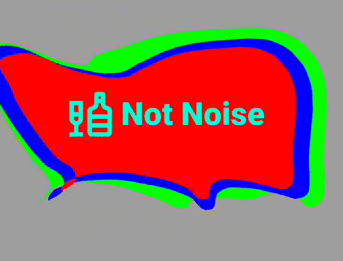
png

Video of the application

Video

Features

  • easy to use
  • has many parameters for fine tuning
  • fully native dart

Getting started

  • Add this to your pubspec.yaml

    dependencies:
      liquid_container: ^1.0.4
    
  • Get the package from Pub:

    flutter packages get
    
  • Import it in your file

    import 'package:liquid_container/liquid_container.dart';
    

Usage

  • Create options
  final optionsParam = Options(
    layers: [
      LayerModel(
        points: [],
        viscosity: 0.9,
        touchForce: 30,
        forceLimit: 15,
        color: const Color(0xFF00FF00),
      ),
      LayerModel(
        points: [],
        viscosity: 0.9,
        touchForce: 50,
        forceLimit: 10,
        color: const Color(0xFFFF0000),
      ),
    ],
    gap: 30,
    noise: 30,
    forceFactorBuild: 10,
    forceFactorOnTap: 150,
  );
  • Add BoxDecoration to customize the container shape (optional)
  BoxDecoration _borderForm() {
    return const BoxDecoration(
        borderRadius: BorderRadius.only(
      topLeft: Radius.circular(40),
      topRight: Radius.circular(80),
      bottomLeft: Radius.circular(150),
      bottomRight: Radius.circular(20),
    ));
  }
  • Use the pretty hover button
  Widget _buildLiquidButton() {
    return LiquidContainer(
      onTap: () {
        // same code
      },
      optionsParam: optionsParam,
      boxDecorationLabel: _borderForm(),
      child: _buildSomeChild(),
    );
  }
Full example
import 'package:flutter/material.dart';

void main() {
  runApp(const LiquidApp());
}

class LiquidApp extends StatelessWidget {
  static const title = 'Liquid Container';

  const LiquidApp({
    super. key,
  });

  @override
  Widget build(BuildContext context) {
    return MaterialApp(
      title: title,
      home: Scaffold(
        appBar: AppBar(
          title: const Text(title),
        ),
        body: Container(
          color: Colors.grey,
          child: ListView(
            children: const [
              BigNoiseLiquidWidget(),
              SizedBox(height: 300),
            ],
          ),
        ),
      ),
    );
  }
}


class BigNoiseLiquidWidget extends StatefulWidget {
  const BigNoiseLiquidWidget({super.key});

  @override
  _BigNoiseLiquidWidgetState createState() => _BigNoiseLiquidWidgetState();
}

class _BigNoiseLiquidWidgetState extends State<BigNoiseLiquidWidget> {
  static const _label = 'Big Noise';
  final optionsParam = Options(
    layers: [
      LayerModel(
        points: [],
        viscosity: 0.9,
        touchForce: 30,
        forceLimit: 15,
        color: const Color(0xFF00FF00),
      ),
      LayerModel(
        points: [],
        viscosity: 0.9,
        touchForce: 50,
        forceLimit: 10,
        color: const Color(0xFF0000FF),
      ),
      LayerModel(
        points: [],
        viscosity: 0.9,
        touchForce: 50,
        forceLimit: 10,
        color: const Color(0xFFFF0000),
      ),
    ],
    gap: 30,
    noise: 30,
    forceFactorBuild: 10,
    forceFactorOnTap: 150,
    scaleOptionLayer: [1, 0.9, 0.8],
  );
  @override
  Widget build(BuildContext context) {
    return Container(
      height: 200,
      margin: const EdgeInsets.only(left: 10, right: 30, top: 100),
      child: LiquidContainer(
        onTap: _onTapToLiquidButton,
        optionsParam: optionsParam,
        boxDecorationLabel: _borderForm(),
        child: _buildForegroundChild(),
      ),
    );
  }

  BoxDecoration _borderForm() {
    return const BoxDecoration(
        borderRadius: BorderRadius.only(
      topLeft: Radius.circular(40),
      topRight: Radius.circular(80),
      bottomLeft: Radius.circular(150),
      bottomRight: Radius.circular(20),
    ));
  }

  void _onTapToLiquidButton() {
    ScaffoldMessenger.of(context).showSnackBar(
      SnackBar(
        content: Padding(
          padding: const EdgeInsets.symmetric(horizontal: 5, vertical: 20),
          child: Row(
            mainAxisAlignment: MainAxisAlignment.spaceBetween,
            children: [
              const Text(
                _label,
                style: TextStyle(
                  fontSize: 20,
                  fontWeight: FontWeight.w900,
                  color: Color(0xFF00FFD5),
                ),
              ),
              IconButton(
                onPressed: ScaffoldMessenger.of(context).clearSnackBars,
                icon: const Icon(
                  Icons.close,
                  size: 30,
                  color: Colors.redAccent,
                ),
              ),
            ],
          ),
        ),
      ),
    );
  }

  Row _buildForegroundChild() {
    return Row(
      mainAxisAlignment: MainAxisAlignment.center,
      children: const <Widget>[
        Icon(
          Icons.liquor_outlined,
          color: Color(0xFF00FFD5),
          size: 60,
        ),
        SizedBox(width: 5),
        Text(
          _label,
          style: TextStyle(
            fontSize: 36,
            fontWeight: FontWeight.w900,
            color: Color(0xFF00FFD5),
          ),
        ),
      ],
    );
  }
}

Author

Okladnoj

श्रेणियाँ

निर्भरताएँ

निर्भरता सूची 1 आइटम

सोर्स रिपॉज़िटरी

इस पैकेज का उपयोग करने वाले प्रोजेक्ट

अभी कोई डेटा उपलब्ध नहीं है।

