पैकेज, रिपॉज़िटरी और ऐप श्रेणियाँ खोजें

outline_material_icons कवर
पैकेज विवरणv1.0.0

outline_material_icons

Google से नए आउटलाइन थीम के मैटेरियल डिज़ाइन आइकॉन प्रदान करता है।

AndroidiOSWebmacOSWindowsLinux
30-दिन डाउनलोड
859
लाइक
95
Pub अंक
50

पैकेज इंस्टॉल करें

flutter pub add outline_material_icons

पैकेज अवलोकन

सार्वजनिक जानकारी से बना चयन मार्गदर्शन। केवल संदर्भ हेतु।

एक फ्लटर पैकेज जो गूगल के मैटीरियल डिज़ाइन आइकन के आउटलाइन वेरिएंट प्रदान करता है, जिसमें साफ और मिनिमलिस्ट एस्थेटिक होता है। ये आइकन अपडेटेड मैटीरियल डिज़ाइन सिस्टम का हिस्सा हैं और आधुनिक UI के लिए उपयुक्त हैं जो सरलता और स्पष्टता पर ध्यान केंद्रित करते हैं। पैकेज को pub के माध्यम से आसानी से एकीकृत किया जा सकता है, सभी प्रमुख प्लेटफॉर्म का समर्थन करता है, और एप्लिकेशन के बीच एक समान आइकनोग्राफी सुनिश्चित करता है। यह विकासकर्ताओं के लिए विशेष रूप से उपयोगी है जो अपने ऐप के डिज़ाइन को वर्तमान मैटीरियल डिज़ाइन दिशानिर्देशों के अनुरूप बनाना चाहते हैं।

उपयोग

  • आधुनिक एप्प इंटरफेस
  • न्यूनतम उपयोगकर्ता इंटरफेस डिज़ाइन
  • क्रॉस-प्लेटफॉर्म एप्लिकेशन
  • Material Design 3 सुसंगतता
  • समान आइकन शैली

मुख्य विशेषताएँ

  • आउटलाइन शैली के मैटेरियल डिज़ाइन आइकन
  • सभी फ्लटर प्लेटफॉर्म को समर्थन करता है
  • pub के माध्यम से आसान एकीकरण
  • स्रोत से नियमित अपडेट
  • हल्का और कारगर

इनके लिए उपयुक्त

  • Material Design 3 का उपयोग करने वाले यूआई डिजाइनर
  • बहुप्लेटफॉर्म लक्षित विकासकर्ता
  • स्थिर आइकन सेट की आवश्यकता वाले ऐप
  • आधुनिक डिज़ाइन प्रवृत्तियों का पालन करने वाले प्रोजेक्ट

विचार योग्य बातें

  • प्रारंभिक पब फ़ेच के लिए इंटरनेट की आवश्यकता होती है
  • गूगल के आउटलाइन आइकन सेट पर सीमित
  • व्यक्तिगत आइकन के लिए कोई कस्टमाइज़ेशन विकल्प नहीं हैं
  • उपरोक्त GitHub भंडार पर निर्भर
  • कस्टम आइकन की आवश्यकता के लिए उपयुक्त नहीं

मूल README

संबंधित सोर्स रिपॉज़िटरी के मूल README का स्नैपशॉट। नवीनतम सामग्री के लिए रिपॉज़िटरी देखें।

outline_material_icons

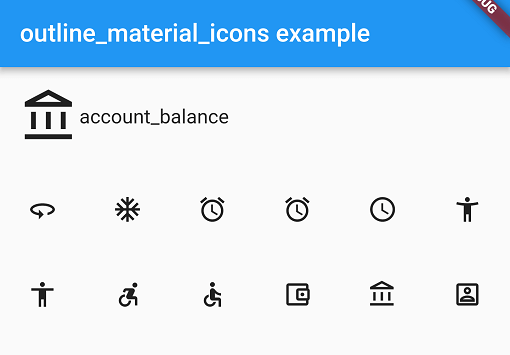
This package provides the 'outline' theme of icons on the Material Design website, which is not available in Flutter or as a .ttf font file.

Example

These icons were downloaded in September 2018, they may be updated in the future.

Usage

Add the package to pubspec.yaml and use the OMIcons class.

  Widget build(BuildContext context) => Icon(OMIcons.sentimentSatisfied);

Browse available icons using the example app or the Material Design icons website above.

There is a Map<String, int> of snake_case icon names to codepoints if you want to list all the icons. See the example app code for how. Using the OMIcons class directly is preferable in most cases.

Changes and omissions

All 'partly filled' icons are removed due to single colour restriction for .ttf fonts. This includes partly-filled battery icons and not-full-strength wifi/reception icons.

Icons with an underline have had the line made solid: border_color, format_color_fill and format_color_text.

These icons were renamed to avoid Dart errors/clashes: 360 -> icon360, class -> classIcon, sync -> syncIcon

Getting Started

For help getting started with Flutter, view our online documentation.

For help on editing package code, view the documentation.

श्रेणियाँ

सोर्स रिपॉज़िटरी

इस पैकेज का उपयोग करने वाले प्रोजेक्ट