श्रेणियाँ, पैकेज और रिपॉज़िटरी खोजें

पैकेज विवरणv1.0.2

parallax_cards

स्क्रॉलिंग पैरलैक्स प्रभाव और कस्टम कार्ड ओवरले के लिए एक Flutter पैकेज

AndroidiOSmacOSWindowsLinux
30-दिन डाउनलोड
92
लाइक
94
Pub अंक
160

पैकेज इंस्टॉल करें

flutter pub add parallax_cards

पैकेज अवलोकन

सार्वजनिक जानकारी से बना चयन मार्गदर्शन। केवल संदर्भ हेतु।

ParallaxCards एक Flutter पैकेज है जो आपके ऐप में स्मूथ स्क्रॉलिंग पैरलैक्स प्रभाव और कस्टमाइज़ेबल कार्ड ओवरले की अनुमति देता है। यह उपयोगकर्ता एंगेजमेंट को बढ़ावा देता है, क्योंकि उपयोगकर्ता सामग्री को स्क्रॉल करते समय डायनामिक, दृश्य रूप से आकर्षक कार्ड ट्रांज़िशन बनाता है। कैरोसेल, कवर फ्लो या इंटरैक्टिव गैलरी के लिए आदर्श, यह Android, iOS, macOS, Windows और Linux जैसे कई प्लेटफॉर्म का समर्थन करता है। पैकेज डेवलपर्स को कार्ड के दिखावट, गहराई और एनीमेशन व्यवहार को आसानी से कस्टमाइज़ करने की अनुमति देता है। pub add के माध्यम से न्यूनतम सेटअप के साथ, यह मौजूदा Flutter प्रोजेक्ट में बिना किसी दिक्कत के एकीकृत हो जाता है।

उपयोग

  • इंटरैक्टिव उत्पाद प्रदर्शन
  • डायनामिक इमेज स्लाइडर्स
  • आकर्षक ओनबोर्डिंग स्क्रीन्स
  • विजुअल डेटा डैशबोर्ड
  • मोबाइल ऐप नेविगेशन इंटरफेस

मुख्य विशेषताएँ

  • स्मूथ पैरलैक्स स्क्रॉलिंग
  • कस्टमाइज़ेबल कार्ड ओवरले
  • प्लेटफॉर्म के अनुकूल समर्थन
  • pub के साथ आसान एकीकरण
  • निर्धारित गहराई और एनीमेशन
  • प्रतिक्रियाशील डिज़ाइन संभालना

इनके लिए उपयुक्त

  • इंटरएक्टिव यूआई बनाने वाले डेवलपर्स
  • दृश्य गहराई की तलाश में डिज़ाइनर
  • सामग्री-भरे कैरोसल वाले ऐप्स
  • आकर्षक स्क्रॉल प्रभाव की आवश्यकता वाले प्रोजेक्ट
  • Flutter शुरुआती लोग एनिमेशन का अन्वेषण कर रहे हैं

विचार योग्य बातें

  • कम शक्ति वाले डिवाइस पर प्रदर्शन पर प्रभाव पड़ सकता है
  • एनिमेशन पैरामीटर्स को सावधानीपूर्वक ट्यून करने की आवश्यकता है
  • मूल उदाहरणों के अतिरिक्त सीमित दस्तावेज़न
  • बहुत बड़े डेटासेट के लिए अनअनुकूलित
  • मध्यम कार्ड गिनती के लिए सबसे उपयुक्त
मूल README

संबंधित सोर्स रिपॉज़िटरी के मूल README का स्नैपशॉट। नवीनतम सामग्री के लिए रिपॉज़िटरी देखें।

Parallax Cards

A Flutter package for scrolling parallax effect and custom card overlays

Getting started

1. Depend on it

Add this to your package's pubspec.yaml file:

dependencies:
  parallax_cards: ^1.0.1
2. Install it

Install it from the command line:

$ flutter pub get
3. Import it

Now in your project you can use:

import 'package:parallax_cards/parallax_cards.dart';

Usage

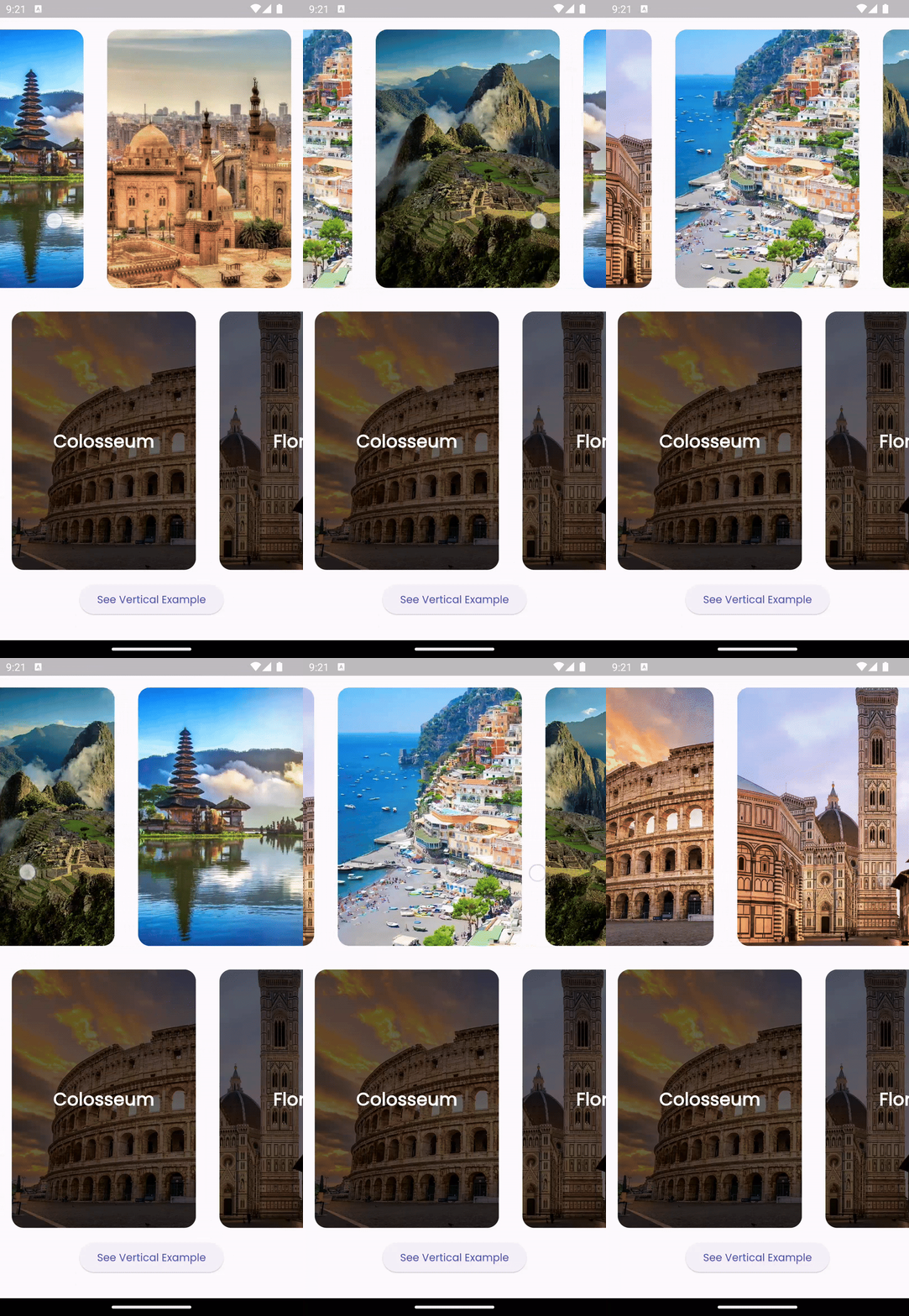
ParallaxCards is a Stateless Widget which you can include in your widget tree. You can use it either vertically or horizontally by overriding the scrollDirection property:

Horizontal scroll view
ParallaxCards(
  scrollDirection: Axis.horizontal,
  imagesList: imagesList,
  width: 250,
  height: 350,
  onTap: (index) {
    log('$index pressed');
  },
),

img

Vertical scroll view

You can customize the card overlays according to your preferences by overriding the overlays property. However, ensure that the lengths of imageList and overlays are equal.

ParallaxCards(
                imagesList: imagesList,
                width: double.infinity,
                height: 200,
                onTap: (index) {
                  ScaffoldMessenger.of(context).showSnackBar(SnackBar(
                    content: Text("$index tapped"),
                    duration: const Duration(milliseconds: 500),
                  ));
                },
                overlays: [
                  for (var title in titlesList)
                    Stack(
                      children: [
                        Positioned.fill(
                          child: DecoratedBox(
                            decoration: BoxDecoration(
                              gradient: LinearGradient(
                                colors: [
                                  Colors.transparent,
                                  Colors.black.withOpacity(0.8)
                                ],
                                stops: const [0.5, 0.9],
                                begin: Alignment.topCenter,
                                end: Alignment.bottomCenter,
                              ),
                            ),
                          ),
                        ),
                        Positioned(
                          left: 16,
                          bottom: 12,
                          child: Text(
                            title,
                            style: const TextStyle(
                                fontSize: 22,
                                color: Colors.white,
                                fontWeight: FontWeight.bold),
                          ),
                        ),
                      ],
                    )
                ],
              ),

img

Additional information

Feel free to open an issue if you encounter any bugs or challenges. Pull requests are welcome!

श्रेणियाँ

सोर्स रिपॉज़िटरी

इस पैकेज का उपयोग करने वाले प्रोजेक्ट

अभी कोई डेटा उपलब्ध नहीं है।