पैकेज, रिपॉज़िटरी और ऐप श्रेणियाँ खोजें

pencil_field कवर
पैकेज विवरणv0.5.0

pencil_field

विभिन्न उपकरणों और प्लेटफॉर्म पर पेंसिल/स्टाइलस इंटरैक्शन (लेखन और मिटाना)। इनपुट के संस्करण-आधारित स्थायित्व के साथ आता है।

AndroidiOSmacOSWindowsLinux
30-दिन डाउनलोड
200
लाइक
17
Pub अंक
150

पैकेज इंस्टॉल करें

flutter pub add pencil_field

पैकेज अवलोकन

सार्वजनिक जानकारी से बना चयन मार्गदर्शन। केवल संदर्भ हेतु।

Pencil_Field एक Flutter पैकेज है जो Android, iOS, macOS, Windows और Linux जैसे कई प्लेटफॉर्मों पर ड्राइंग, लिखने और मिटाने के लिए सटीक स्टाइलस और पेंसिल इंटरैक्शन की अनुमति देता है। यह उपयोगकर्ता इनपुट के संस्करण-आधारित स्थायित्व का समर्थन करता है, जिससे स्केच और टिप्पणियों को विश्वसनीय रूप से सहेजा और बहाल किया जा सकता है। क्रॉस-डिवाइस संगतता के लिए डिज़ाइन किया गया, यह हार्डवेयर के अंतर के बावजूद स्थिर प्रदर्शन प्रदान करता है। नोट लेने, हस्ताक्षर कैप्चर या रचनात्मक ड्राइंग टूल्स जैसे ऐप्स के लिए आदर्श है।

उपयोग

  • डिजिटल नोट लेना
  • साइनेचर कैप्चर
  • रचनात्मक चित्रण
  • अनोटेशन टूल्स
  • प्लेटफॉर्म-समन्वय ड्राइंग ऐप्स

मुख्य विशेषताएँ

  • स्टाइलस और टच इनपुट समर्थन
  • संस्करणित इनपुट स्थायित्व
  • बहुपлатफॉर्म सुसंगतता
  • स्मूथ पेन दबाव हैंडलिंग
  • वास्तविक समय धोखा कार्यक्षमता

इनके लिए उपयुक्त

  • ड्रॉइंग और पेंटिंग ऐप्स
  • शैक्षिक सॉफ्टवेयर
  • ई-हस्ताक्षर समाधान
  • नोट लेने वाले एप्लिकेशन
  • इंटरैक्टिव व्हाइटबोर्ड

विचार योग्य बातें

  • पूर्ण स्टाइलस विशेषताओं के लिए संगत हार्डवेयर की आवश्यकता होती है
  • कम शक्ति वाले डिवाइस पर प्रदर्शन में भिन्नता हो सकती है
  • पैकेज में सूचीबद्ध प्लेटफ़ॉर्म तक सीमित
  • उन्नत उपयोग के मामलों के लिए अतिरिक्त कॉन्फ़िगरेशन की आवश्यकता हो सकती है
  • इनपुट पर्सिस्टेंस के लिए सही राज्य प्रबंधन की आवश्यकता होती है
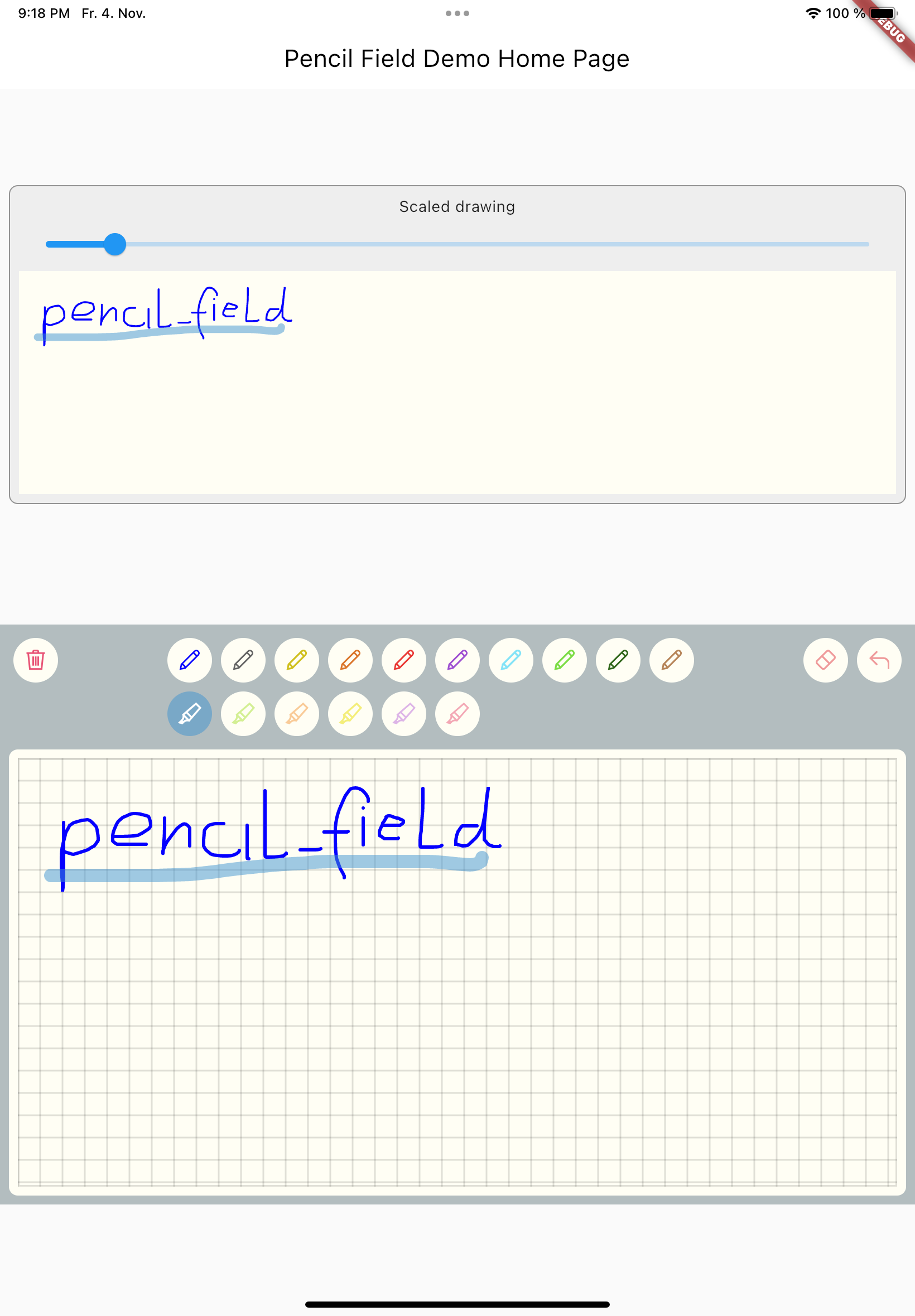
मूल README

संबंधित सोर्स रिपॉज़िटरी के मूल README का स्नैपशॉट। नवीनतम सामग्री के लिए रिपॉज़िटरी देखें।

FLUTTER PENCIL FIELD

pencil_field

Widget for pencil / stylus input on different devices and platforms. This widget is intended for any freehand input like signatures or drawings.

example


How to use

Just create PencilField widget and embedd it into your page:

PencilField(
  controller: widget.controller,
  pencilPaint: pencilPaint,
  onPencilDrawingChanged: widget.onPencilDrawingChanged,
  decoration: PencilDecoration(
    type: PencilDecorationType.chequered,
    backgroundColor: Colors.white,
    patternColor: Colors.grey[300]!,
    numberOfLines: 10,
    strokeWidth: 2,
    padding: const EdgeInsets.all(10),
  ),
  pencilOnly: true,
)

And resulting input can be displayed like so. As everything is stored in vector format scaling (e.g. for creating previews) is easy:

PencilDisplay(
  pencilDrawing: widget.controller.drawing.scale(
    scale: scale,
  ),
  decoration: PencilDecoration(backgroundColor: Colors.white),
)

Features


PencilField / PencilFieldController

The actual widget that provides the capability to capture and store freehand / pencil input. Each PencilField requires a controller that builds the bridge between the widget and PencilDrawing that stores the input.

PencilDrawing

PencilDrawing stores the actual content captured by PencilField. You can store and retrieve this data in a versioned format, so that future version of PencilField can load old data.

Example

A full example is provided. This example shows how to use PencilField and its litte sibling PencilDisplay. It also shows how to define pens for input and interactions like erase, undo and clear.

Upcoming features

  • Additional eraser that only erases strokes within a circle
  • Pan support for the input widget and the display widget
  • Pinch support for the display widget
  • Input widget decoration that supports images as background

श्रेणियाँ

सोर्स रिपॉज़िटरी

इस पैकेज का उपयोग करने वाले प्रोजेक्ट

अभी कोई डेटा उपलब्ध नहीं है।