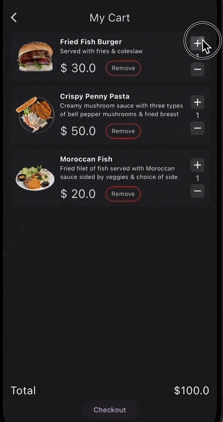
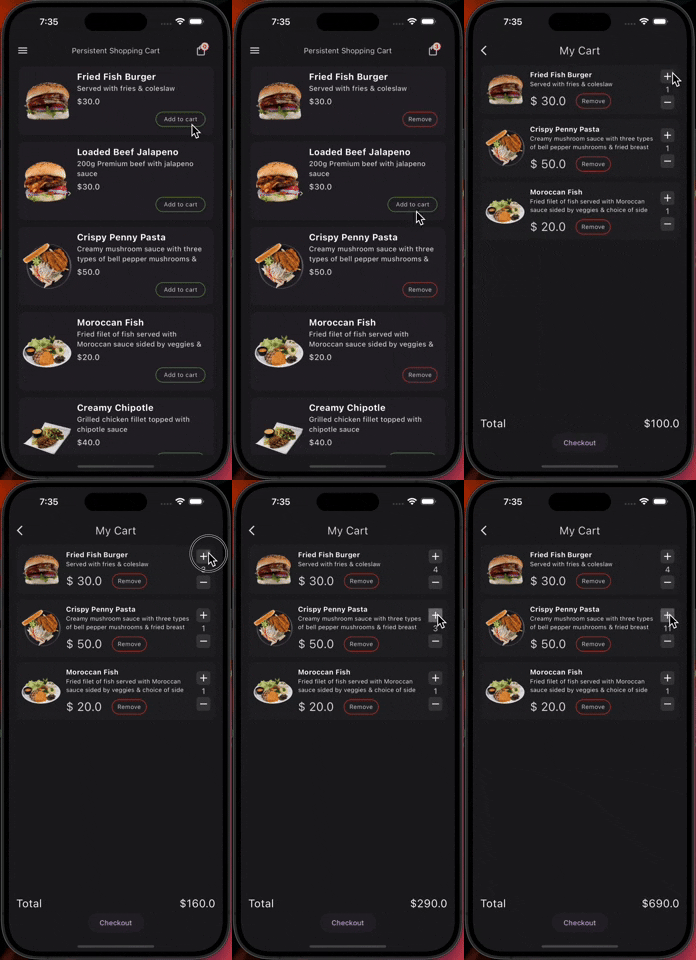
इस व्यापक पैकेज के साथ अपने Flutter ऐप में खरीदारी के गाड़ी डेटा को आसानी से प्रबंधित और स्थायी बनाएं। स्थानीय स्टोरेज को सरल बनाएं और उपयोगकर्ताओं के लिए खरीदारी का अनुभव बढ़ाएं।
सार्वजनिक जानकारी से बना चयन मार्गदर्शन। केवल संदर्भ हेतु।
एक फ्लटर पैकेज जो ऐप रिस्टार्ट के बाद शॉपिंग कार्ट डेटा के निरंतर प्रबंधन और स्थायी भंडारण की अनुमति देता है। यह खुद-ब-खुद कार्ट की सामग्री को डिवाइस स्टोरेज में सहेजकर स्थानीय डेटा हैंडलिंग को सरल बनाता है, जिससे उपयोगकर्ता ऐप बंद करने के बाद भी अपने चयनों को बनाए रखते हैं। ई-कॉमर्स एप्लिकेशन के लिए आदर्श, यह उपयोगकर्ता अनुभव को बढ़ाता है और कार्ट की अखंडता बनाए रखता है। यह पैकेज एंड्रॉइड, आईओएस, मैकओएस, विंडोज और लिनक्स जैसे बहुत सारे प्लेटफॉर्म को सपोर्ट करता है, जिससे यह क्रॉस-प्लेटफॉर्म विकास के लिए लचीला हो जाता है।
उपयोग
उपयोगकर्ता कार्ट वाले ई-कॉमर्स ऐप्स
ऑफलाइन शॉपिंग अनुभव
स्थायी उत्पाद चयन
क्रॉस-डिवाइस कार्ट सिंक्रनाइजेशन
उपयोगकर्ता सत्र निरंतरता
मुख्य विशेषताएँ
स्वचालित स्थानीय अटूटता
प्लेटफॉर्म के अनुकूलता
कार्ट ऑपरेशन्स के लिए सरल API
रियल-टाइम कार्ट अपडेट
जटिल आइटम डेटा का समर्थन
इनके लिए उपयुक्त
मोबाइल ई-कॉमर्स ऐप्स
शॉपिंग एप्लिकेशन
ऑफलाइन डेटा की आवश्यकता वाले ऐप्स
आसान कार्ट प्रबंधन चाहने वाले डेवलपर्स
कई प्लेटफॉर्म के लिए प्रोजेक्ट
विचार योग्य बातें
स्टोरेज फेल्यर के लिए सही त्रुटि हैंडलिंग की आवश्यकता होती है
बड़े कार्ट डेटासेट के लिए कस्टमाइजेशन की आवश्यकता हो सकती है
सही प्रारंभ के निर्भर करता है
बादल-आधारित कार्ट सिंक के लिए उपयुक्त नहीं
केवल स्थानीय भंडारण तक सीमित
मूल README
संबंधित सोर्स रिपॉज़िटरी के मूल README का स्नैपशॉट। नवीनतम सामग्री के लिए रिपॉज़िटरी देखें।
Persistent Shopping Cart
Persistent Shopping Cart is a Flutter package that provides a simple and persistent shopping cart functionality for your mobile application. It uses Hive for local storage, making the cart data persist across app sessions.
Demo Preview
Features
Initialization: Easily initialize the shopping cart using init() method.
Add to Cart: Add products to the cart with the addToCart method.
Remove from Cart: Remove products from the cart using the removeFromCart method.
Increment/Decrement Quantity: Adjust the quantity of items in the cart with the incrementCartItemQuantity and decrementCartItemQuantity methods.
Calculate Total Price: Get the total price of items in the cart using the calculateTotalPrice method.
Get Cart Item Count: Retrieve the total number of items in the cart with the getCartItemCount method.
Clear Cart: Remove all items from the cart using the clearCart method.
Show Cart Items: Display the cart items using the showCartItems method, providing flexible builders for customizing how the cart is displayed (e.g., ListView, GridView).
Show Cart Item Count Widget: Show a widget displaying the current cart item count using the showCartItemCountWidget method.
Show Total Amount Widget: Display a widget showing the total amount of items in the cart with the showTotalAmountWidget method.
Show and Update Cart Item Widget: Show a widget that dynamically updates based on whether a product is in the cart or not, using the showAndUpdateCartItemWidget method.
Retrieve Cart Data and Total Price: Use getCartData method in the PersistentShoppingCart class to get a list of cart items and the total price.
Start using the shopping cart functionality in your application!
Example Usage
// Add product to the cartawaitPersistentShoppingCart().addToCart(PersistentShoppingCartItem());
// Remove product from the cartawaitPersistentShoppingCart().removeFromCart(productId);
// Increment product quantity in the cartawaitPersistentShoppingCart().incrementCartItemQuantity(productId);
// Decrement product quantity in the cartawaitPersistentShoppingCart().decrementCartItemQuantity(productId);
// Get total price of items in the cartdouble totalPrice = PersistentShoppingCart().calculateTotalPrice();
// Get total number of items in the cartint itemCount = PersistentShoppingCart().getCartItemCount();
// Clear the cartPersistentShoppingCart().clearCart();
// Retrieve cart data and total priceMap<String, dynamic> cartData = PersistentShoppingCart().getCartData();
List<PersistentShoppingCartItem> cartItems = cartData['cartItems'];
double totalPriceFromData = cartData['totalPrice'];
Widgets
Show Cart Items
The showCartItems method now provides flexibility to define how cart items are displayed (e.g., ListView, GridView) using a builder function.
PersistentShoppingCart().showCartItems(
cartItemsBuilder: (BuildContext context, List<PersistentShoppingCartItem> cartItems) {
// no item added to cartif(cartItems.isEmpty){
returnEmptyCartMsgWidget();
}
// Define your custom widget for displaying cart itemsreturnListView.builder(
itemCount: cartItems.length,
itemBuilder: (context, index) {
final item = cartItems[index];
returnListTile(
title: Text(item.name), // Replace with your cart item widget
subtitle: Text('Quantity: ${item.quantity}'),
);
},
);
},
);
Show Cart Item Count Widget
PersistentShoppingCart().showCartItemCountWidget(
  cartItemCountWidgetBuilder: (int itemCount) {
    // Your custom widget displaying the cart item count
  },
);
Show Total Amount Widget
PersistentShoppingCart().showTotalAmountWidget(
  cartTotalAmountWidgetBuilder: (double totalAmount) {
    // Your custom widget displaying the total amount
  },
);