सार्वजनिक जानकारी से बना चयन मार्गदर्शन। केवल संदर्भ हेतु।
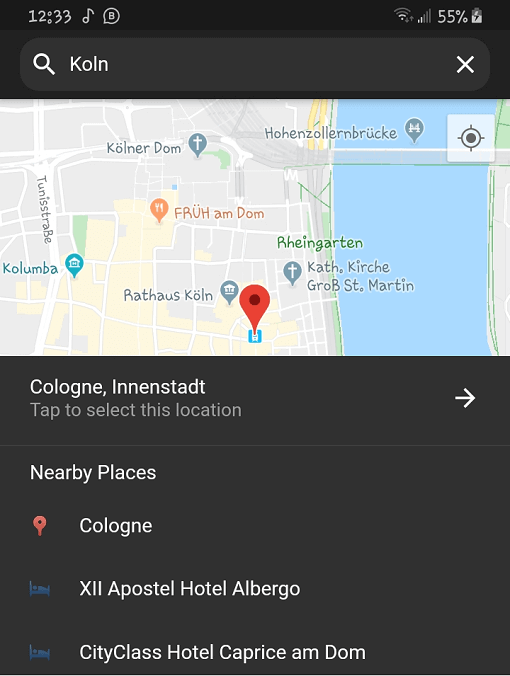
प्लेस पिकर एक पूरी तरह से डार्ट लिखित फ्लटर पैकेज है जो स्थानों का चयन करने के लिए है, जिसमें सुझाव और आसपास के स्थानों की सूची शामिल है। यह स्थानीयकरण का समर्थन करता है, जिससे बहुभाषी उपयोगकर्ता अनुभव संभव होता है। फ्लटर ऐप में बिना किसी दिक्कत के एकीकृत करने के लिए बनाया गया है, इससे उपयोगकर्ता अनुभव को सरल बनाया गया है। यह पैकेज उच्च सटीकता के लिए गूगल मैप्स का उपयोग करता है और स्मार्ट सुझाव और वास्तविक समय के प्रतिक्रिया के माध्यम से उपयोगकर्ता अनुभव को बढ़ाता है। सटीक स्थान चयन की आवश्यकता वाले ऐप्स के लिए उपयुक्त है।
उपयोग
फॉर्म में पता इनपुट
डिलीवरी सेवाओं के लिए स्थान चयन
यात्रा और मैपिंग एप्लिकेशन
उपयोगकर्ता प्रोफ़ाइल स्थान सेटअप
घटना या स्थान पंजीकरण
मुख्य विशेषताएँ
स्वचालित पूर्ण सुझाव
पास के स्थानों की सूची
निर्मित स्थानीयकरण
Google मानचित्र एकीकरण
पूरी तरह से कस्टमाइज़ किया गया UI
डार्ट केवल अमलीकरण
इनके लिए उपयुक्त
स्थान इनपुट की आवश्यकता वाले मोबाइल एप्लिकेशन
अंतरराष्ट्रीय उपयोगकर्ताओं के लिए ऐप्स
शुद्ध डार्ट समाधान का उपयोग करने वाले विकासकर्ता
हल्के स्थान चयनकर्ता की आवश्यकता वाले प्रोजेक्ट
मानचित्र-आधारित विशेषताओं वाले Flutter ऐप्स
विचार योग्य बातें
Google Maps API की की आवश्यक है
Google Maps बैकएंड पर सीमित
कस्टम थीम के लिए अतिरिक्त स्टाइलिंग की आवश्यकता हो सकती है
इंटरनेट कनेक्टिविटी पर निर्भर है
ऑफलाइन स्थान चयन के लिए उपयुक्त नहीं
मूल README
संबंधित सोर्स रिपॉज़िटरी के मूल README का स्नैपशॉट। नवीनतम सामग्री के लिए रिपॉज़िटरी देखें।
Flutter Place Picker
The missing location picker made in Flutter for Flutter. With dark theme and custom localization support.
⚠️ Please note: This library will NOT be affected by the deprecation of Place Picker as indicated here.
🍭 Remember to enable Places API, Maps SDK for Android, Maps SDK for iOS and Geocoding API for your API key.
Opt-in to the embedded views preview by adding a boolean property to the app's Info.plist file
with the key io.flutter.embedded_views_preview and the value YES.
Also add these to the dict values in Info.plist for location request to work on iOS
Sample Usage
Import the package into your code
import'package:place_picker/place_picker.dart';
Create a method like below, and call it in onTap of a button or InkWell. A LocationResult will be returned
with the name and lat/lng of the selected place. You can then handle the result in any way you want.
Pass in an optional LatLng displayLocation to display that location instead. This is useful when you want the map
to display the previously selected location.
voidshowPlacePicker() async {
LocationResult result = awaitNavigator.of(context).push(MaterialPageRoute(
builder: (context) =>
PlacePicker("YOUR API KEY",
displayLocation: customLocation,
)));
// Handle the result in your wayprint(result);
}