सार्वजनिक जानकारी से बना चयन मार्गदर्शन। केवल संदर्भ हेतु।
Roggle एक सरल, रंगीन और आसानी से विस्तारित किया जा सकने वाला Dart लॉगिंग पैकेज है, जो लोकप्रिय लॉगर लाइब्रेरी से प्रेरित है। यह Android, iOS, Web, macOS, Windows और Linux जैसे कई प्लेटफॉर्मों पर लॉग आउटपुट करने के लिए एक स्पष्ट और स्वचालित API प्रदान करता है। चमकीले रंग कोडिंग और कस्टमाइज़ेबल फॉर्मेटिंग के साथ, Roggle जटिलता बढ़ाए बिना डिबग दृश्यता को बढ़ाता है। इसका हल्का डिज़ाइन विकास और उत्पादन दोनों के लिए आदर्श है, खासकर जब डेवलपर्स को न्यूनतम सेटअप के साथ दृश्यता में अलग लॉगिंग अनुभव चाहिए। पैकेज को pub.dev के माध्यम से Flutter प्रोजेक्ट में बिना किसी दिक्कत के एकीकृत किया जा सकता है।
उपयोग
एप्लिकेशन फ्लो का डीबगिंग
रनटाइम व्यवहार का मॉनिटरिंग
विकास में लॉग पठनीयता को बढ़ाना
क्रॉस-प्लेटफॉर्म लॉगिंग
मौजूदा परियोजनाओं में त्वरित एकीकरण
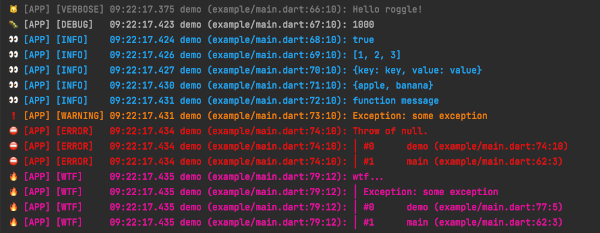
लॉग स्तरों का दृश्य अंतर
मुख्य विशेषताएँ
रंगीन कंसोल आउटपुट
सरल और स्पष्ट एपीआई
विस्तारयोगी डिज़ाइन
बहु-प्लेटफॉर्म समर्थन
न्यूनतम कॉन्फ़िगरेशन
लॉग स्तर फ़िल्टरिंग
इनके लिए उपयुक्त
दृश्य लॉग स्पष्टता की तलाश करने वाले विकासकर्ता
हल्के लॉगिंग की आवश्यकता वाले Flutter ऐप
विकासक अनुभव पर ध्यान केंद्रित टीमें
आसानी से पढ़े जा सकने वाले डिबग आउटपुट की आवश्यकता वाले प्रोजेक्ट
स्पष्ट प्रतिक्रिया के साथ तेज़ प्रोटोटाइपिंग
भारी निर्भरता के बिना सरल लॉगिंग
विचार योग्य बातें
उच्च आयतन उत्पादन लॉगिंग के लिए उपयुक्त नहीं
पूर्ण-सुविधा वाले लॉगर्स की तुलना में सीमित उन्नत विशेषताएं
रंग आउटपुट गैर-टर्मिनल पर्यावरण में उपयोगी नहीं हो सकता है
मुख्य कार्यक्षमता के लिए बाहरी लॉगर पर निर्भर है
कस्टम फॉर्मेटर के लिए अतिरिक्त कॉन्फ़िगरेशन की आवश्यकता हो सकती है
विकास या कम ट्रैफ़िक वाले परिदृश्यों में सबसे अच्छा उपयोग किया जाता है
मूल README
संबंधित सोर्स रिपॉज़िटरी के मूल README का स्नैपशॉट। नवीनतम सामग्री के लिए रिपॉज़िटरी देखें।
Roggle
Simple, colorful and easy to expand logger for dart.
Inspired by the logger and dependent to the logger.
Getting Started
Just create an instance of Roggle and start logging:
import'package:roggle/roggle.dart';
final logger = Roggle();
logger.d('Roggle is working!');
Instead of a string message, you can also pass other objects like List, Map, Set or Function.
Output
Documentation
Roggle's API is almost the same as the logger. See the logger for basic usage.
Difference from the logger
Printer defaults to SinglePrettyPrinter class.
Not try-catch at LogOutput class, because we want to stop the process.
Added some getters in Roggle class.
Changed the log interface dynamic to Object?.
Options
If you use the SinglePrettyPrinter, there are more options:
final logger = Roggle(
  printer: SinglePrettyPrinter(
    loggerName: '[APP]', // Print a logger name for each log message
    colors: true, // Colorful log messages
    printCaller: true, // Print a caller for each log message
    printLocation: true, // Print a location of caller for each log message
    printFunctionName: true, // Print a function name of caller for each log message
    printEmojis: true, // Print an emoji for each log message
    printLabels: true, // Print a level string for each log message
    printTime: true, // Print a timestamp for each log message
    stackTraceLevel:
        Level.error, // The current logging level to display stack trace
    stackTraceMethodCount: 10, // Number of stack trace methods to display
    stackTracePrefix: '>>> ', // Replace stack trace prefix
    levelColors: {}, // Replace level colors map
    levelEmojis: {}, // Replace level emojis map
    levelLabels: {}, // Replace level labels map
    timeFormatter: (now) => DateFormat('yyyy/MM/dd HH:mm:ss.SSS')
        .format(now), // Replace time formatter
  ),
);
You can use the Roggle.crashlytics() to send errors and logs using the FirebaseCrashlytics API in release mode.
final logger = Roggle.crashlytics(
printer: CrashlyticsPrinter(
errorLevel: Level.error, // Logs above this level will call onError
onError: (event) {
// Send an error to Firebase Crashlytics as followsFirebaseCrashlytics.instance.recordError(
event.exception,
event.stack,
fatal: true,
);
},
onLog: (event) {
// Send logs to Firebase Crashlytics as followsFirebaseCrashlytics.instance.log(event.message);
},
loggerName: '[APP]',
printCaller: true, // Print a caller for each log message
printLocation: true, // Print a location of caller for each log message
printFunctionName: true, // Print a function name of caller for each log message
printEmojis: true, // Print an emoji for each log message
printLabels: true, // Print a level string for each log message
levelEmojis: {}, // Replace level emojis map
levelLabels: {}, // Replace level labels map
),
);
Tips
If you want to stop the process at the same time as the error log, do the following.
import'package:roggle/roggle.dart';
final logger = Roggle(
output: AssertionOutput(),
);
classAssertionOutputextendsConsoleOutput{
@overridevoidoutput(OutputEvent event) {
super.output(event);
if (event.level.index >= Level.error.index) {
throwAssertionError('Stopped by logger.');
}
}
}
License
MIT LicenseCopyright (c) 2022KeyberInc.
Permissionis hereby granted, free of charge, to any person obtaining a copy
of this software and associated documentation files (the "Software"), to deal
in the Software without restriction, including without limitation the rights
to use, copy, modify, merge, publish, distribute, sublicense, and/or sell
copies of the Software, and to permit persons to whom the Softwareis
furnished to do so, subject to the following conditions:
The above copyright notice and this permission notice shall be included in all
copies or substantial portions of the Software.
THE SOFTWARE IS PROVIDED "AS IS", WITHOUT WARRANTY OF ANY KIND, EXPRESS OR
IMPLIED, INCLUDING BUT NOT LIMITED TO THE WARRANTIES OF MERCHANTABILITY,
FITNESS FOR A PARTICULAR PURPOSE AND NONINFRINGEMENT. IN NO EVENT SHALL THE
AUTHORS OR COPYRIGHT HOLDERS BE LIABLE FOR ANY CLAIM, DAMAGES OR OTHER
LIABILITY, WHETHER IN AN ACTION OF CONTRACT, TORT OR OTHERWISE, ARISING FROM,
OUT OF OR IN CONNECTION WITH THE SOFTWARE OR THE USE OR OTHER DEALINGS IN THE
SOFTWARE.