पैकेज, रिपॉज़िटरी और ऐप श्रेणियाँ खोजें

rotated_corner_decoration कवर
पैकेज विवरणv2.1.0+1

rotated_corner_decoration

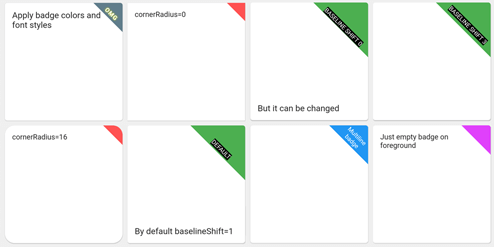
RotatedCornerDecoration पैकेज को कोने के बैज बनाने और लगाने के लिए विकसित किया गया था। इसमें TextSpans की स्वचालित घुमाव प्रदान किया जाता है।

AndroidiOSWebmacOSWindowsLinux
30-दिन डाउनलोड
118
लाइक
113
Pub अंक
150

पैकेज इंस्टॉल करें

flutter pub add rotated_corner_decoration

पैकेज अवलोकन

सार्वजनिक जानकारी से बना चयन मार्गदर्शन। केवल संदर्भ हेतु।

RotatedCornerDecoration एक Flutter पैकेज है जिसका उपयोग कोने के बैज बनाने और लागू करने के लिए किया जाता है, जिसमें स्वचालित पाठ घूर्णन शामिल है। यह डेवलपर्स को विजेट्स में रिबन या बैज जैसे डिकोरेटिव कोने के तत्व आसानी से जोड़ने की अनुमति देता है, भले ही कोनों में रखे जाने पर भी पाठ लेबल सही दिशा में रहे। 'नए' या 'बिक्री' टैग जैसे UI सुधार के लिए आदर्श है, यह Android, iOS, Web, macOS, Windows और Linux जैसे कई प्लेटफॉर्म का समर्थन करता है। इस पैकेज का उपयोग TextSpan के स्वचालित घूर्णन के माध्यम से घूर्णित कंटेनर में पाठ को संरेखित करने की प्रक्रिया को सरल बनाता है।

उपयोग

  • सजावटी कोने बैज जोड़ें
  • डायनामिक रिबन लेबल बनाना
  • दृश्य संकेतकों के साथ UI में सुधार
  • कोनों में स्थिति टैग प्रदर्शित करें
  • विजेट कोने सजावट कस्टमाइज़ करना
  • प्रमोशनल बैनर बनाना

मुख्य विशेषताएँ

  • स्वचालित रूप से घूमता हुआ टेक्स्टस्पैन
  • कई प्लेटफॉर्म का समर्थन करता है
  • मौजूदा विजेट्स के साथ आसान एकीकरण
  • लचीला कोन स्थिति
  • न्यूनतम बॉयलरप्लेट कोड
  • प्लेटफॉर्म के अनुकूलता

इनके लिए उपयुक्त

  • दृश्य आकर्षण की तलाश में UI डिज़ाइनर
  • ई-कॉमर्स एप्प्स बना रहे डेवलपर्स
  • डैशबोर्ड इंटरफेस बनाने वाली टीमें
  • स्थिति संकेतक की आवश्यकता वाले ऐप्स
  • कस्टम बैज आवश्यकताओं वाले प्रोजेक्ट्स

विचार योग्य बातें

  • TextSpan लेआउट की समझ की आवश्यकता है
  • जटिल लेआउट के लिए सूक्ष्म समायोजन की आवश्यकता हो सकती है
  • कोने सजावट उपयोग मामलों तक सीमित
  • पूर्ण-स्क्रीन ओवरले के लिए उपयुक्त नहीं
  • सरल पाठ सामग्री के साथ सबसे अच्छा उपयोग किया जाता है

मूल README

संबंधित सोर्स रिपॉज़िटरी के मूल README का स्नैपशॉट। नवीनतम सामग्री के लिए रिपॉज़िटरी देखें।

Pay attention!

If you need a regular (not rotated) text at the corner of widgets please consider to use Stack with Containers and Text widgets.
This package was developed to provide auto rotation of TextSpans.

Example

Take a look at the provided example application for how to use the CornerDecoration.

How to use

screenshot1678647469887

Container(
  foregroundDecoration: RotatedCornerDecoration.withColor(
    color: Color(0xffffd700),
    badgeSize: Size(16, 16),
  ),
),

screenshot1678647470825

Container(
  foregroundDecoration: RotatedCornerDecoration.withColor(
    color: Colors.red,
    spanBaselineShift: 4,
    badgeSize: Size(64, 64),
    badgeCornerRadius: Radius.circular(8),
    badgePosition: BadgePosition.topStart,
    textSpan: TextSpan(
      text: 'OMG',
      style: TextStyle(
        color: Colors.white,
        fontSize: 12,
        letterSpacing: 1,
        fontWeight: FontWeight.bold,
        shadows: [
          BoxShadow(color: Colors.yellowAccent, blurRadius: 8),
        ],
      ),
    ),
  ),
),

screenshot1678647471437

Container(
  foregroundDecoration: RotatedCornerDecoration.withColor(
    color: Colors.blue,
    badgeSize: Size(64, 64),
    textSpan: TextSpan(
      text: 'Multiline\nbadge',
      style: TextStyle(fontSize: 10),
    ),
  ),
),

screenshot1678647472293

Container(
  foregroundDecoration: RotatedCornerDecoration.withColor(
    color: Colors.black87,
    badgeSize: Size(64, 64),
    spanBaselineShift: 2,
    textSpan: TextSpan(
      children: [
        TextSpan(
          text: 'LOREM\n',
          style: TextStyle(
            fontSize: 10,
            fontWeight: FontWeight.bold,
            color: Colors.redAccent,
          ),
        ),
        TextSpan(
          text: 'IPSUM',
          style: TextStyle(
            fontSize: 7,
            fontStyle: FontStyle.italic,
            letterSpacing: 5,
            color: Colors.yellow,
          ),
        ),
      ],
    ),
  ),
),

screenshot1678647473029

Container(
  foregroundDecoration: RotatedCornerDecoration.withColor(
    color: Colors.brown,
    badgeSize: Size(112, 56),
    textSpan: TextSpan(
      text: 'WEIRD BADGE',
      style: TextStyle(fontSize: 10),
    ),
  ),
),

screenshot1678647473739

Container(
  foregroundDecoration: RotatedCornerDecoration.withColor(
    color: Colors.blueGrey,
    badgeSize: Size(64, 64),
    textSpan: TextSpan(
      text: 'WOW',
      style: TextStyle(fontSize: 10),
    ),
    spanHorizontalOffset: -12,
  ),
),

screenshot1678647478380

Container(
  foregroundDecoration: RotatedCornerDecoration.withColor(
    color: Colors.green,
    badgeSize: Size(64, 64),
    textSpan: TextSpan(
      text: 'SHIFT 1',
      style: TextStyle(fontSize: 10, backgroundColor: Colors.black),
    ),
  ),
),

screenshot1678647479092

Container(
  foregroundDecoration: RotatedCornerDecoration.withColor(
    color: Colors.green,
    badgeSize: Size(64, 64),
    spanBaselineShift: 3,
    textSpan: TextSpan(
      text: 'SHIFT 4',
      style: TextStyle(fontSize: 10, backgroundColor: Colors.black),
    ),
  ),
),

screenshot1678647479917

Container(
  foregroundDecoration: RotatedCornerDecoration.withGradient(
    gradient: LinearGradient(
      begin: Alignment.topRight,
      end: Alignment.bottomLeft,
      colors: [Colors.blue, Colors.lightGreenAccent],
    ),
    badgeSize: Size(64, 64),
  ),
  decoration: RotatedCornerDecoration.withGradient(
    badgePosition: BadgePosition.topStart,
    gradient: LinearGradient(
      begin: Alignment.topLeft,
      end: Alignment.topRight,
      stops: [0, 0.5, 1],
      colors: [
        Colors.purpleAccent,
        Colors.amber,
        Colors.blue,
      ],
    ),
    badgeSize: Size(64, 64),
  ),
),

screenshot1678647480605

Container(
  foregroundDecoration: RotatedCornerDecoration.withGradient(
    gradient: RadialGradient(
      center: Alignment.topRight,
      radius: 1.5,
      stops: const [0, 0.25, 0.5],
      colors: [
        Colors.redAccent,
        Colors.redAccent.withOpacity(0.5),
        Colors.redAccent.withOpacity(0),
      ],
    ),
    badgeSize: const Size(64, 64),
  ),
  decoration: RotatedCornerDecoration.withGradient(
    badgePosition: BadgePosition.topStart,
    gradient: SweepGradient(
      center: const FractionalOffset(0.27, -0.65),
      colors: List.generate(360, _generator),
    ),
    badgeSize: const Size(64, 64),
  ),
),

screenshot1678647483564

Container(
  foregroundDecoration: RotatedCornerDecoration.withColor(
    color: Colors.lightBlue,
    badgeSize: Size(64, 64),
    badgeShadow: BadgeShadow(color: Colors.black, elevation: 4),
  ),
),

screenshot1678647484300

Container(
  foregroundDecoration: RotatedCornerDecoration.withColor(
    color: Colors.indigo,
    badgeSize: Size(64, 64),
    badgePosition: BadgePosition.bottomStart,
    textDirection: TextDirection.ltr,
  ),
),

screenshot1678647485147

Container(
  foregroundDecoration: RotatedCornerDecoration.withColor(
    color: Colors.indigo,
    badgeSize: Size(64, 64),
    badgePosition: BadgePosition.bottomStart,
    textDirection: TextDirection.rtl,
  ),
),

EXPERIMENTAL FEATURE!

use isEmoji: true to disable span rotating
you can shift span position with spanHorizontalOffset and TextStyle.height parameters screenshot1678649657350

Container(
  foregroundDecoration: RotatedCornerDecoration.withColor(
    color: Colors.purple,
    badgeSize: Size(64, 64),
    isEmoji: true,
    textSpan: TextSpan(
      text: '🤮',
      style: TextStyle(fontSize: 20, height: 1.7),
    ),
  ),
),

श्रेणियाँ

सोर्स रिपॉज़िटरी

इस पैकेज का उपयोग करने वाले प्रोजेक्ट

अभी कोई डेटा उपलब्ध नहीं है।