पैकेज, रिपॉज़िटरी और ऐप श्रेणियाँ खोजें

पैकेज विवरणv1.0.7

social_login_buttons

एक नया Flutter पैकेज जो उपयोगकर्ताओं को सोशल मीडिया लॉगिन बटन आसानी से बनाने की अनुमति देता है।

AndroidiOSLinuxmacOSWebWindows
30-दिन डाउनलोड
1.2 हज़ार
लाइक
56
Pub अंक
150

पैकेज इंस्टॉल करें

flutter pub add social_login_buttons

पैकेज अवलोकन

सार्वजनिक जानकारी से बना चयन मार्गदर्शन। केवल संदर्भ हेतु।

एक फ्लटर पैकेज जो सोशल मीडिया लॉगिन बटन के निर्माण को सरल बनाता है, जिससे डेवलपर्स अपने ऐप में Google, Facebook और Apple जैसे लोकप्रिय सोशल लॉगिन को तेजी से एम्बेड कर सकते हैं। इसके पास पहले से डिज़ाइन किए गए, कस्टमाइज़ करने योग्य बटन हैं जो प्लेटफॉर्म के अनुसार एक समान शैली के साथ रहते हैं। यह पैकेज Android, iOS, Web और डेस्कटॉप वातावरण जैसे कई प्लेटफॉर्म का समर्थन करता है, जिससे उपयोगकर्ता अनुभव निरंतर रहता है। कम सेटअप के साथ, यह आम दिखने वाले, दृश्य रूप से आकर्षक लॉगिन विकल्प प्रदान करके ऐप के ओनबोर्डिंग को बढ़ावा देता है।

उपयोग

  • सोशल लॉगिन का त्वरित एकीकरण
  • उपयोगकर्ता ऑनबोर्डिंग में सुधार करना
  • क्रॉस-प्लेटफ़ॉर्म प्रमाणीकरण
  • लॉगिन UI डिज़ाइन को सरल बनाएं
  • बहुत सोशल प्रदाता का समर्थन करना
  • बॉयलरप्लेट को कम करना

मुख्य विशेषताएँ

  • पूर्व-निर्मित सोशल लॉगिन बटन
  • कस्टमाइज़ेबल बटन स्टाइल
  • बहु-प्लेटफॉर्म समर्थन
  • न्यूनतम कोड के साथ आसान सेटअप
  • उपकरणों के माध्यम से एकसमान UI
  • निर्मित प्रदाता आइकॉन

इनके लिए उपयुक्त

  • मोबाइल ऐप विकासकर्ता
  • वेब एप्लिकेशन क्रिएटर्स
  • डेस्कटॉप एप्लिकेशन इंटीग्रेटर्स
  • त्वरित लॉगिन कार्यान्वयन की आवश्यकता वाली स्टार्टअप्स
  • उपयोगकर्ता अनुभव/उपयोगकर्ता सीमा प्रभावशीलता पर केंद्रित विकासकर्ता

विचार योग्य बातें

  • प्रत्येक सोशल प्रदाता के लिए अतिरिक्त कॉन्फ़िगरेशन की आवश्यकता होती है
  • OAuth प्रवाह के लिए कस्टम हैंडलिंग की आवश्यकता हो सकती है
  • पूर्वनिर्धारित बटन डिज़ाइनों तक सीमित
  • बाह्य प्रदाता API पर निर्भर करता है
  • जटिल प्रमाणीकरण कार्यप्रवाह के लिए उपयुक्त नहीं
  • लॉगिन के दौरान इंटरनेट कनेक्शन की आवश्यकता होती है

मूल README

संबंधित सोर्स रिपॉज़िटरी के मूल README का स्नैपशॉट। नवीनतम सामग्री के लिए रिपॉज़िटरी देखें।

pub package pub points

Flutter Social Login Button

Social Login Button is a flutter package to create social media login buttons of all common used SSO.

Usage

Add the dependency in pubsec.yaml file.

  dependencies:
    flutter:
      sdk: flutter
    social_login_buttons: 1.0.7

How to Use

  SocialLoginButton(
    buttonType: SocialLoginButtonType.apple,
    onPressed: () {},
  )          

You can also specify some other arguments which are:

  • imageURL (if you're specifying the image link from your Github repo, don't forget to change blob with raw)
  • imagePath (you can also use local image, Local will be preferred incase cpecifed both)
  • imageWidth
  • text
  • backgroundColor
  • textColor
  • height
  • width
  • borderRadius
  • fontSize
  • mode

Below is the example with all arguments supplied:

   SocialLoginButton(
      backgroundColor: Colors.amber,
      height: 50,
      text: 'SignIn',
      borderRadius: 20,
      fontSize: 25,
      buttonType: SocialLoginButtonType.generalLogin,
      imageWidth: 20,
      imagepath: "assets/file.png",
      imageURL: "URL",
      onPressed: () {},
   ),

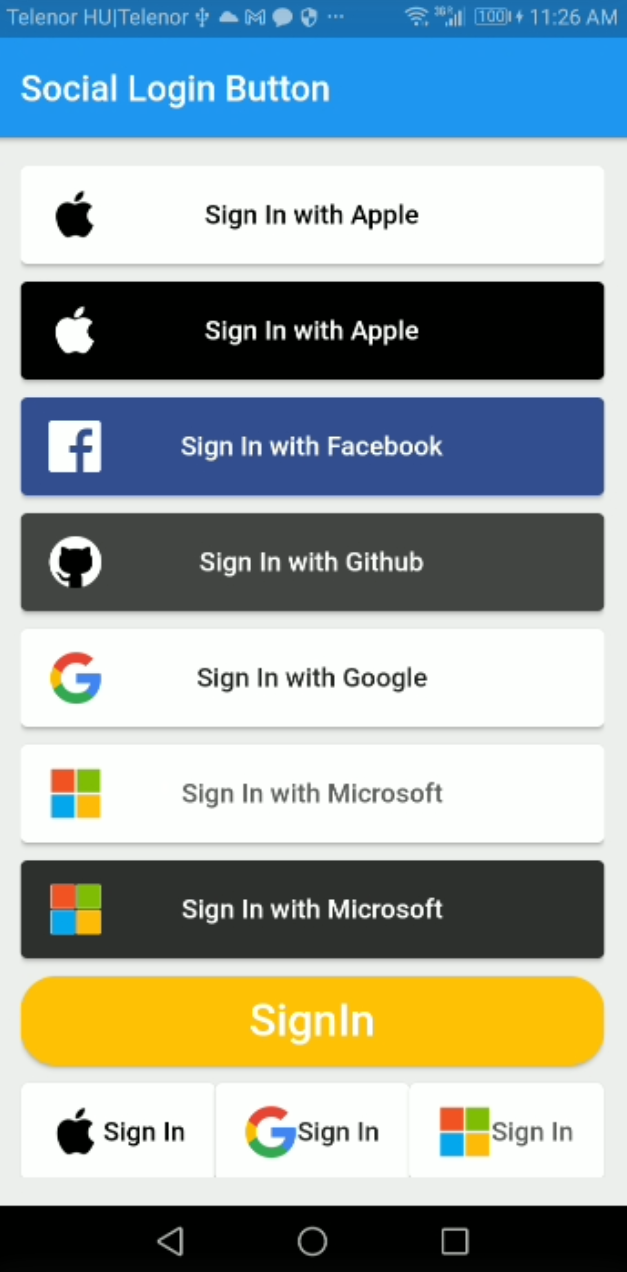
Button Types

  • Facebook
  • Google
  • Twitter
  • Apple
  • AppleBlack
  • Microsoft
  • MicrosoftBlack
  • Github
  • General Login

Mode

There are two modes available for the buttons, You can make shorter buttons with single mode.

  • single
  • multi

Example

import 'package:flutter/material.dart';
import 'package:social_login_buttons/social_login_buttons.dart';

void main() {
  runApp(const MyApp());
}

class MyApp extends StatelessWidget {
  const MyApp({Key? key}) : super(key: key);

  @override
  Widget build(BuildContext context) {
    return MaterialApp(
      title: 'Flutter Social Login Buttons',
      debugShowCheckedModeBanner: false,
      theme: ThemeData(
        primarySwatch: Colors.blue,
      ),
      home: const MyHomePage(tittle: 'Flutter Social Login Buttons'),
    );
  }
}

class MyHomePage extends StatelessWidget {
  const MyHomePage({Key? key, required this.tittle}) : super(key: key);
  final String tittle;

  @override
  Widget build(BuildContext context) {
    return Scaffold(
      appBar: AppBar(
        title: const Text('Social Login Button'),
        elevation: 2.0,
      ),
      body: _buildContainer(context),
      backgroundColor: Colors.grey[200],
    );
  }

  Widget _buildContainer(BuildContext context) {
    return Padding(
      padding: const EdgeInsets.all(16.0),
      child: Center(
        child: SingleChildScrollView(
          child: Column(
            crossAxisAlignment: CrossAxisAlignment.stretch,
            mainAxisAlignment: MainAxisAlignment.center,
            children: <Widget>[
              SocialLoginButton(
                buttonType: SocialLoginButtonType.apple,
                onPressed: () {},
              ),
              const SizedBox(height: 10),
              SocialLoginButton(
                buttonType: SocialLoginButtonType.appleBlack,
                onPressed: () {},
              ),
              const SizedBox(height: 10),
              SocialLoginButton(
                buttonType: SocialLoginButtonType.facebook,
                onPressed: () {},
              ),
              const SizedBox(height: 10),
              SocialLoginButton(
                buttonType: SocialLoginButtonType.github,
                onPressed: () {},
              ),
              const SizedBox(height: 10),
              SocialLoginButton(
                buttonType: SocialLoginButtonType.google,
                onPressed: () {},
              ),
              const SizedBox(height: 10),
              SocialLoginButton(
                buttonType: SocialLoginButtonType.microsoft,
                onPressed: () {},
              ),
              const SizedBox(height: 10),
              SocialLoginButton(
                buttonType: SocialLoginButtonType.microsoftBlack,
                onPressed: () {},
                imageWidth: 20,
              ),
              const SizedBox(height: 10),
              SocialLoginButton(
                backgroundColor: Colors.amber,
                height: 50,
                text: 'SignIn',
                borderRadius: 20,
                fontSize: 25,
                buttonType: SocialLoginButtonType.generalLogin,
                onPressed: () {},
              ),
              const SizedBox(height: 10),
              Row(
                mainAxisAlignment: MainAxisAlignment.spaceBetween,
                children: [
                  SocialLoginButton(
                    buttonType: SocialLoginButtonType.google,
                    onPressed: () {},
                    mode: SocialLoginButtonMode.single,
                  ),
                ],
              )
            ],
          ),
        ),
      ),
    );
  }
}

Contributing

Pull requests are welcome. For major changes, please open an issue first to discuss what you would like to change.

License

Apache-2.0

Screenshot

Image

श्रेणियाँ

सोर्स रिपॉज़िटरी

इस पैकेज का उपयोग करने वाले प्रोजेक्ट

अभी कोई डेटा उपलब्ध नहीं है।