सार्वजनिक जानकारी से बना चयन मार्गदर्शन। केवल संदर्भ हेतु।
Sweetsheet एक Flutter पैकेज है जो विकासकर्मियों को आकर्षक बॉटम शीट को सत्यापन डायलॉग के रूप में तेजी से और आसानी से प्रदर्शित करने में सक्षम बनाता है। इसके लिए न्यूनतम कोड के साथ मॉडल बॉटम शीट बनाने की प्रक्रिया को सरल बनाता है, जिसमें बॉक्स के भीतर एक साफ और आधुनिक UI उपलब्ध होता है। इसे विभिन्न प्लेटफॉर्मों पर बिना किसी दिक्कत के एकीकृत करने के लिए डिज़ाइन किया गया है, जिसमें Android, iOS, Web, macOS, Windows और Linux शामिल हैं। इस पैकेज के माध्यम से उपयोगकर्ता अनुभव को चिकनी एनीमेशन और कस्टमाइज़ करने योग्य लेआउट के माध्यम से बढ़ाया जाता है, जबकि डिज़ाइन में सरलता और स्थिरता बनाई रखी जाती है।
उपयोग
त्वरित पुष्टि डायलॉग
उपयोगकर्ता कार्रवाई प्रॉम्प्ट्स
फॉर्म सबमिशन पुष्टिकरण
मॉडल नेविगेशन
सरल पॉप-अप इंटरफेस
मुख्य विशेषताएँ
उपयोग में आसान API
सुंदर डिफ़ॉल्ट स्टाइलिंग
क्रॉस-प्लेटफॉर्म समर्थन
कस्टमाइज़ किया गया सामग्री
चिकनी एनीमेशन
न्यूनतम बॉलरप्लेट
इनके लिए उपयुक्त
त्वरित बॉटम शीट कार्यान्वयन की खोज कर रहे विकासकर्ता
हल्के संयोजन डायलॉग की आवश्यकता वाले प्रोजेक्ट
सुसंगत उपयोगकर्ता इंटरफेस पैटर्न वाले एप्स
विकास गति को प्राथमिकता देने वाली टीमें
Flutter शुरुआती नीचे की शीट्स का अन्वेषण कर रहे हैं
विचार योग्य बातें
मूल शैली के आगे सीमित कस्टमाइजेशन
जटिल इंटरैक्टिव शीट्स के लिए आदर्श नहीं
पूर्ण कार्यक्षमता के लिए बाहरी निर्भरताओं पर निर्भर करता है
उन्नत मॉडल्स के बजाय सरल उपयोग केस के लिए सबसे उपयुक्त
मूल README
संबंधित सोर्स रिपॉज़िटरी के मूल README का स्नैपशॉट। नवीनतम सामग्री के लिए रिपॉज़िटरी देखें।
sweetsheet
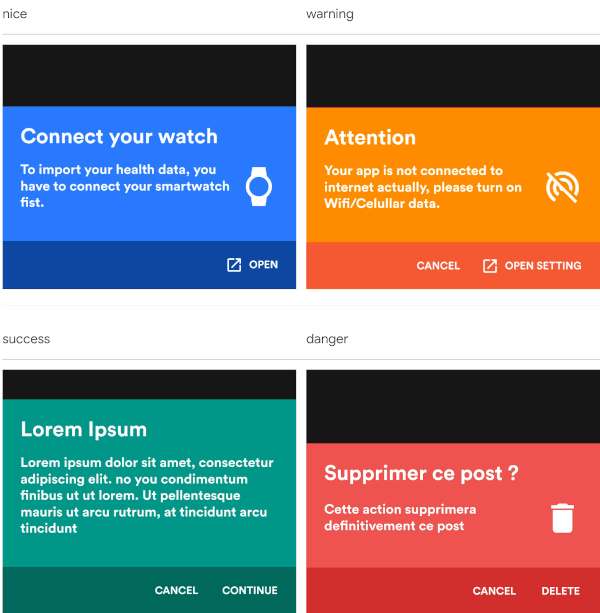
Show beautiful bottom sheet as confirmation dialog quickly and easily.
nice
warning
success
danger
and since version 0.2.0 , it is fully customizable.
custom dark
custom light
Getting Started
With increasingly large smartphones, it has become almost impossible to have good ergonomics in an application using confirmation dialogs.
The SweetSheet package allows you to show beautiful bottoms sheets to replace your confirmation dialogs and maintain a good user experience.
How to use?
Add this to your package's pubspec.yaml file:
dependencies:sweetsheet:^0.4.0
And import it:
import'package:sweetsheet/sweetsheet.dart';
to start using the sheets, you have to create the instance of the
SweetSheet class first.
finalSweetSheet _sweetSheet = SweetSheet();
Now you can show the bottom sheet by calling the method show() on the instance.
This is the signature of the show method