सार्वजनिक जानकारी से बना चयन मार्गदर्शन। केवल संदर्भ हेतु।
एक फ्लटर प्लगइन जो एंड्रॉइड और आईओएस पर स्थायी, सिस्टम-स्तर के ओवरले विंडो को दिखाने की अनुमति देता है, जैसे कि ट्रूकॉलर के अलार्ट इंटरफ़ेस के समान। यह सभी अन्य ऐप्स के ऊपर काम करता है और उपयोगकर्ता बातचीत के लिए कॉलबैक इवेंट्स को समर्थन देता है। उच्च दृश्यता नोटिफिकेशन या त्वरित चेतावनी के लिए डिज़ाइन किया गया है, और मूल तंत्र के अनुमतियों के साथ बेहद निरंतर रूप से एकीकृत है। इस प्लगइन का उपयोग मानक पुश नोटिफिकेशन पर निर्भर न करते हुए उपयोगकर्ता का त्वरित ध्यान आकर्षित करने वाले ऐप्स के लिए उपयोगी है।
उपयोग
आपातकालीन चेतावनियाँ प्रदर्शित कर रहे हैं
हमेशा-ऊपर नोटिफिकेशन विंडो बनाएं
कॉल-ब्लॉकिंग इंटरफेस का कार्यान्वयन
रियल-टाइम स्थिति ओवरले चालू करें
प्रणाली-स्तरीय इंटरैक्शन प्रॉम्प्ट प्रदान करना
मुख्य विशेषताएँ
सिस्टम ओवरले ए लेज़ सपोर्ट
क्रॉस-प्लेटफॉर्म (Android और iOS)
कॉलबैक इवेंट हैंडलिंग
अन्य ऐप्स के ऊपर स्थायी प्रदर्शन
प्रणाली की अनुमति सेटिंग्स के साथ एकीकरण
इनके लिए उपयुक्त
सुरक्षा और गोपनीयता ऐप्स
कॉल प्रबंधन टूल्स
रियल-टाइम मॉनिटरिंग उपकरण
आपातकालीन चेतावनी प्रणाली
उच्च प्राथमिकता वाले उपयोगकर्ता इंटरैक्शन की आवश्यकता वाले ऐप
विचार योग्य बातें
Android पर सिस्टम अनुमति की आवश्यकता है
प्लेटफॉर्म सीमाओं के कारण सीमित iOS कार्यक्षमता
सुरक्षा एप्स द्वारा चिह्नित किया जा सकता है
उपयोगकर्ता को हस्ताक्षर ओवरले अनुमति सक्रिय करनी होगी
संभावित बैटरी और प्रदर्शन प्रभाव
मूल README
संबंधित सोर्स रिपॉज़िटरी के मूल README का स्नैपशॉट। नवीनतम सामग्री के लिए रिपॉज़िटरी देखें।
system_alert_window
A flutter plugin to show Truecaller like overlay window, over all other apps along with callback events. Android Go or Android 11 & above, this plugin shows notification bubble, in other android versions, it shows an overlay window.
Android
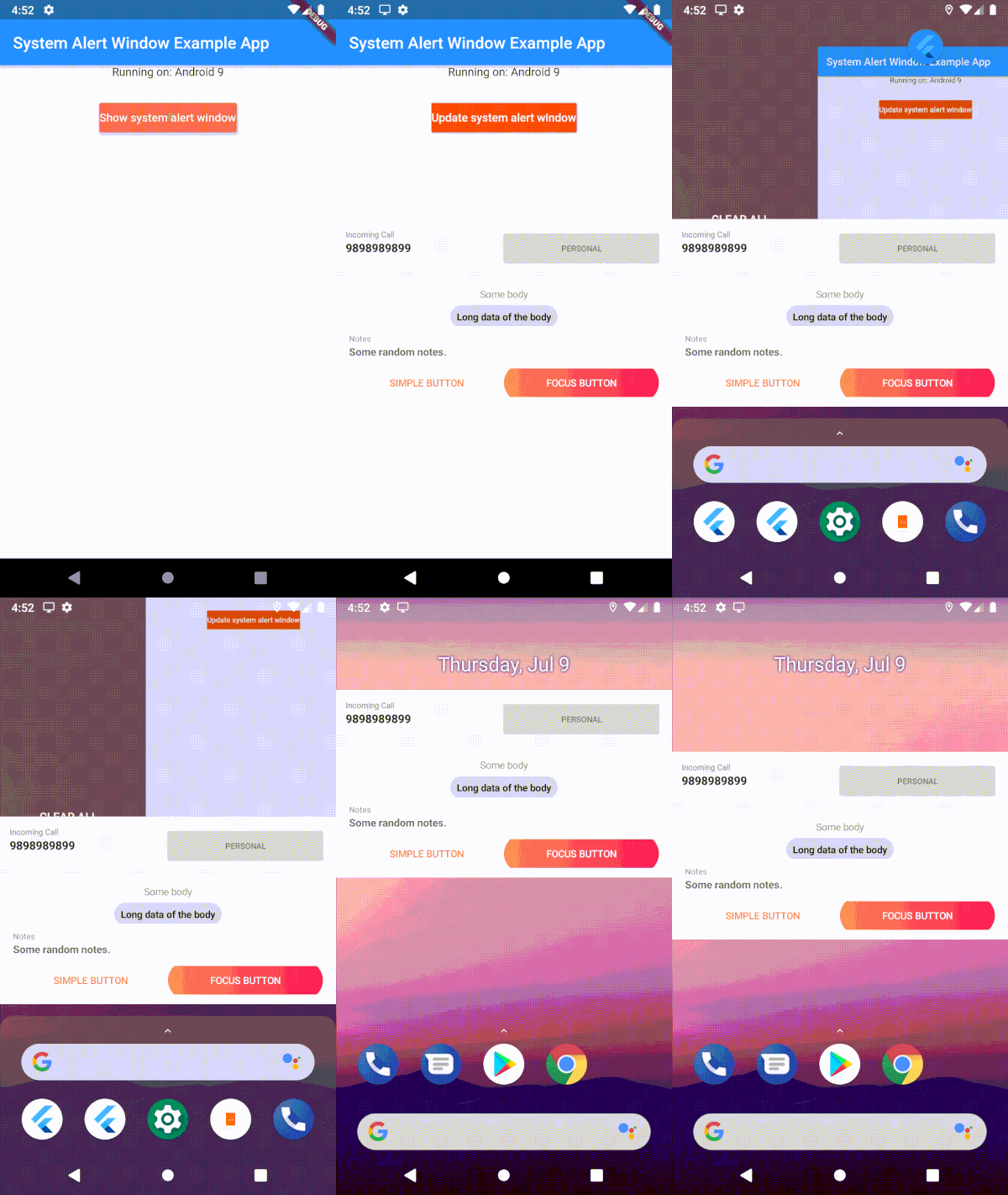
Demo
1. Clip of example app and 2. Working of button click in the background
Uses 'draw on top' permission and displays it as a overlay window
Android 11 & above
With SystemWindowPrefMode.OVERLAY, system alert windows uses 'overlay functionality' wherever it's supported. In that mode, it will show as bubbles if the 'display over other apps' is not supported.
With SystemWindowPrefMode.DEFAULT/SystemWindowPrefMode.BUBBLE, User has to allow 'All conversations can bubble' in the notification settings of the app. Uses Android Bubble APIs to show the overlay window inside a notification bubble.
Edge-to-edge content and window insets are handled automatically inside the bubble container — wrap your overlay widget with SafeArea to avoid content being obscured by system bars.
Android GO (API 29)
User has to manually enable bubbles from the developer options. Uses Android Bubble APIs to show the overlay window inside a notification bubble.
IOS
Displays as a notification in the notification center [Help Needed]
Example
Show Overlay
Request overlay permission
await SystemAlertWindow.requestPermissions;
Inside main.dart create an entry point for your Overlay widget;
// overlay entry point@pragma("vm:entry-point")
voidoverlayMain() {
runApp(constMaterialApp(
debugShowCheckedModeBanner: false,
home: Material(child: Text("My overlay"))
));
}
//Open overLay content// - Optional arguments:/// `gravity` Position of the window and default is [SystemWindowGravity.CENTER]/// `width` Width of the window and default is [Constants.MATCH_PARENT]/// `height` Height of the window and default is [Constants.WRAP_CONTENT]/// `notificationTitle` Notification title, applicable in case of bubble/// `notificationBody` Notification body, applicable in case of bubble/// `prefMode` Preference for the system window. Default is [SystemWindowPrefMode.DEFAULT]/// `layoutParamFlags` List of List of WindowManager.LayoutParams. This is not applicable for bubbles.awaitSystemAlertWindow.showSystemWindow();
/// update the overlay flag while the overlay in action/// - Optional arguments:/// `gravity` Position of the window and default is [SystemWindowGravity.CENTER]/// `width` Width of the window and default is [Constants.MATCH_PARENT]/// `height` Height of the window and default is [Constants.WRAP_CONTENT]/// `notificationTitle` Notification title, applicable in case of bubble/// `notificationBody` Notification body, applicable in case of bubble/// `prefMode` Preference for the system window. Default is [SystemWindowPrefMode.DEFAULT]/// `layoutParamFlags` List of List of WindowManager.LayoutParams. This is not applicable for bubbles.awaitFlutterOverlayWindow.updateSystemWindow();
// closes overlay if openawaitSystemAlertWindow.closeSystemWindow();
// broadcast data to overlay app from main appawaitSystemAlertWindow.sendMessageToOverlay("Hello from the other side");
//streams message from main app to overlay.SystemAlertWindow.overlayListener.listen((event) {
log("Current Event: $event");
});
Isolate communication
Use this snippet, if you want the callbacks on your main thread
While initializing system alert window in your code
awaitSystemAlertWindow.checkPermissions;
ReceivePort _port = ReceivePort();
IsolateManager.registerPortWithName(_port.sendPort);
_port.listen((message) {
log("message from OVERLAY: $message");
print("Do what ever you want here. This is inside your application scope");
});
Use this to send data to isolate mentioned above
voidcallBackFunction(String tag) {
print("Got tag " + tag);
SendPort port = IsolateManager.lookupPortByName();
port.send(tag);
}