पैकेज, रिपॉज़िटरी और ऐप श्रेणियाँ खोजें

tbib_downloader कवर
पैकेज विवरणv2.6.1

tbib_downloader

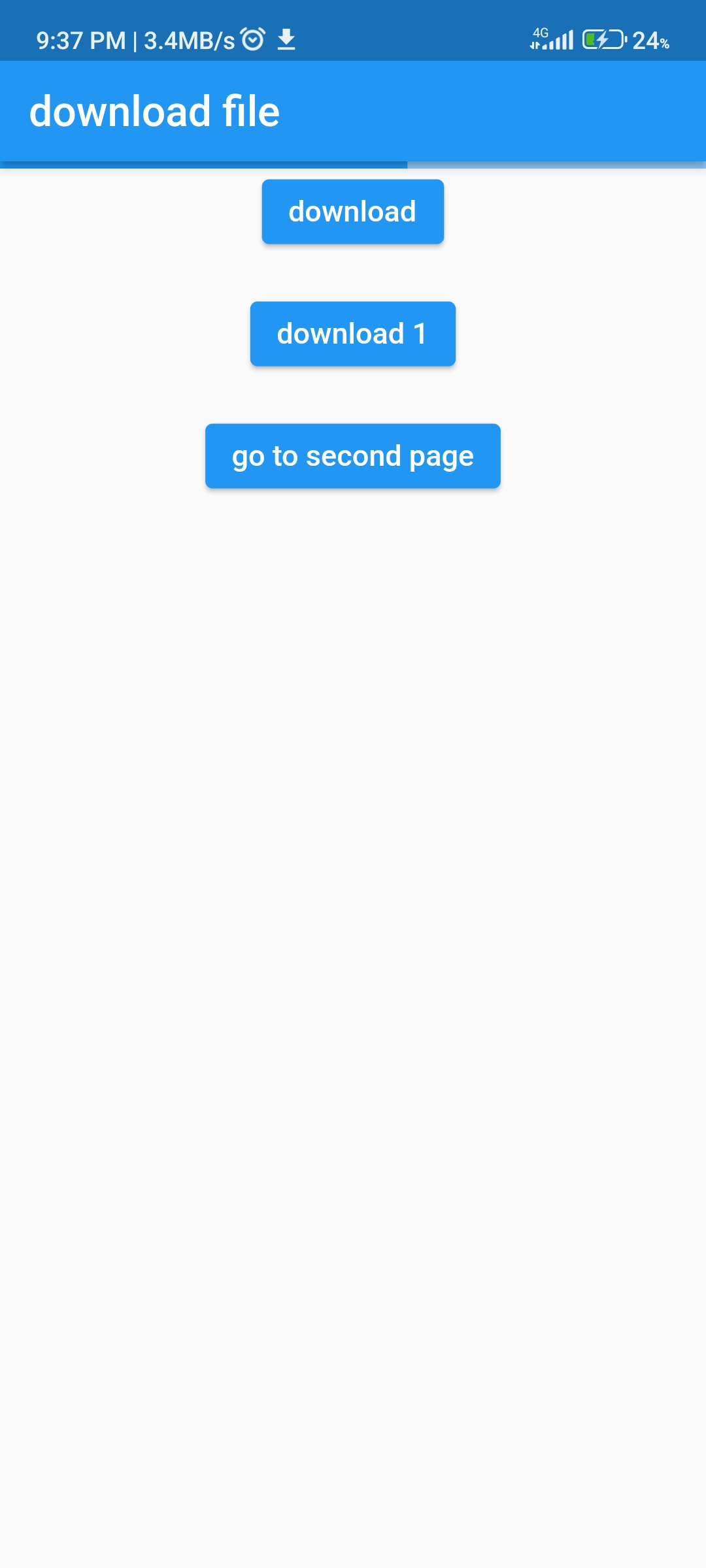
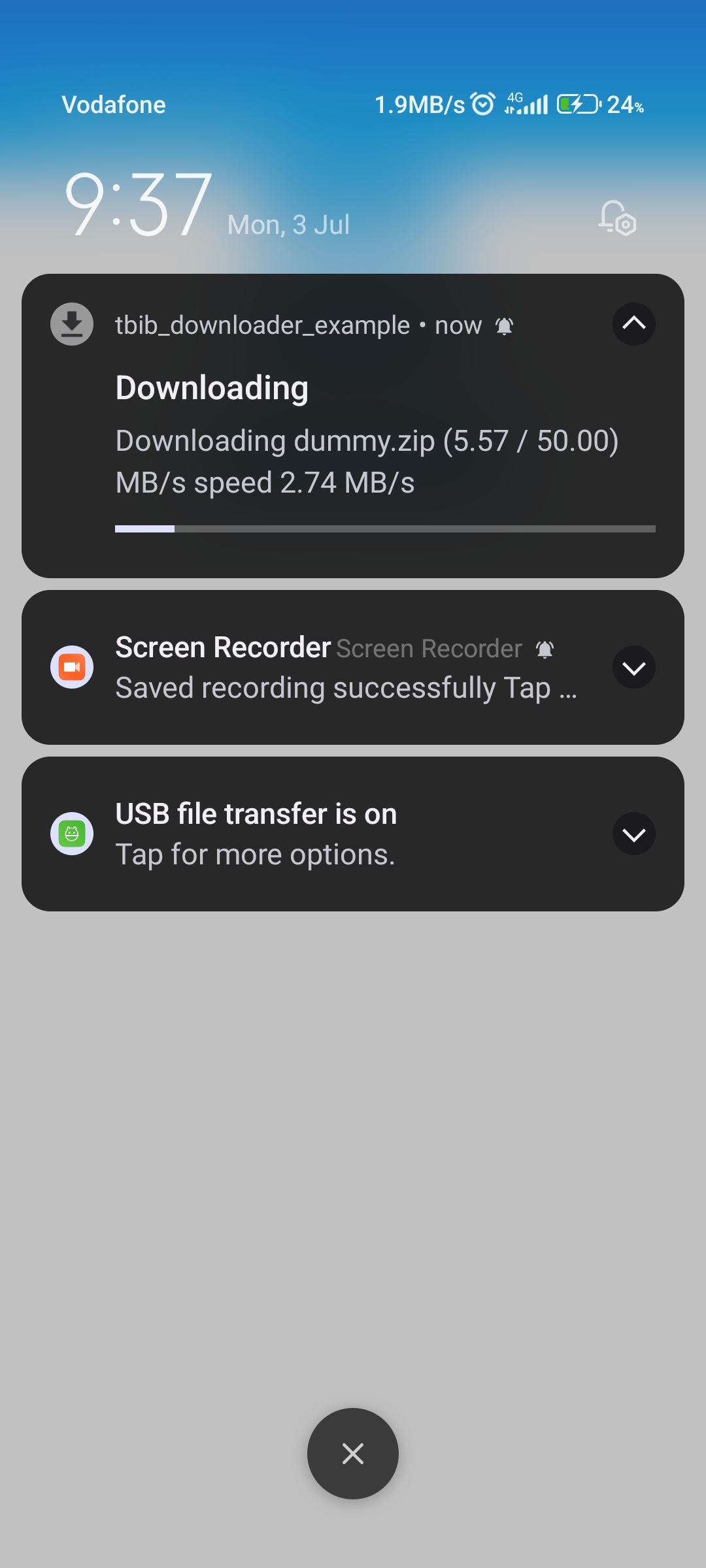
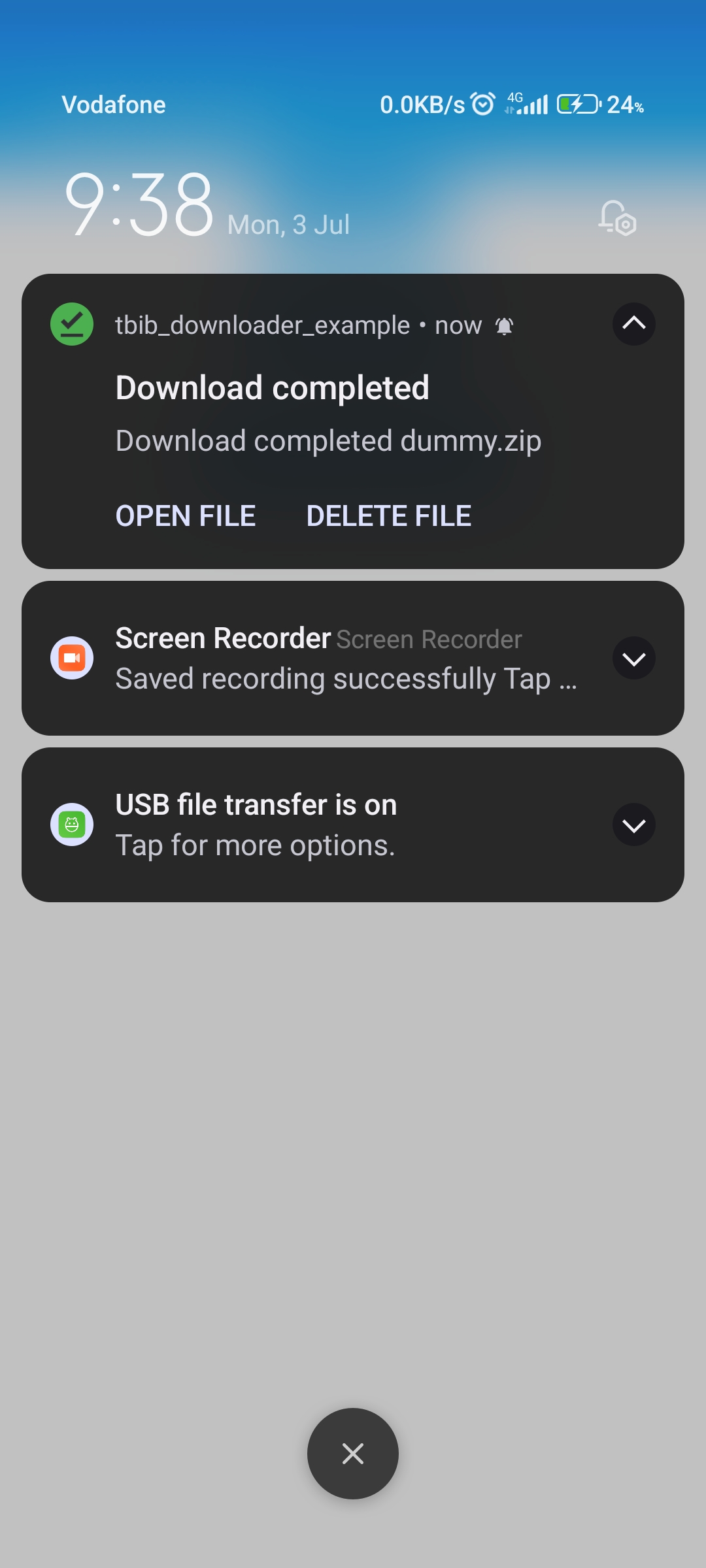
इस पैकेज का उपयोग फ़ाइल डाउनलोड और ओपन करने के लिए किया जा सकता है, आप नोटिफिकेशन और प्रगति नोटिफिकेशन दिखा सकते हैं और डाउनलोड किए गए बाइट्स और कुल बाइट्स प्राप्त कर सकते हैं।

AndroidiOS
30-दिन डाउनलोड
80
लाइक
30
Pub अंक
130

पैकेज इंस्टॉल करें

flutter pub add tbib_downloader

पैकेज अवलोकन

सार्वजनिक जानकारी से बना चयन मार्गदर्शन। केवल संदर्भ हेतु।

tbib_downloader पैकेज फ्लटर ऐप में डाउनलोड करने की सुविधा प्रदान करता है, जिसमें प्रगति ट्रैकिंग, नोटिफिकेशन और रियल-टाइम बाइट अपडेट का समर्थन होता है। यह उपयोगकर्ताओं को स्क्रीन या सिस्टम नोटिफिकेशन के माध्यम से डाउनलोड प्रगति को ट्रैक करने की अनुमति देता है और प्राप्त और कुल बाइट्स के लिए कॉलबैक प्रदान करता है। एंड्रॉइड और आईओएस के लिए डिज़ाइन किया गया, इससे न्यूनतम सेटअप के साथ फ़ाइल डाउनलोड को सरल बनाया जाता है। विश्वसनीय बैकग्राउंड डाउनलोड और ट्रांसफर के दौरान उपयोगकर्ता प्रतिक्रिया की आवश्यकता वाले ऐप्स के लिए उपयुक्त है।

उपयोग

  • प्रगति ट्रैकिंग के साथ फ़ाइलें डाउनलोड करें
  • डाउनलोड नोटिफिकेशन प्रदर्शित कर रहे हैं
  • बाइट-बाइट डाउनलोड प्रगति की मॉनिटरिंग
  • बड़े फ़ाइल डाउनलोड का प्रबंधन
  • बैकग्राउंड डाउनलोड कार्यक्षमता को एकीकृत करना
  • रियल-टाइम डाउनलोड स्थिति दिखा रहा है

मुख्य विशेषताएँ

  • प्रगति और बाइट ट्रैकिंग
  • डाउनलोड के लिए सिस्टम नोटिफिकेशन
  • प्राप्त और कुल बाइट्स के लिए कॉलबैक
  • Android और iOS के लिए समर्थन
  • pub के माध्यम से सरल एकीकरण
  • बैकग्राउंड डाउनलोड समर्थन

इनके लिए उपयुक्त

  • फ़ाइल डाउनलोड की आवश्यकता वाले ऐप्स
  • मीडिया या दस्तावेज़ डाउनलोड फीचर्स
  • डाउनलोड के दौरान उपयोगकर्ता प्रतिक्रिया की आवश्यकता वाले ऐप्स
  • ऑफलाइन कंटेंट बना रहे विकासकर्ता
  • बड़े फ़ाइल ट्रांसफर की आवश्यकता वाले प्रोजेक्ट

विचार योग्य बातें

  • प्लेटफ़ॉर्म-विशिष्ट अनुमतियाँ आवश्यक हैं
  • Android और iOS पर सीमित
  • कोई निर्मित अंतराल/पुनः प्रारंभ कार्यक्षमता नहीं है
  • बाहरी भंडार पर निर्भर करता है
  • अतिरिक्त त्रुटि प्रबंधन की आवश्यकता हो सकती है
  • नोटिफिकेशन व्यवहार प्लेटफॉर्म पर निर्भर करता है

मूल README

संबंधित सोर्स रिपॉज़िटरी के मूल README का स्नैपशॉट। नवीनतम सामग्री के लिए रिपॉज़िटरी देखें।

tbib_downloader

This package for download file and open it you can display notifications and progress notification and can receive download bytes and total bytes

Note this package use awesome notification

  • Can display progress in your app

  • Notification with progress bar

  • Notification downloaded ended

  • ios configuration

step 1

 Change
  BUILD_LIBRARY_FOR_DISTRIBUTION = YES 
 to 
 BUILD_LIBRARY_FOR_DISTRIBUTION = NO  

step 2

  • in info.plist
    <key>LSSupportsOpeningDocumentsInPlace</key>
    <true/>
    <key>UIFileSharingEnabled</key>
    <true/>

Note:

Notification progress bar not support in ios.

  • How to use

step 1

  • init package in main
void main() async {
  WidgetsFlutterBinding.ensureInitialized();

  await TBIBDownloader().init();
  ....
}

step 2

  • add awesome notification listener in main page
  @override
  void initState() {
    super.initState();
    AwesomeNotifications().setListeners(
        onActionReceivedMethod: MyNotificationService.onActionReceivedMethod,
        onNotificationCreatedMethod:
            MyNotificationService.onNotificationCreatedMethod,
        onNotificationDisplayedMethod:
            MyNotificationService.onNotificationDisplayedMethod,
        onDismissActionReceivedMethod:
            MyNotificationService.onDismissActionReceivedMethod);
            ...
  }

step 3

  • Create class: MyNotificationService
import 'dart:developer';

import 'package:awesome_notifications/awesome_notifications.dart';
import 'package:tbib_downloader/tbib_downloader.dart';

class MyNotificationService {
  /// Use this method to detect when a new notification or a schedule is created
  @pragma("vm:entry-point")
  static Future<void> onNotificationCreatedMethod(
      ReceivedNotification receivedNotification) async {
    // Your code goes here
  }

  /// Use this method to detect every time that a new notification is displayed
  @pragma("vm:entry-point")
  static Future<void> onNotificationDisplayedMethod(
      ReceivedNotification receivedNotification) async {
    // Your code goes here
  }

  /// Use this method to detect if the user dismissed a notification
  @pragma("vm:entry-point")
  static Future<void> onDismissActionReceivedMethod(
      ReceivedAction receivedAction) async {
    // Your code goes here
  }

  /// Use this method to detect when the user taps on a notification or action button
  @pragma("vm:entry-point")
  static Future<void> onActionReceivedMethod(
      ReceivedAction receivedAction) async {
    if (receivedAction.buttonKeyPressed == 'tbib_downloader_open_file') {
      var res = await TBIBDownloaderOpenFile()
          .openFile(path: receivedAction.payload!['path']!);

      log(res.message);
    } else if (receivedAction.buttonKeyPressed ==
        'tbib_downloader_delete_file') {
      await TBIBDownloaderOpenFile()
          .deleteFile(receivedAction.payload!['path']!);
    }
  }
}

  • how to download

Note

in version 1.0.1 can use attribute saveFileInDataApp to save in android/data/${package name}/...

 ElevatedButton(
                onPressed: () async {
                  var path = await TBIBDownloader().downloadFile(
                    url: 'http://212.183.159.230/50MB.zip',
                    fileName: 'dummy.zip',
                    directoryName: 'test',
                    onReceiveProgress: ({int? receivedBytes, int? totalBytes}) {
                      if (!context.mounted) {
                        return;
                      }
                      setState(() {
                        progress = (receivedBytes! / totalBytes!);
                      });
                    },
                  );
                  debugPrint('path $path');
                  if (!context.mounted) {
                    return;
                  }
                  setState(() {
                    progress = 0;
                  });
                },
                child: const Text('download'),
              ),
  • now more future in download progress

onReceiveProgress use it for get current downloaded and max file size with bytes

  • package support download one file and download file in background

  • if user leave page download will be continue but not support stop download

support open file with native apps

android support

{
            {".3gp",    "video/3gpp"},
            {".torrent","application/x-bittorrent"},
            {".kml",    "application/vnd.google-earth.kml+xml"},
            {".gpx",    "application/gpx+xml"},
            {".csv",    "application/vnd.ms-excel"},
            {".apk",    "application/vnd.android.package-archive"},
            {".asf",    "video/x-ms-asf"},
            {".avi",    "video/x-msvideo"},
            {".bin",    "application/octet-stream"},
            {".bmp",    "image/bmp"},
            {".c",      "text/plain"},
            {".class",  "application/octet-stream"},
            {".conf",   "text/plain"},
            {".cpp",    "text/plain"},
            {".doc",    "application/msword"},
            {".docx",   "application/vnd.openxmlformats-officedocument.wordprocessingml.document"},
            {".xls",    "application/vnd.ms-excel"},
            {".xlsx",   "application/vnd.openxmlformats-officedocument.spreadsheetml.sheet"},
            {".exe",    "application/octet-stream"},
            {".gif",    "image/gif"},
            {".gtar",   "application/x-gtar"},
            {".gz",     "application/x-gzip"},
            {".h",      "text/plain"},
            {".htm",    "text/html"},
            {".html",   "text/html"},
            {".jar",    "application/java-archive"},
            {".java",   "text/plain"},
            {".jpeg",   "image/jpeg"},
            {".jpg",    "image/jpeg"},
            {".js",     "application/x-javascript"},
            {".log",    "text/plain"},
            {".m3u",    "audio/x-mpegurl"},
            {".m4a",    "audio/mp4a-latm"},
            {".m4b",    "audio/mp4a-latm"},
            {".m4p",    "audio/mp4a-latm"},
            {".m4u",    "video/vnd.mpegurl"},
            {".m4v",    "video/x-m4v"},
            {".mov",    "video/quicktime"},
            {".mp2",    "audio/x-mpeg"},
            {".mp3",    "audio/x-mpeg"},
            {".mp4",    "video/mp4"},
            {".mpc",    "application/vnd.mpohun.certificate"},
            {".mpe",    "video/mpeg"},
            {".mpeg",   "video/mpeg"},
            {".mpg",    "video/mpeg"},
            {".mpg4",   "video/mp4"},
            {".mpga",   "audio/mpeg"},
            {".msg",    "application/vnd.ms-outlook"},
            {".ogg",    "audio/ogg"},
            {".pdf",    "application/pdf"},
            {".png",    "image/png"},
            {".pps",    "application/vnd.ms-powerpoint"},
            {".ppt",    "application/vnd.ms-powerpoint"},
            {".pptx",   "application/vnd.openxmlformats-officedocument.presentationml.presentation"},
            {".prop",   "text/plain"},
            {".rc",     "text/plain"},
            {".rmvb",   "audio/x-pn-realaudio"},
            {".rtf",    "application/rtf"},
            {".sh",     "text/plain"},
            {".tar",    "application/x-tar"},
            {".tgz",    "application/x-compressed"},
            {".txt",    "text/plain"},
            {".wav",    "audio/x-wav"},
            {".wma",    "audio/x-ms-wma"},
            {".wmv",    "audio/x-ms-wmv"},
            {".wps",    "application/vnd.ms-works"},
            {".xml",    "text/plain"},
            {".z",      "application/x-compress"},
            {".zip",    "application/x-zip-compressed"},
            {"",        "*/*"}
}

ios support

{
  ".rtf": "public.rtf",
  ".txt": "public.plain-text",
  ".html": "public.html",
  ".htm": "public.html",
  ".xml": "public.xml",
  ".tar": "public.tar-archive",
  ".gz": "org.gnu.gnu-zip-archive",
  ".gzip": "org.gnu.gnu-zip-archive",
  ".tgz": "org.gnu.gnu-zip-tar-archive",
  ".jpg": "public.jpeg",
  ".jpeg": "public.jpeg",
  ".png": "public.png",
  ".avi": "public.avi",
  ".mpg": "public.mpeg",
  ".mpeg": "public.mpeg",
  ".mp4": "public.mpeg-4",
  ".3gpp": "public.3gpp",
  ".3gp": "public.3gpp",
  ".mp3": "public.mp3",
  ".zip": "com.pkware.zip-archive",
  ".gif": "com.compuserve.gif",
  ".bmp": "com.microsoft.bmp",
  ".ico": "com.microsoft.ico",
  ".doc": "com.microsoft.word.doc",
  ".xls": "com.microsoft.excel.xls",
  ".ppt": "com.microsoft.powerpoint.​ppt",
  ".wav": "com.microsoft.waveform-​audio",
  ".wm": "com.microsoft.windows-​media-wm",
  ".wmv": "com.microsoft.windows-​media-wmv",
  ".pdf": "com.adobe.pdf"
}

श्रेणियाँ

निर्भरताएँ

निर्भरता सूची 10 आइटम

सोर्स रिपॉज़िटरी

इस पैकेज का उपयोग करने वाले प्रोजेक्ट

अभी कोई डेटा उपलब्ध नहीं है।