पैकेज, रिपॉज़िटरी और ऐप श्रेणियाँ खोजें

touch_indicator कवर
पैकेज विवरणv2.0.0

touch_indicator

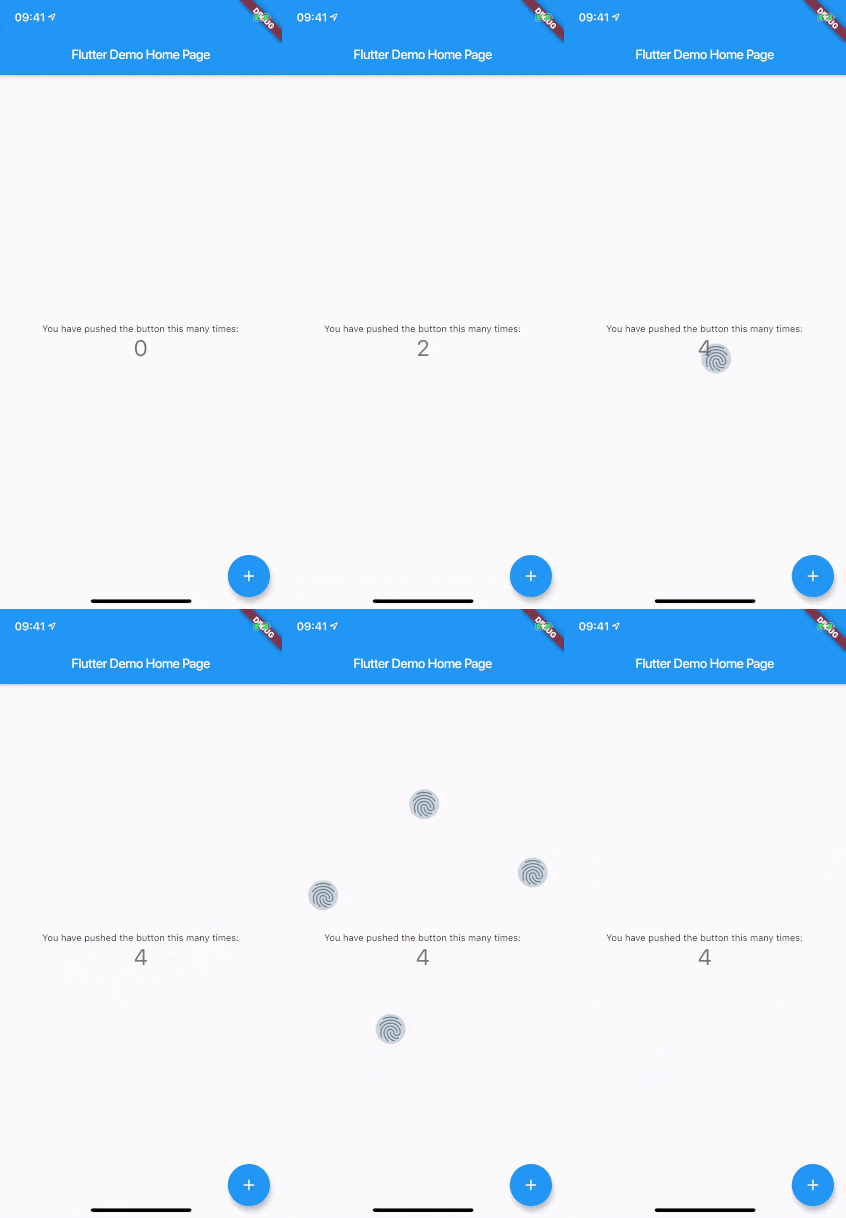
जहां आप स्क्रीन को छूते हैं, वहां अधिकतम 5 टच संकेतक दिखाएं। दर्शकों के लिए प्रदर्शन या अपने ऐप को रिकॉर्ड करने में उपयोगी।

AndroidiOSWebmacOSWindowsLinux
30-दिन डाउनलोड
12.8 हज़ार
लाइक
57
Pub अंक
150

पैकेज इंस्टॉल करें

flutter pub add touch_indicator

पैकेज अवलोकन

सार्वजनिक जानकारी से बना चयन मार्गदर्शन। केवल संदर्भ हेतु।

touch_indicator पैकेज स्क्रीन पर उपयोगकर्ता के छूने के स्थानों पर अधिकतम पांच दृश्य संकेत दिखाता है। लाइव प्रदर्शन या स्क्रीन रिकॉर्डिंग के लिए आदर्श, यह दर्शकों को बताता है कि इंटरैक्शन कहाँ हो रहा है। संकेत सूक्ष्म लेकिन दिखाई देने वाले हैं, जिससे उपयोगकर्ता अनुभव को बाधित किए बिना ऐप की क्षमता को प्रदर्शित करने में उपयुक्त हैं। यह आधुनिक मोबाइल, वेब और डेस्कटॉप प्लेटफॉर्म पर उपलब्ध है, और फ्लटर ऐप्स में न्यूनतम सेटअप के साथ बिना किसी दिक्कत के एकीकृत होता है। यह पैकेज हल्का है और डेमो या ट्यूटोरियल के दौरान अस्थायी उपयोग के लिए डिज़ाइन किया गया है।

उपयोग

  • लाइव ऐप प्रदर्शन
  • स्क्रीन रिकॉर्डिंग ट्यूटोरियल
  • उपयोगकर्ता इंटरैक्शन प्रतिक्रिया
  • शैक्षिक ऐप वाउकथ्रू
  • टच व्यवहार का डिबग करना

मुख्य विशेषताएँ

  • अधिकतम 5 टच बिंदु प्रदर्शित करता है
  • क्रॉस-प्लेटफ़ॉर्म समर्थन
  • न्यूनतम प्रदर्शन प्रभाव
  • सरल एकीकरण
  • कस्टमाइज़ेबल दिखावट

इनके लिए उपयुक्त

  • एप्लिकेशन प्रस्तुत करने वाले विकासकर्मी
  • सॉफ्टवेयर का प्रदर्शन कर रहे शिक्षक
  • UI परीक्षण कर्मी
  • एप्प डेमो निर्माता
  • ट्यूटोरियल वीडियो रिकॉर्ड करना

विचार योग्य बातें

  • उत्पादन उपयोग के लिए नहीं बनाया गया है
  • अंतिम बिल्ड में सूचकों को अक्षम करना चाहिए
  • सभी हार्डवेयर पर विश्वसनीय रूप से काम नहीं कर सकता
  • प्रदर्शन के दौरान अस्थायी रूप से सबसे अच्छा उपयोग
  • कुछ परिस्थितियों में दृश्य संकेतक विचलित कर सकते हैं
मूल README

संबंधित सोर्स रिपॉज़िटरी के मूल README का स्नैपशॉट। नवीनतम सामग्री के लिए रिपॉज़िटरी देखें।

touch_indicator

When you are recording a screencast of your app, you often want to give visual indication of where your fingers are touching the screen. Showing that on Android is easy. On iOS it's less intuitive. touch_indicator makes it easier and consistent on both platforms.

You add this widget as the main widget where you want to display user touches. Usually this will be the direct child of your MaterialApp. It will show an indicator on every touching finger and is completely customizable.

Installation

Add the plugin to your pubspec.yaml:

dependencies:
  touch_indicator: ^2.0.0

Usage

Import the package in your Dart code:

import 'package:touch_indicator/touch_indicator.dart';

Wrap all routes in your app in the TouchIndicator widget:

class MyApp extends StatelessWidget {
  MaterialApp(
    title: 'Touch indicator example',
    builder: (context, child) => TouchIndicator(child: child!),
    home: MyHomePage(title: 'Flutter Demo Home Page'),
  );
}

Customization options

indicatorColor

Changes the color of the backdrop and icon. Default is Colors.blueGrey.

indicatorSize

Changes the size of the indicator. Default is 40.0.

indicator

By adding a Widget here, you can change the complete look of the touch indicators. Make sure to supply a proper indicatorSize in order for the indicators to be positioned at the center of your touchpoints.

forceInReleaseMode

When you want to show indicators when the app is running in release mode, make sure to enable this option. Default is false.

enabled

You can enable or disable display of the indicators on the fly with this option. Default is true.

श्रेणियाँ

सोर्स रिपॉज़िटरी

इस पैकेज का उपयोग करने वाले प्रोजेक्ट

अभी कोई डेटा उपलब्ध नहीं है।