पैकेज, रिपॉज़िटरी और ऐप श्रेणियाँ खोजें

user_profile_avatar कवर
पैकेज विवरणv0.1.3

user_profile_avatar

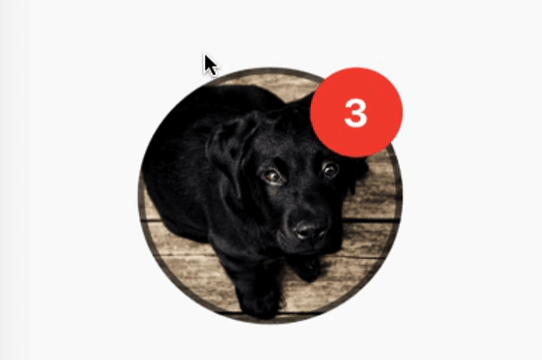
एक सरल विजेट जो गोलाकार प्रोफ़ाइल छवि को दिखाता है और छवि के लोड होने के दौरान मूल गोलाकार प्रगति इंडिकेटर दिखाता है।

AndroidiOSmacOSWindowsLinux
30-दिन डाउनलोड
77
लाइक
37
Pub अंक
140

पैकेज इंस्टॉल करें

flutter pub add user_profile_avatar

पैकेज अवलोकन

सार्वजनिक जानकारी से बना चयन मार्गदर्शन। केवल संदर्भ हेतु।

एक फ्लटर विजेट जो छवि लोड होने के दौरान एक मूल दिखने वाले गोलाकार प्रगति सूचक के साथ एक गोलाकार प्रोफ़ाइल छवि प्रदर्शित करने के लिए डिज़ाइन किया गया है। यह छवि लोडिंग और विजुअल फीडबैक को बिना किसी दिक्कत के संभालता है, जिससे ऐप में उपयोगकर्ता अवतार के लिए इम्प्लीमेंटेशन सरल हो जाता है। यह विजेट प्लेटफॉर्म के आधार पर एक समान दिखावट सुनिश्चित करता है, जो एंड्रॉइड, आईओएस, मैकओएस, विंडोज और लिनक्स को सपोर्ट करता है। चैट इंटरफ़ेस, उपयोगकर्ता प्रोफ़ाइल और किसी भी UI के लिए उपयुक्त जिसमें चिकने लोडिंग स्टेट्स के साथ गोलाकार अवतार की आवश्यकता होती है।

उपयोग

  • उपयोगकर्ता प्रोफ़ाइल प्रदर्शित करता है
  • चैट इंटरफेस
  • सोशल मीडिया ऐप अवतार
  • प्रमाणीकरण स्क्रीन
  • डैशबोर्ड उपयोगकर्ता कार्ड

मुख्य विशेषताएँ

  • सर्कुलर प्रोफाइल छवि रेंडरिंग
  • मूल गोलाकार प्रगति सूचक
  • प्लेटफॉर्म के अनुकूलता
  • सरल API एकीकरण
  • स्वचालित छवि लोडिंग स्थिति प्रबंधन

इनके लिए उपयुक्त

  • चैट ऐप्स बनाने वाले डेवलपर्स
  • साफ अवतार की आवश्यकता वाले UI डिजाइनर
  • उपयोगकर्ता प्रमाणीकरण वाले ऐप्स
  • क्रॉस-प्लेटफॉर्म मोबाइल और डेस्कटॉप ऐप्स
  • प्रोफ़ाइल छवियों के लिए न्यूनतम बॉयलरप्लेट की आवश्यकता वाले प्रोजेक्ट

विचार योग्य बातें

  • दूरस्थ छवियों के लिए इंटरनेट की आवश्यकता होती है
  • मूल शैली के अलावा सीमित कस्टमाइज़ेशन
  • बाहरी छवि लोडिंग तरीके पर निर्भर करता है
  • गैर-व rund अवतार डिज़ाइन के लिए उपयुक्त नहीं
  • उच्च ट्रैफिक एप्लिकेशन में प्रदर्शन के लिए अतिरिक्त कैशिंग की आवश्यकता हो सकती है

मूल README

संबंधित सोर्स रिपॉज़िटरी के मूल README का स्नैपशॉट। नवीनतम सामग्री के लिए रिपॉज़िटरी देखें।

Flutter User Profile Avatar

A simple widget that display round profile picture where the picture is fetched from network and displays circular progress indicator whilst the image is being loaded. Also, has the ability to display notification bubble.


How to use


UserProfileAvatar(
        avatarUrl: 'https://picsum.photos/id/237/5000/5000',
        onAvatarTap: () {
          print('Avatar Tapped..');
        },
        notificationCount: 10,
        notificationBubbleTextStyle: TextStyle(
          fontSize: 30,
          color: Colors.white,
          fontWeight: FontWeight.bold,
        ),
        avatarSplashColor: Colors.purple,
        radius: 100,
        isActivityIndicatorSmall: false,
        avatarBorderData: AvatarBorderData(
          borderColor: Colors.white,
          borderWidth: 5.0,
        ),
      )

Properties

  • avatarUrl
    The url for the image, if this set to null or empty then an empty user avatar gets displayed by default.


  • onAvatarTap
    Use this to perform any action when the avatar gets tapped.

  • notificationCount
    Pass an int to display the notification bubble. 99+ gets displayed if notification count was larger than 100.

  • notificationBubbleTextStyle
    Used to style the notification count, if null then the default one will be applied.

  • avatarSplashColor
    Splash color when user taps on the avatar.

  • radius
    Use this to size the avatar.

    • minimum default radius is 15
    • maximum default radius is 150
  • isActivityIndicatorSmall
    use this to display small/large circular progress indicator (native) when image is loading, default is true.


  • avatarBorderData
    Use this to apply border width and color of the avatar.

श्रेणियाँ

निर्भरताएँ

निर्भरता सूची 1 आइटम

सोर्स रिपॉज़िटरी

इस पैकेज का उपयोग करने वाले प्रोजेक्ट

अभी कोई डेटा उपलब्ध नहीं है।