पैकेज, रिपॉज़िटरी और ऐप श्रेणियाँ खोजें

पैकेज विवरणv1.1.0

zoom_tap_animation

ज़ूम टैप एनिमेशन के साथ आप आज के टैब में App Store के आइटम के समान प्रभाव बना सकते हैं, जब आप किसी आइटम पर लंबे समय तक टैप करते हैं, तो यह ज़ूम इन करना शुरू करता है और फिर ज़ूम आउट करता है।

AndroidiOSWebmacOSWindowsLinux
30-दिन डाउनलोड
5.5 हज़ार
लाइक
139
Pub अंक
140

पैकेज इंस्टॉल करें

flutter pub add zoom_tap_animation

पैकेज अवलोकन

सार्वजनिक जानकारी से बना चयन मार्गदर्शन। केवल संदर्भ हेतु।

Zoom Tap Animation एक Flutter पैकेज है जो उपयोगकर्ता के आइटम को लंबे समय तक दबाने पर डायनामिक ज़ूम-इन और ज़ूम-आउट प्रभाव बनाता है, जो App Store के Today टैब में देखे जाने वाले इंटरैक्टिव व्यवहार की नकल करता है। यह छूने के बाद दृश्य प्रतिक्रिया प्रदान करके उपयोगकर्ता के भागीदारी को बढ़ाता है। यह एनीमेशन चिकना और कस्टमाइज़ करने योग्य है, बटन, कार्ड या किसी भी इंटरैक्टिव UI तत्व के लिए उपयुक्त है। प्रदर्शन और क्रॉस-प्लेटफॉर्म संगतता के ध्यान में रखते हुए बनाया गया, यह Android, iOS, Web, macOS, Windows और Linux पर बिना किसी समस्या के काम करता है।

उपयोग

  • इंटरैक्टिव ऐप आइकन
  • एनिमेटेड कार्ड टैप
  • विस्तारित बटन प्रतिक्रिया
  • आज के टैब-शैली इंटरफेस
  • उपयोगकर्ता भागीदारी तत्व
  • टच इंटरैक्शन हाइलाइट्स

मुख्य विशेषताएँ

  • लंबे समय तक दबाए जाने पर ज़ूम होता है
  • स्मूथ ज़ूम-इन और ज़ूम-आउट
  • क्रॉस-प्लेटफ़ॉर्म समर्थन
  • कस्टमाइज़ किए गए एनीमेशन अवधि
  • मौजूदा विजेट्स के साथ आसान एकीकरण
  • हल्का और कार्यक्षम

इनके लिए उपयुक्त

  • आकर्षक टच प्रभाव की तलाश में विकासकर्ता
  • UI डिजाइनर अंतरक्रिया में सुधार कर रहे हैं
  • हैंडल आधारित नेविगेशन वाले ऐप्स
  • App Store जैसे एनीमेशन की आवश्यकता वाले प्रोजेक्ट
  • बहुप्लेटफॉर्म लक्षित फ्लटर एप्प्स

विचार योग्य बातें

  • अनुकूल समय के लिए ट्यूनिंग की आवश्यकता हो सकती है
  • स्थिर या अन्योद्दीपक सामग्री के लिए आदर्श नहीं
  • स्पष्ट दृश्य लक्ष्य के साथ सबसे अच्छा उपयोग किया जाता है
  • यदि नियंत्रित नहीं किया गया, तो अन्य हस्तक्षेपों से टकराएगा
  • टैप/लंबे दबाव ट्रिगर्स तक सीमित

मूल README

संबंधित सोर्स रिपॉज़िटरी के मूल README का स्नैपशॉट। नवीनतम सामग्री के लिए रिपॉज़िटरी देखें।

pub package

Zoom Tap Animation

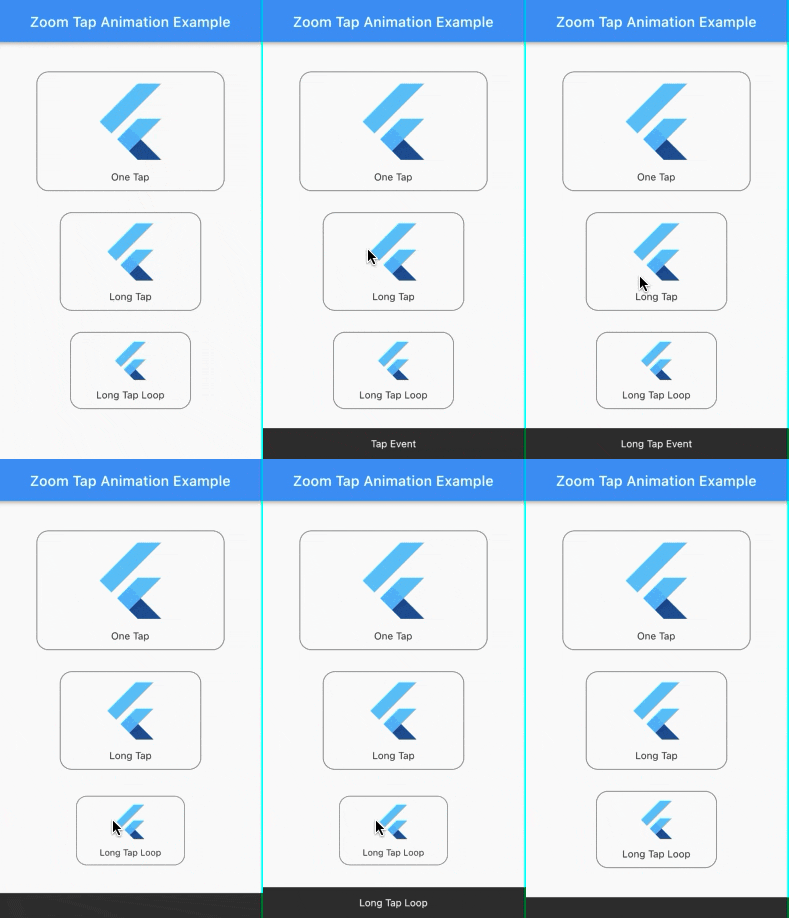
Zoom Tap Animation is is a package that allows you to make an zoom animation effect similar to App Store's (ios app) items in Today tab, when you long tap on some item, it start to zoom in then it zoom out when you release it.

Screenshots:

Source of idea

The idea is inspired from App Store app in Today tab where you can long tap on some item and it start to zoom in then zoom out as shown in the screenshot below.

Example:

Check out the example project in the example folder.

Installation:

add the package to your dependencies
dependencies:
  zoom_tap_animation: ^1.1.0
import 'package:zoom_tap_animation/zoom_tap_animation.dart';

Usage:

default use of ZoomTapAnimation widget
ZoomTapAnimation(
      onTap: (){},
      child: YOUR_WIDGET
);
and you can also define custom parameters
ZoomTapAnimation(
      child: YOUR_WIDGET,
      onTap: (){},
      onLongTap: (){},
      enableLongTapRepeatEvent: false,
      longTapRepeatDuration: const Duration(milliseconds: 100),
      begin: 1.0,
      end: 0.93,
      beginDuration: const Duration(milliseconds: 20),
      endDuration: const Duration(milliseconds: 120),
      beginCurve: Curves.decelerate,
      endCurve: Curves.fastOutSlowIn
);
also you can use ZoomTapAnimation with your custom gestures
ZoomTapAnimation(
      child: GestureDetector(
      onTap: () {},
      onLongPress: (){},
      onDoubleTap: (){},
      // you can add more gestures...
      child: Container(color: Colors.yellow, width: 100.0, height: 100.0),
      ),
);
parameters
parameter description default
child your child widget that you want to put the zoom effect on.
onTap what should happen when you tap on the widget. null
onLongTap what should happen when you long tap on the widget. null
enableLongTapRepeatEvent option to enable long tap loop which repeat every onTap event (in case onLongTap is specified, it repeats the onLongTap event). false
longTapRepeatDuration the duration between every onTap/onLongTap loop event. const Duration(milliseconds: 100)
begin the size of widget you want to begin with. 1.0
end the size of widget you want to begin with. 0.93
beginDuration the duration of the begin zoom in animation. const Duration(milliseconds: 20)
endDuration the duration of the end zoom in animation. const Duration(milliseconds: 120)
beginCurve the curve animation type of the begin zoom in animation. Curves.decelerate
endCurve the curve animation type of the end zoom in animation. Curves.fastOutSlowIn

श्रेणियाँ

सोर्स रिपॉज़िटरी

इस पैकेज का उपयोग करने वाले प्रोजेक्ट