パッケージ、リポジトリ、アプリカテゴリを検索

markdown_widget のカバー
パッケージ詳細v2.3.2+8

markdown_widget

新しいマークダウンパッケージ。TOC機能、コードの強調表示をサポートし、すべてのプラットフォームに対応しています。

AndroidiOSWebmacOSWindowsLinux
30日間ダウンロード
1万
いいね数
411
Pub ポイント
160

パッケージをインストール

flutter pub add markdown_widget

パッケージ概要

公開情報に基づく選定ガイドです。参考としてご利用ください。

Flutter用のクロスプラットフォームなMarkdownレンダリングパッケージで、目次生成、コードブロックの構文強調、Android、iOS、Web、macOS、Windows、Linuxでのシームレスな統合をサポートしています。シンプルさとパフォーマンスを重視して設計されており、最小限の設定で豊富なMarkdownコンテンツを表示できます。このパッケージは継続的にメンテナンスされており、Markdownソースからの動的テキストレンダリングが必要なアプリ向けに設計されています。

用途

  • アプリ内でのドキュメントのレンダリング
  • ユーザーが生成したコンテンツを表示しています
  • ヘルプまたはFAQセクションの作成
  • 動的ブログ投稿の生成
  • 知識ベースインターフェースの構築

主な機能

  • 目次サポート
  • 構文ハイライト
  • クロスプラットフォーム互換性
  • 軽量で高速レンダリング
  • カスタマイズ可能なスタイル
  • すべての主要プラットフォームをサポートしています

適している対象

  • ドキュメントアプリ
  • 教育ツール
  • コンテンツ重視のアプリケーション
  • 開発者ツール
  • Web およびデスクトップ用 Flutter アプリ

注意事項

  • Markdownソース形式が必要です
  • 基本的なHTMLレンダリングに限定
  • カスタムテーマの調整が必要になる場合があります
  • 複雑なレイアウトには適していません
  • パフォーマンスはコンテンツのサイズに依存します
  • 組み込みの画像読み込みサポートなし

元の README

関連するソースリポジトリの README 原文のスナップショットです。最新の内容はリポジトリをご覧ください。

Language:简体中文 | English | 日本語

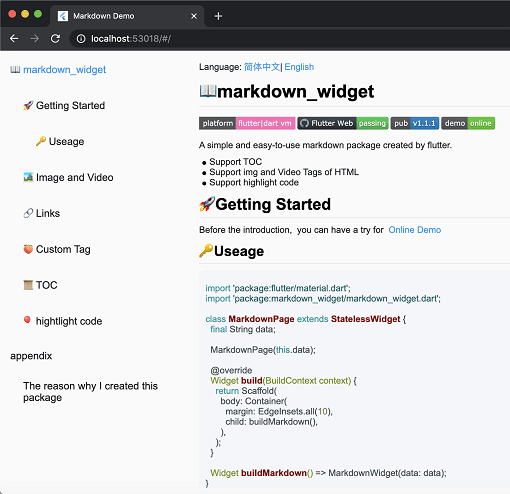
screen

📖markdown_widget

Coverage Status pub package demo

A simple and easy-to-use markdown rendering component.

  • Supports TOC (Table of Contents) function for quick location through Headings
  • Supports code highlighting
  • Supports all platforms

🚀Usage

Before starting, you can try out the online demo by clicking demo

import 'package:flutter/material.dart';
import 'package:markdown_widget/markdown_widget.dart';

class MarkdownPage extends StatelessWidget {
  final String data;

  MarkdownPage(this.data);

  @override
  Widget build(BuildContext context) => Scaffold(body: buildMarkdown());

  Widget buildMarkdown() => MarkdownWidget(data: data);
}

If you want to use your own Column or other list widget, you can use MarkdownGenerator

  Widget buildMarkdown() =>
      Column(children: MarkdownGenerator().buildWidgets(data));

Or use MarkdownBlock

  Widget buildMarkdown() =>
      SingleChildScrollView(child: MarkdownBlock(data: data));

📁 More Examples

For advanced usage examples, check out the example/lib/markdown_custom folder in the repository:

  • video.dart - Custom video tag support
  • latex.dart - LaTeX math formula rendering
  • mermaid.dart - Mermaid diagram support (flowcharts, sequence diagrams, etc.)
  • html_support.dart - HTML tag extension
  • custom_node.dart - Custom node implementation examples

These examples demonstrate how to extend the package with custom tags and features.

🌠Night mode

markdown_widget supports night mode by default. Simply use a different MarkdownConfig to enable it.

  Widget buildMarkdown(BuildContext context) {
    final isDark = Theme.of(context).brightness == Brightness.dark;
    final config = isDark
        ? MarkdownConfig.darkConfig
        : MarkdownConfig.defaultConfig;
    final codeWrapper = (child, text, language) =>
        CodeWrapperWidget(child, text, language);
    return MarkdownWidget(
        data: data,
        config: config.copy(configs: [
        isDark
        ? PreConfig.darkConfig.copy(wrapper: codeWrapper)
        : PreConfig().copy(wrapper: codeWrapper)
    ]));
  }
Default mode Night mode

🔗Link

You can customize the style and click events of links, like this

  Widget buildMarkdown() => MarkdownWidget(
      data: data,
      config: MarkdownConfig(configs: [
        LinkConfig(
          style: TextStyle(
            color: Colors.red,
            decoration: TextDecoration.underline,
          ),
          onTap: (url) {
            ///TODO:on tap
          },
        )
      ]));

📜TOC (Table of Contents) feature

Using the TOC is very simple

  final tocController = TocController();

  Widget buildTocWidget() => TocWidget(controller: tocController);

  Widget buildMarkdown() => MarkdownWidget(data: data, tocController: tocController);

  @override
  Widget build(BuildContext context) {
    return Scaffold(
        body: Row(
          children: <Widget>[
            Expanded(child: buildTocWidget()),
            Expanded(child: buildMarkdown(), flex: 3)
          ],
        ));
  }

🎈Highlighting code

Highlighting code supports multiple themes.

import 'package:flutter_highlight/themes/a11y-light.dart';

  Widget buildMarkdown() => MarkdownWidget(
      data: data,
      config: MarkdownConfig(configs: [
        PreConfig(theme: a11yLightTheme),
      ]));

🧬Select All and Copy

Cross-platform support for Select All and Copy function.

image

🌐Html tag

As the current package only implements the conversion of Markdown tags, it does not support the conversion of HTML tags by default. However, this functionality can be supported through extension. You can refer to the usage in html_support.dart for more details.

Here is the online HTML demo showcase

🧮Latex support

The example also includes simple support for LaTeX, which can be implemented by referring to the implementation in latex.dart

Here is the online latex demo showcase

🔷Mermaid diagram support

The example includes support for Mermaid diagrams, which can render flowcharts, sequence diagrams, state diagrams, and more. Refer to the implementation in mermaid.dart

Features:

  • Multiple diagram types (flowchart, sequence diagram, state diagram, ER diagram, etc.)
  • Theme support (auto light/dark mode)
  • Interactive display modes (code only, diagram only, or both)
  • Fullscreen viewer with pan & zoom support
  • Independent horizontal scrolling for wide diagrams
  • Smart caching and debouncing for optimal performance

Here is the online Mermaid demo showcase

import 'package:markdown_widget/markdown_widget.dart';
import 'markdown_custom/mermaid.dart';

// Basic usage
final isDark = Theme.of(context).brightness == Brightness.dark;
final preConfig = PreConfig(
  wrapper: createMermaidWrapper(
    config: const MermaidConfig(),
    isDark: isDark,
    preConfig: preConfig,
  ),
);

MarkdownWidget(
  data: markdown,
  config: config.copy(configs: [preConfig]),
)

// With custom configuration
final preConfig = PreConfig(
  wrapper: createMermaidWrapper(
    config: MermaidConfig(
      displayMode: MermaidDisplayMode.codeAndDiagram,
      diagramPadding: EdgeInsets.all(16.0),
      showLoadingIndicator: true,
    ),
    isDark: isDark,
    preConfig: preConfig,
  ),
);

🍑Custom tag implementation

By passing a SpanNodeGeneratorWithTag to MarkdownGeneratorConfig, you can add new tags and the corresponding SpanNodes for those tags. You can also use existing tags to override the corresponding SpanNodes.

You can also customize the parsing rules for Markdown strings using InlineSyntax and BlockSyntax, and generate new tags.

You can refer to this issue to learn how to implement a custom tag.

If you have any good ideas or suggestions, or have any issues using this package, please feel free to open a pull request or issue.

🧾Appendix

Here are the other libraries used in markdown_widget

Packages Descriptions
markdown Parsing markdown data
flutter_highlight Code highlighting
highlight Code highlighting
url_launcher Opening links
visibility_detector Listening for visibility of a widget;
scroll_to_index Enabling ListView to jump to an index.

カテゴリー

依存関係

依存関係一覧 6 件

ソースリポジトリ

このパッケージを使用しているプロジェクト