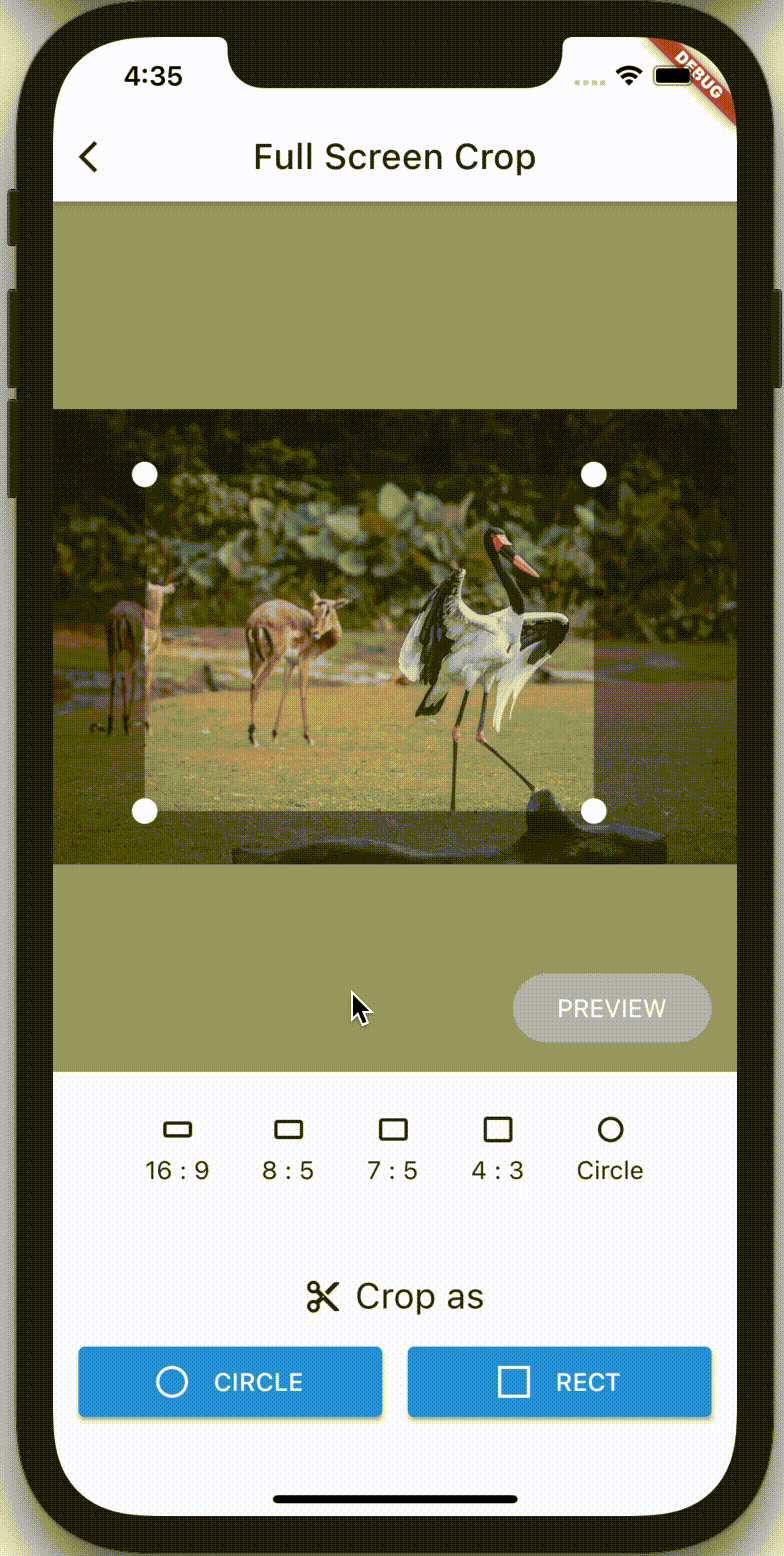
crop_your_image는 사용자 정의 가능한 위젯을 사용하여 앱에 이미지 자르기 기능을 통합할 수 있도록 해주는 Flutter 패키지입니다. 앱 인터페이스 내에서 직접 이미지를 선택하고 자르는 간단한 방법을 제공하며, Android, iOS, Web, macOS, Windows, Linux 등 다양한 플랫폼을 지원합니다. 최소한의 설정으로 쉽게 사용할 수 있으며 기존 프로젝트에 원활하게 통합할 수 있습니다. Flutter의 위젯 시스템을 활용해 유연하고 반응성 있는 자르기 경험을 제공합니다.
사용 사례
사진 앱에서의 이미지 편집
사용자 프로필 사진 자르기
콘텐츠 생성 도구
소셜 미디어 업로드 전처리
문서 이미지 자르기
주요 기능
내장형 크롭 위젯
다수의 플랫폼을 지원합니다
사용자 정의 가능한 종횡비
반응형 UI 디자인
Flutter와의 간편한 통합
실시간 미리보기
적합한 대상
이미지가 많은 앱을 개발하는 개발자
사용자 이미지 커스터마이징을 요구하는 앱
크로스 플랫폼 이미지 처리 기능
사용자 경험에 중점을 둔 프론트엔드 팀
모바일 및 웹 애플리케이션
고려 사항
이미지 액세스를 위해 추가 권한이 필요합니다
일관된 외관을 위해 사용자 정의 스타일이 필요할 수 있습니다
고급 필터 없이 기본적인 자르기만 가능
완전한 기능을 위해 외부 종속성에 의존합니다
매우 큰 이미지에 최적화되지 않음
원본 README
연결된 소스 저장소의 README 원문 스냅샷입니다. 최신 내용은 저장소에서 확인하세요.
crop_your_image
A flutter plugin that provides Crop widget for cropping images.
Philosophy
crop_your_image provides flexible and customizableCrop widget that can be placed at anywhere in your well designed apps.
As Crop is a simple widget displaying minimum cropping UI, Crop can be placed anywhere such as, for example, occupying entire screen, at top half of the screen, or even on dialogs or bottom sheets. It's totally up to you!
Users' cropping operation is also customizable. By default, images are fixed on the screen and users can move crop rect to decide where to crop. Once configured interactive mode, images can be zoomed/panned, and crop rect can be configured as fixed.
CropController enables you to control crop rect from outside of Crop. The controller allows you to run cropping (or related actions) from anywhere on your codebase.
Enjoy building your own cropping UI with crop_your_image!
Features
Minimum UI restrictions
Flexible Crop widget that can be placed anywhere on your widget tree
CropController to control Crop
Zooming / panning images
Crop with rect or circle whichever you want
Fix aspect ratio
Configure Rect of crop rect programmatically
Detect events of users' operation
Undo / Redo operation
(advanced) Cropping backend logics are also customizable
Note that this package DON'T
read / download image data from any storages, such as gallery, internet, etc.
resize, tilt, or other conversions which can be done with image package directly.
provide UI parts other than cropping editor, such as buttons to control. Building UI is fully UP TO YOU!
Usage
Basics
Place Crop Widget wherever you want to place image cropping UI.
final _controller = CropController();
@overrideWidgetbuild(BuildContext context) {
returnCrop(
image: _imageData,
controller: _controller,
onCropped: (result) {
switch(result) {
caseCropResult.success(:final croppedImage):
// do something with cropped image data caseCropResult.error(:final error):
// do something with error
}
}
);
}
Then, Crop widget will automatically display cropping editor UI on users screen with given image.
By passing CropController instance to controller argument of Crop's constructor, you can control the Crop widget from anywhere on your source code.
For example, when you want to crop the image with the current crop rect, you can just call _controller.crop() whenever you want, such like the code below.
Because _controller.crop() only kicks the cropping process, this method returns immediately without any cropped image data. You can obtain the result of cropping images via onCropped callback of Crop Widget.
Undo / Redo
CropController also provides undo and redo methods.
You can also detect history of crop rect changes via onHistoryChanged callback of Crop Widget. This callback exposes History object, which contains undoCount and redoCount, that indicates how many times undo / redo operation is available.
final _controller = CropController();
Widgetbuild(BuildContext context) {
returnCrop(
image: _imageData,
controller: _controller,
onCropped: (result) {
switch(result) {
caseCropResult.success(:final croppedImage):
// do something with cropped image data caseCropResult.error(:final error):
// do something with error
}
},
aspectRatio: 4 / 3,
initialRectBuilder: InitialRectBuilder.withBuilder((viewportRect, imageRect) {
returnRect.fromLTRB(
viewportRect.left + 24,
viewportRect.top + 32,
viewportRect.right - 24,
viewportRect.bottom - 32,
);
}),
// initialRectBuilder: InitialRectBuilder.withArea(// ImageBasedRect.fromLTWH(240, 212, 800, 600),// ),// initialRectBuilder: InitialRectBuilder.withSizeAndRatio(// size: 0.5,// aspectRatio: 4 / 3,// ),// withCircleUi: true,
baseColor: Colors.blue.shade900,
maskColor: Colors.white.withAlpha(100),
overlayBuilder: (context, rect) {
returnCustomPaint(painter: MyPainter(rect));
},
progressIndicator: constCircularProgressIndicator(),
radius: 20,
onMoved: (newRect) {
// do something with current crop rect.
},
onImageMoved: (newImageRect) {
// do something with current image rect.
},
onStatusChanged: (status) {
// do something with current CropStatus
},
willUpdateScale: (newScale) {
// if returning false, scaling will be canceledreturn newScale < 5;
},
cornerDotBuilder: (size, edgeAlignment) => constDotControl(color: Colors.blue),
clipBehavior: Clip.none,
interactive: true,
// fixCropRect: true,// formatDetector: (image) {},// imageCropper: myCustomImageCropper,// imageParser: (image, {format}) {},
);
}
argument
type
description
image
Uint8List
Original image data to be cropped. The result of cropping operation can be obtained via onCropped callback.
onCropped
void Function(CropResult)
Callback called when cropping operation is completed. The result is exposed as CropResult object. CropResult.success() contains cropped image data, and CropResult.error() contains error object.
controller
CropController
Controller for managing cropping operation.
aspectRatio
double?
Initial aspect ratio of crop rect. Set null or just omit if you want to crop images with any aspect ratio. aspectRatio can be changed dynamically via setter of CropController.aspectRatio. (see below)
initialSize
double?
is the initial size of crop rect. 1.0 (or null, by default) fits the size of image, which means crop rect extends as much as possible. 0.5 would be the half. This value is also referred when aspectRatio changes via CropController.aspectRatio.
initialRectBuilder
InitialRectBuilder?
An object preserving configuration for building the initial crop rect. InitialRectBuilder.withBuilder enables you to configure the rect with a function to decide initial Rect of crop rect based on viewport of Crop itself. InitialRectBuilder.withArea enables you to configure the rect with ImageBasedRect which is based on actual image size. InitialRectBuilder.withSizeAndRatio enables you to configure the rect with size and aspectRatio.
withCircleUi
bool
Flag to decide the shape of cropping UI. If true, the shape of cropping UI is circle and aspectRatio is automatically set 1.0. Note that this flag does NOT affect to the result of cropping image. If you want cropped images with circle shape, call CropController.cropCircle instead of CropController.crop.
maskColor
Color?
Color of the mask widget which is placed over the cropping editor.
baseColor
Color?
Color of the base color of the cropping editor.
overlayBuilder
Widget Function(BuildContext, ViewportBasedRect)?
Builder function to build Widget placed over the cropping rect. rect of argument is current ViewportBasedRect of crop rect.
radius
double?
Corner radius of crop rect.
onMoved
void Function(ViewportBasedRect)?
Callback called when crop rect is moved regardless of its reasons. newRect of argument is current ViewportBasedRect of crop rect.
onImageMoved
void Function(ViewportBasedRect)?
Callback called when image is moved regardless of its reasons. newImageRect of argument is current ViewportBasedRect of image.
onHistoryChanged
void Function(History)?
Callback called when history of crop rect is changed. This history allows you to undo / redo feature is available or not.
onStatusChanged
void Function(CropStatus)?
Callback called when status of Crop is changed.
willUpdateScale
bool Function(double)?
Callback called before scale changes on interactive mode. By returning false to this callback, updating scale will be canceled.
cornerDotBuilder
Widget Function(Size, EdgeAlignment)?
Builder function to build Widget placed at four corners used to move crop rect. The builder passes size which widget must follow and edgeAlignment which indicates the position.
progressIndicator
Widget?
Widget for showing preparing image is in progress. Nothing (SizedBox.shrink() actually) is shown by default.
interactive
bool?
Flag to enable interactive mode that users can move / zoom images. false by default
fixCropRect
bool?
Flag if crop rect should be fixed on interactive mode. false by default
clipBehavior
Clip?
Decide clipping strategy for Crop. Clip.hardEdge by default
filterQuality
FilterQuality?
Decide filter quality for Image showing target image. FilterQuality.low by default
for Web
argument
type
description
scrollZoomSensitivity
double?
Sensitivity for zoom gesture using mouse-wheel. For web applications only.
Advanced
crop_your_image also allows you to customize backend logic for
detecting the format of the image
detecting detail information (width / height) of the image
cropping
by passing the arguments below.
argument
type
description
formatDetector
ImageFormat Function(Uint8List)?
Function to detect the format of original image. By detecting the format before imageParser parses the original image from Uint8List to ImageDetail, imageParser will sufficiently parse the binary, which means the initializing operation speeds up. defaultFormatDetector is used by default
imageParser
ImageDetail Function(Uint8List, {ImageFormat})?
Function for parsing original image from Uint8List to ImageDetail, which preserve height, width and parsed image with generic type <T>. image is passed to imageCropper with Rect to be cropped. defaultImageParser is used by default
imageCropper
ImageCropper?
By implementing ImageCropper<T> and passing its instance to this argument, you can exchange cropping logic. defaultImageCropper is used by default
You can find several examples with executable source codes here.
Contact
If you have anything you want to inform me (@chooyan-eng), such as suggestions to enhance this package or functionalities you want etc, feel free to make issues on GitHub or send messages on X @tsuyoshi_chujo (Japanese @chooyan_i18n).