패키지, 저장소 및 앱 카테고리 검색

flutter_contacts 표지
패키지 상세v2.6.0

flutter_contacts

Android, iOS 및 macOS용 빠르고 완전한 연락처 관리 — 모든 필드, 그룹, 계정, vCard, 네이티브 다이얼로그, 리스너, SIM 연락처 및 번호 차단

AndroidiOSmacOS
30일 다운로드
37.3만
좋아요
503
Pub 점수
160

패키지 설치

flutter pub add flutter_contacts

패키지 개요

공개 정보를 바탕으로 생성한 선택 가이드입니다.

flutter_contacts는 Android, iOS 및 macOS를 대상으로 하는 Flutter 애플리케이션을 위한 포괄적인 연락처 관리 패키지입니다. 모든 필드, 연락처 그룹, 여러 계정, vCard 가져오기/내보내기, 네이티브 연락처 다이얼로그, 실시간 리스너, SIM 카드 연락처 및 전화번호 차단을 완전히 지원합니다. 복잡한 하위 API를 추상화하면서 플랫폼에 맞는 원활한 경험을 제공합니다. 장치의 연락처 시스템과 깊이 통합이 필요한 앱에 이상적입니다.

사용 사례

  • 메시지 앱에서 연락처 선택기
  • 사용자 연락처를 앱 데이터와 동기화 중
  • vCard 가져오기/내보내기
  • 연락처 그룹 관리
  • 원하지 않는 번호 차단
  • SIM 연락처 표시

주요 기능

  • 완전한 연락처 필드 접근
  • 연락처 그룹 및 계정 지원
  • vCard 가져오기/내보내기
  • 네이티브 연락처 대화상자
  • 실시간 연락처 리스너
  • SIM 고객 지원 연락

적합한 대상

  • 메시징 및 통화 앱
  • CRM 및 비즈니스 도구
  • 소셜 네트워킹 플랫폼
  • 연락처 동기화 서비스
  • 번호 차단이 필요한 앱

고려 사항

  • 각 플랫폼에서 적절한 권한이 필요합니다
  • iOS 개인정보 선언을 위해 추가 설정이 필요할 수 있습니다
  • 성능은 장치 연락처 데이터베이스 크기에 따라 달라집니다
  • 네이티브 연락처 시스템에 제한됨(클라우드 동기화 없음)
  • 비접촉 관련 기능에 적합하지 않습니다

원본 README

연결된 소스 저장소의 README 원문 스냅샷입니다. 최신 내용은 저장소에서 확인하세요.

📞 Flutter Contacts

The fastest, most complete Flutter plugin for native contacts 🚀

Get, create, update, and delete contacts with comprehensive property support. Includes groups, accounts, vCard import/export, native dialogs, real-time change listeners, permissions management, and platform-specific APIs across Android, iOS, and macOS.

pub version pub likes pub dm license

💜 Sponsored by Quis Contacts — a modern, private contacts app from the makers of this plugin.

Website App Store Google Play


⚡ Why Flutter Contacts?

  • 🏆 Benchmarks: up to 7x faster reads, 100x faster bulk operations
  • 📈 Scalable - handles 10,000+ contacts smoothly via batch operations
  • 🛡️ Read/write with comprehensive property support
  • 🔍 Efficient filtering by name, phone, email, group, and more
  • 👥 Accounts & Groups for multi-account contact management
  • 📇 vCard import/export supporting all properties and formats
  • 🔔 Real-time change listeners with change tracking
  • 🎨 Native dialogs for picking, viewing, editing contacts
  • 📱 Android-specific APIs - Blocked Numbers, Ringtones, SIM contacts
  • 🌍 Cross-platform - Android, iOS, and macOS

🚀 Quick Start

1. Add Dependency
dependencies:
  flutter_contacts: ^2.0.0
2. Configure Permissions

Android (android/app/src/main/AndroidManifest.xml):

<uses-permission android:name="android.permission.READ_CONTACTS"/>
<uses-permission android:name="android.permission.WRITE_CONTACTS"/>

iOS (ios/Runner/Info.plist):

<key>NSContactsUsageDescription</key>
<string>We need access to your contacts to...</string>
iOS Notes Entitlement

To access contact notes on iOS, add the com.apple.developer.contacts.notes entitlement and set FlutterContacts.config.enableIosNotes = true. See Apple's documentation.

3. Basic Usage
import 'package:flutter_contacts/flutter_contacts.dart';

// Request permissions
final status = await FlutterContacts.permissions.request(PermissionType.readWrite);
if (status == PermissionStatus.granted) {
  // Get all contacts (fast - defaults to IDs and display names only)
  List<Contact> contacts = await FlutterContacts.getAll();

  // Get a specific contact with all properties
  Contact? contact = await FlutterContacts.get(
    contacts.first.id!,
    properties: ContactProperties.all,
  );
}

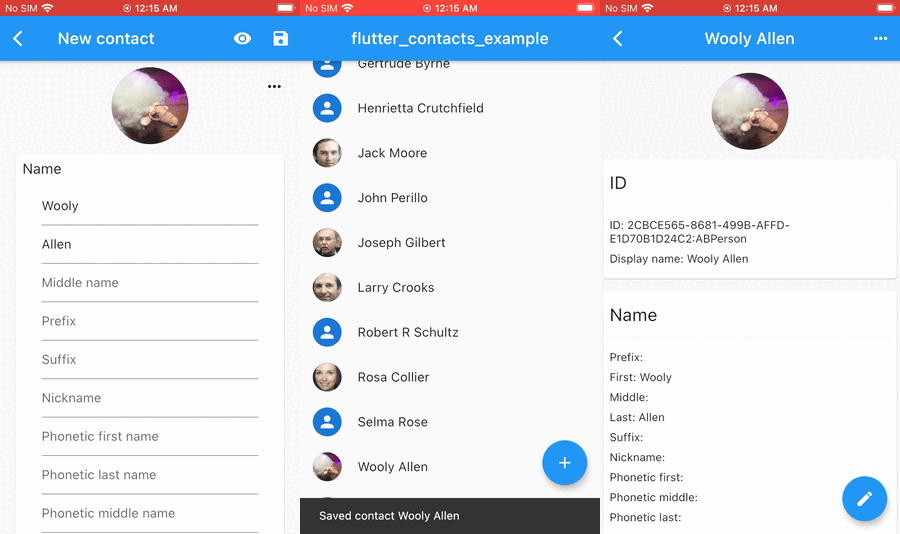
📂 See example/ for a minimal example, or flutter_contacts_example for a full-fledged contacts app.


🧠 Core Concepts

📐 API Structure
Category API Purpose
Core CRUD FlutterContacts.get(), .getAll(), .create(), .createAll(), .update(), .updateAll(), .delete(), .deleteAll() Contact operations
Feature APIs FlutterContacts.accounts, .groups, .permissions, .vCard, .native, .config Specialized features
Platform APIs FlutterContacts.sim (Android), .profile (Android/macOS), .blockedNumbers (Android), .ringtones (Android) Platform-specific
Streams FlutterContacts.onDatabaseChange, .onContactChange Real-time notifications
⚡ Selective Fetching

By default, get() and getAll() fetch only ID and display name. Specify properties for additional fields.

// List view: display name is always fetched, add thumbnails
await FlutterContacts.getAll(
  properties: {ContactProperty.photoThumbnail},
);

// Detail view: all properties
await FlutterContacts.get(contactId, properties: ContactProperties.all);
🔒 Data Integrity

Only fetched properties can be updated. This prevents accidental data loss.

// Fetch name + phone only
var contact = await FlutterContacts.get(id, properties: {ContactProperty.name, ContactProperty.phone});

// Only name and phone are saved; email changes would be ignored
contact = contact.copyWith(name: Name(first: 'Jane'));
await FlutterContacts.update(contact);
Unified Contact Model

On Android, multiple "raw contacts" from different accounts are automatically merged into unified contacts. On iOS, the same merging happens behind the scenes. The plugin provides a single, consistent API across both platforms.

Accounts & Groups

Accounts (containers on iOS) organize contacts by source - Google, iCloud, local device. Groups (labels on Android) organize contacts within an account. When creating a contact, you can specify which account to use; otherwise, it uses the default.


📊 Performance Benchmarks

Tested with ~2,000 contacts on real devices (iPhone 7, Pixel 6):

                          Fetch all contacts: ID + display name (ms)

                          ━━━━━━━━━━━━ iOS ━━━━━━━━━━━━  ━━━━━━━━━━ Android ━━━━━━━━━━━

                          ◀─── faster  slower ───▶        ◀─── faster slower ───▶
flutter_contacts v2       █████░░░░░░░░░░░░░░░░░░░  117   ██████████░░░░░░░░░░░░░   424
fast_contacts             █████░░░░░░░░░░░░░░░░░░░  127   ███████░░░░░░░░░░░░░░░░   304
contacts_service_plus     █████████████░░░░░░░░░░░  462   ███████████████░░░░░░░░   668
flutter_contacts v1       ███████████████████████░  803   ███████████████████████  1075
V2 vs V1 iOS Android
Read speed 1.6–7x faster 2–5x faster
Bulk create 4x faster 5x faster
Bulk delete 34x faster 140x faster

See the benchmark repository for detailed methodology and feature comparison.


📚 Core API

Read
// Single contact with all properties
Contact? contact = await FlutterContacts.get(id, properties: ContactProperties.all);

// All contacts with filtering
List<Contact> contacts = await FlutterContacts.getAll(
  properties: {ContactProperty.name, ContactProperty.phone},
  filter: ContactFilter.name('John'),
  limit: 100,
);

Both get() and getAll() default to fetching only ID + display name. Specify properties for additional fields.

Properties: name, phone, email, address, organization, website, socialMedia, event, relation, note, photoThumbnail, photoFullRes, favorite (Android), ringtone (Android), sendToVoicemail (Android), timestamp (Android), identifiers (Android). Use ContactProperties.all for all properties, or ContactProperties.allProperties to exclude photos. Only fetch the properties you need to improve query performance.

Filters: ContactFilter.name(), .phone(), .email(), .group(), .ids(). Phone/email filters use partial match on Android, full match on iOS.

Create
String id = await FlutterContacts.create(contact, account: account);
List<String> ids = await FlutterContacts.createAll([contact1, contact2]);
Update
// Must fetch first (see Data Integrity above)
await FlutterContacts.update(contact);
await FlutterContacts.updateAll([contact1, contact2]);
Delete
await FlutterContacts.delete(id);
await FlutterContacts.deleteAll([id1, id2, id3]);

🔧 Feature APIs

🔐 Permissions
bool has = await FlutterContacts.permissions.has(PermissionType.read);
PermissionStatus status = await FlutterContacts.permissions.check(PermissionType.read);
PermissionStatus result = await FlutterContacts.permissions.request(PermissionType.readWrite);
await FlutterContacts.permissions.openSettings();

Types: PermissionType.read, .write, .readWrite (on iOS, all are equivalent).

👤 Accounts
List<Account> accounts = await FlutterContacts.accounts.getAll();
Account? defaultAccount = await FlutterContacts.accounts.getDefault();
await FlutterContacts.accounts.showDefaultPicker(); // Android only
👥 Groups
Group? group = await FlutterContacts.groups.get(groupId, withContactCount: true);
List<Group> groups = await FlutterContacts.groups.getAll(accounts: [account]);
Group created = await FlutterContacts.groups.create('Family', account: account);
await FlutterContacts.groups.update(group);
await FlutterContacts.groups.delete(groupId);
await FlutterContacts.groups.addContacts(groupId: groupId, contactIds: [id1, id2]);
await FlutterContacts.groups.removeContacts(groupId: groupId, contactIds: [id1]);
List<Group> contactGroups = await FlutterContacts.groups.getOf(contactId);
📇 vCard
String vCard = FlutterContacts.vCard.export(contact, version: VCardVersion.v3);
String vCards = FlutterContacts.vCard.exportAll([contact1, contact2]);
List<Contact> contacts = FlutterContacts.vCard.import(vCardString);

Supports vCard 2.1, 3.0, and 4.0.

🎨 Native Dialogs (Android & iOS)

System UI for picking, viewing, editing, and creating contacts.

Contact? picked = await FlutterContacts.native.showPicker(
  properties: {ContactProperty.phone},
);
await FlutterContacts.native.showViewer(contactId);
String? editedId = await FlutterContacts.native.showEditor(contactId);
String? createdId = await FlutterContacts.native.showCreator(contact: prefill);

Permissions:

  • showPicker() and showCreator() need no contacts permission on either platform.
  • showPicker(properties: …) is permissionless on iOS. On Android it requires READ_CONTACTS and throws PlatformException if missing.
  • showViewer() and showEditor() are permissionless on Android. On iOS they require NSContactsUsageDescription in Info.plist and a granted read permission.
🔔 Change Listeners
FlutterContacts.onDatabaseChange.listen((_) => refreshUI());

FlutterContacts.onContactChange.listen((changes) {
  for (final change in changes) {
    print('${change.type}: ${change.contactId}');
  }
});
📱 SIM Contacts (Android only)
List<Contact> simContacts = await FlutterContacts.sim.get();

SIM contacts are read-only and typically contain only name and phone.

👤 Profile / "Me" Card (Android & macOS)
Contact? me = await FlutterContacts.profile.get(properties: ContactProperties.all);

Returns the device owner's profile (Android) or "Me" card (macOS). Not available on iOS.

🚫 Blocked Numbers (Android only)

Requires app to be default phone app. See example manifest.

if (await FlutterContacts.blockedNumbers.isAvailable()) {
  bool isBlocked = await FlutterContacts.blockedNumbers.isBlocked('+1234567890');
  List<Phone> blocked = await FlutterContacts.blockedNumbers.getAll();
  await FlutterContacts.blockedNumbers.block('+1234567890');
  await FlutterContacts.blockedNumbers.blockAll([number1, number2]);
  await FlutterContacts.blockedNumbers.unblock('+1234567890');
  await FlutterContacts.blockedNumbers.unblockAll([number1, number2]);
  await FlutterContacts.blockedNumbers.openDefaultAppSettings();
}
🔔 Ringtones (Android only)
String? uri = await FlutterContacts.ringtones.pick(type: RingtoneType.ringtone);
Ringtone? ringtone = await FlutterContacts.ringtones.get(uri, withMetadata: true);
List<Ringtone> all = await FlutterContacts.ringtones.getAll(type: RingtoneType.ringtone);
String? defaultUri = await FlutterContacts.ringtones.getDefaultUri(RingtoneType.ringtone);
await FlutterContacts.ringtones.setDefaultUri(RingtoneType.ringtone, uri);
await FlutterContacts.ringtones.play(uri);
await FlutterContacts.ringtones.stop();
⚙️ Configuration
FlutterContacts.config.enableIosNotes = true; // Requires iOS entitlement

📋 Data Model

See lib/models/ for complete data model documentation.

A Contact contains an id, an auto-generated displayName, and lists of properties (phones, emails, addresses, etc.). Many properties support native labels (home, work, mobile, etc.) and custom labels.

Contact Structure
class Contact {
  final String? id;                         // Stable identifier
  final String? displayName;                // Read-only, auto-generated
  final Photo? photo;
  final Name? name;
  final List<Phone> phones;
  final List<Email> emails;
  final List<Address> addresses;
  final List<Organization> organizations;
  final List<Website> websites;
  final List<SocialMedia> socialMedias;
  final List<Event> events;                 // Birthdays, anniversaries
  final List<Relation> relations;
  final List<Note> notes;

  // Android-specific fields: isFavorite, customRingtone,
  // sendToVoicemail, timestamp, identifiers
  final AndroidData? android;
}
Property Types
// Name
Name(
  first: 'John',
  last: 'Smith',
  middle: 'Q',
  prefix: 'Dr.',
  suffix: 'Jr.',
)

// Phone, Email, Address
Phone('555-1234')
Phone('555-1234', label: Label(PhoneLabel.mobile))
Email('john@example.com', label: Label(EmailLabel.work))
Address(
  street: '123 Main St',
  city: 'New York',
  state: 'NY',
  postalCode: '10001',
  label: Label(AddressLabel.home),
)

// Organization
Organization(
  organizationName: 'FlutterCorp',
  jobTitle: 'Software Engineer',
  departmentName: 'Engineering',
)

// Photo
Photo(fullSize: imageBytes)

Address Usage: Prefer component fields (street, city, state, etc.) when creating/editing. The formatted field is available when reading and is guaranteed to be present.

Photo Usage: When creating/updating, set Photo(fullSize: imageBytes) - the system automatically generates the thumbnail. When reading, fetch ContactProperty.photoThumbnail (fast) for contact lists, ContactProperty.photoFullRes (slower) for detail views.

Note: The examples above show common fields. See lib/models/ for the complete list of all available fields and properties.

Labels

Most properties support labels (home, work, mobile, etc.) and custom labels:

// Standard label
Phone('555-1234', label: Label(PhoneLabel.mobile))

// Custom label
Phone('555-1234', label: Label(PhoneLabel.custom, customLabel: 'Emergency'))

Platform Support: Some labels are platform-specific (e.g., PhoneLabel.appleWatch is iOS-only, PhoneLabel.workMobile is Android-only). Unsupported labels are automatically converted to custom labels with the original name preserved.


⚠️ Platform Limitations

iOS & macOS

Not Available:

  • APIs: ringtones, blockedNumbers, sim, profile (iOS), native (macOS)
  • Properties: favorite, ringtone, sendToVoicemail, timestamp, identifiers, debugData (all nested in android field)
  • Fields: Phone.isPrimary, Phone.normalizedNumber, Email.isPrimary, Address.poBox, Address.neighborhood, Organization.jobDescription, Organization.symbol, Organization.officeLocation
  • Some Android-specific labels (auto-converted to custom)

Limits: One organization, one note, one birthday per contact.

Filtering: Phone and email filters only support full match (not partial).

iOS Notes: Requires the com.apple.developer.contacts.notes entitlement and FlutterContacts.config.enableIosNotes = true. See Apple's documentation.

Android

Not Available:

  • Fields: Name.previousFamilyName, Address.isoCountryCode, Address.subAdministrativeArea, Address.subLocality
  • Some iOS-specific labels (auto-converted to custom)

Special Features:

  • SIM Contacts: Read-only, typically name + phone only
  • Blocked Numbers: Requires app to be default phone app

🔄 Migrating from v1

If you're using flutter_contacts v1:

v1 v2
FlutterContacts.getContacts() FlutterContacts.getAll()
FlutterContacts.getContact(id) FlutterContacts.get(id)
contact.insert() FlutterContacts.create(contact)
FlutterContacts.requestPermission() FlutterContacts.permissions.request(PermissionType.readWrite)
FlutterContacts.addListener() FlutterContacts.onDatabaseChange.listen()
contact.toVCard() FlutterContacts.vCard.export(contact)
PhoneLabel.mobile Label(PhoneLabel.mobile)
FlutterContacts.openExternalView(id) FlutterContacts.native.showViewer(id)
FlutterContacts.openExternalPick() FlutterContacts.native.showPicker()
FlutterContacts.openExternalEdit(id) FlutterContacts.native.showEditor(id)
FlutterContacts.openExternalInsert() FlutterContacts.native.showCreator()

🤝 Contributing

We'd love your help making this plugin even better. Found a bug? Have a feature idea? Want to improve the docs?

Every contribution, big or small, makes a difference. Thank you for helping make Flutter Contacts better for everyone.


📄 License

MIT License - see the LICENSE file for details.


💝 Support

Flutter Contacts is maintained in my free time. If this plugin has been helpful for your project, consider supporting its development. Your support helps me continue maintaining and improving it.

ko-fi


🙏 Acknowledgments

Special thanks to all contributors and users who have helped shape this plugin.


Made with ❤️ for the Flutter community

⭐ Star us on GitHub | 📖 Documentation | 🐛 Report Issues

카테고리

소스 저장소

이 패키지를 사용하는 프로젝트