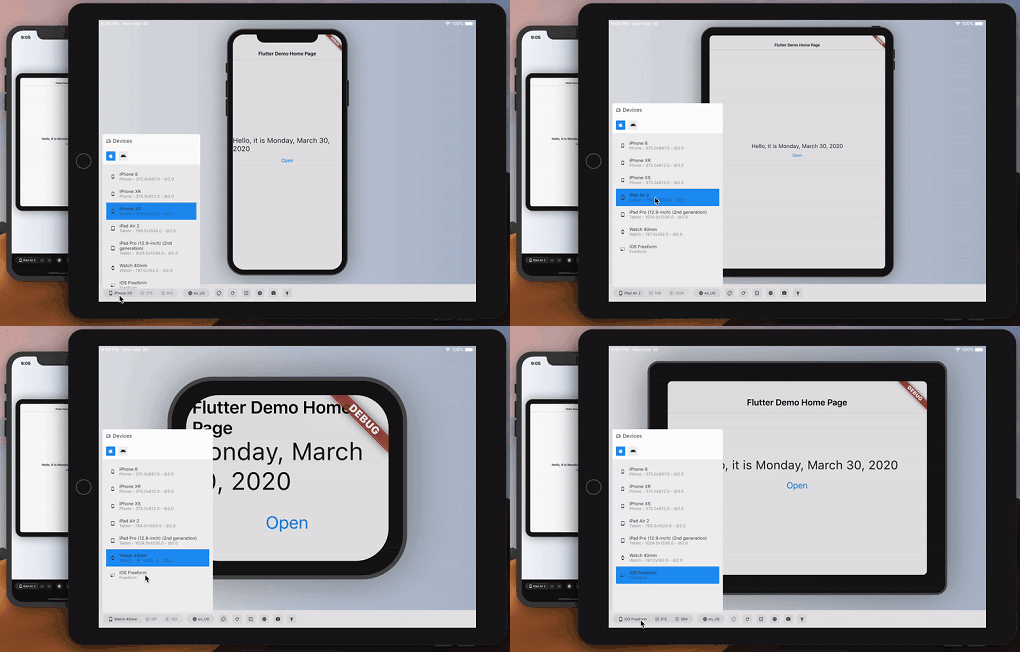
Aus öffentlichen Paketdaten erstellte Orientierung.
Device Preview ist ein Flutter-Paket, das Entwicklern ermöglicht, zu simulieren, wie ihre App auf verschiedenen Geräten im Entwicklungsumfeld aussieht und sich verhält. Es bietet Echtzeit-Gerätesimulation mit Bildschirmgröße, Ausrichtung, Plattform und Systemeinstellungen wie Dunkelmodus. Dadurch wird sichergestellt, dass die Benutzeroberfläche konsistent auf verschiedenen Geräten ist, ohne physische Hardware benötigen zu müssen. Das Paket unterstützt mehrere Plattformen, darunter Android, iOS, Web, macOS, Windows und Linux, was es ideal für plattformübergreifende Tests macht.
Anwendungsfälle
UI-Reaktionsfähigkeit auf verschiedenen Geräten testen
Simulation verschiedener Bildschirmgrößen und Ausrichtungen
Überprüfung des Dunkelmodus und plattformspezifischer Verhaltensweisen
Vorschau der App-Ansicht auf verschiedenen Gerätearten
Überprüfung der plattformübergreifenden UI-Konsistenz
Hauptmerkmale
Echtzeit-Gerätemulation
Unterstützung für mehrere Plattformen
Dynamische Geräteauswahl
Orientierungs- und Themen-Simulation
Integration mit Flutter DevTools
Geeignet für
Flutter-Entwickler testen UI-Layouts
Teams, die an cross-platform-Anwendungen arbeiten
Designer validieren responsive Designs
Entwickler, die Barrierefreiheit und Benutzerfreundlichkeit sicherstellen
Hinweise
Kein Ersatz für die physische Geräteprüfung
Die Leistung kann bei komplexen Benutzeroberflächen variieren
Beschränkt auf visuelle und verhaltensbasierte Simulation
Repliziert keine Netzwerk- oder Hardwarebedingungen
Original-README
Originaler README-Schnappschuss aus dem verknüpften Quell-Repository. Aktuelle Inhalte finden Sie im Repository.
Simulate any device — screen, safe areas, locale, accessibility — with full framework fidelity.
You build on one screen; your users arrive on hundreds. Device Preview switches your running app to another device — an old 320pt phone, a tablet in landscape, a notched display, a half-width desktop window — instantly, with no rebuild and no simulator.
Screen size, pixel ratio, safe areas, orientation, folds, the software keyboard, locales, brightness, text scale, accessibility settings and target platform all change with it, and your app reads them through the same MediaQuery it always used. So the problems that normally surface in front of a customer — a clipped headline, a button under the home indicator, an overflow at 200% text — surface in front of you instead.
Control it from Flutter DevTools, from Dart, or from your tests.
Quickstart
dependencies:device_preview:<latestversion>
voidmain() {
DevicePreview.enable();
runApp(constMyApp()); // runs as usual — now simulatable
}
That's the whole integration. Open DevTools, select the device_preview tab, and pick a device.
enable() is safe to call unconditionally: simulation is active in debug and profile builds and completely off in release, so nothing ships to your users. Pass a value to decide yourself — DevicePreview.enable(enabled: kDebugMode) for debug only, DevicePreview.enable(enabled: false) to turn it off.
Programmatic control:
import'package:device_preview/presets.dart';
final c = DevicePreview.controller;
await c.applyPreset(DevicePresets.iPhone16Pro);
await c.setOrientation(Orientation.landscape);
await c.update((s) => s.copyWith(textScaleFactor: 2.0, platformBrightness: Brightness.dark));
await c.reset();
DevicePreview.controller throws when simulation is off (every release build); use DevicePreview.maybeController?.… from code that ships.
See device_preview/README.md for the full package documentation, including widget-test support via DevicePreviewBindingMixin.
The device catalog: one JSON per device — metrics, screen outline and body artwork. Generated into both the extension catalog and the package's built-in DevicePresets; see its README to add a device.
Legacy device frame drawings package from the 2.x era. Nothing in the 3.0 release depends on it — 3.0 renders frames from the device_specs artwork, carried by the built-in presets and pushed over the DevTools protocol.
The website, including its interactive demo — docs/demo is the counter example built for the web, docs/device_catalog.json the catalog its HTML panel pushes to it. Rebuild both with tool/build_demo.sh.