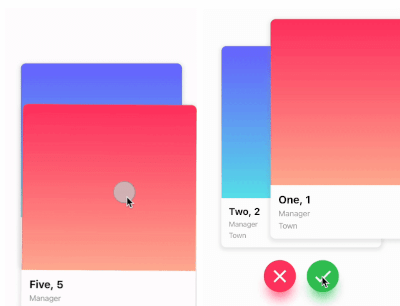
Dies ist ein Tinder-ähnliches Karten-Swiper-Paket. Es ermöglicht Ihnen das Swipen nach links, rechts, oben und unten sowie die Definition Ihrer eigenen Geschäftslogik für jede Richtung.
Aus öffentlichen Paketdaten erstellte Orientierung.
Ein Flutter-Paket, das Tinder-artiges Karten-Swipen mit Unterstützung für linke, rechte, obere und untere Gesten ermöglicht. Entwickler können benutzerdefinierte Logik für jede Swiprichtung festlegen, was es ideal für Anwendungen wie Dating-Apps, Produktpräsentationen oder Inhaltsentdeckungs-Interfaces macht. Das Paket ist plattformübergreifend und funktioniert nahtlos auf Android, iOS, Web, macOS, Windows und Linux. Es bietet eine reibungslose und anpassbare Swipe-Erfahrung mit integrierter Animation und Gestenerkennung.
Anwendungsfälle
Dating-App-Oberflächen
Produkt- oder Artikelentdeckung
Inhaltsempfehlungssysteme
Interaktive Erzählung
Sammlung von Benutzereinstellungen
Hauptmerkmale
Tinder-ähnliche Swipen-Gesten
Anpassbare Swipe-Logik pro Richtung
Plattformübergreifende Kompatibilität
eingebaute Animationen
Gestenerkennung
erweiterbarer Widget-Entwurf
Geeignet für
Entwickler, die swipe-basierte Benutzeroberflächen erstellen
Apps, die eine Benutzerinteraktion über Kartenwischen erfordern
Projekte, die intuitive Navigationsmuster benötigen
Prototyping interaktiver Karten-Erlebnisse
Hinweise
Erfordert sorgfältige Behandlung der Swipe-Zustandsverwaltung
Möglicherweise sind zusätzliche Stile für komplexe Layouts erforderlich
Leistungsbeeinträchtigung bei großen Datensätzen
Nur auf kartenbasierte Interaktionen beschränkt
Nicht für vertikale Scrolllisten optimiert
Original-README
Originaler README-Schnappschuss aus dem verknüpften Quell-Repository. Aktuelle Inhalte finden Sie im Repository.
flutter_card_swiper
This is a Flutter package for a Tinder-like card swiper. ✨
It allows you to swipe left, right, up, and down and define your own business logic for each direction.
Very smooth animations supporting Android, iOS, Web & Desktop.
Why?
We built this package because we wanted to:
Have a fully customizable slider
Swipe in any direction
Undo swipes as many times as you want
Choose your own settings such as duration, angle, padding and more
Trigger swipes in any direction with the controller
Add callbacks while swiping, on end, or when the swiper is disabled
Detect the direction (left, right, top, bottom) the card was swiped
Show Cases
Swipe in any direction
Trigger swipes
Unswipe the cards
Fully customizable
Installation
Add this to your package's pubspec.yaml file:
card_swiper:...
OR run
flutterpubaddflutter_card_swiper
in your project's root directory.
Usage
You can place your CardSwiper inside of a Scaffold like we did here. Optional parameters can be defined to enable different features. See the following example:
Index of the first card when the swiper is initialized
false
isDisabled
false
Set to true if swiping should be disabled, has no impact when triggered from the outside
false
isLoop
true
Set to true if the stack should loop
false
maxAngle
30
Maximum angle that the card can reach during swiping
false
allowedSwipeDirection
AllowedSwipeDirection.all
Sets the direction in which the card can be swiped. It can be set to any combination of left, right up or down.
false
numberOfCardsDisplayed
2
Number of cards displayed at the same time
false
onEnd
-
Callback when there are no more cards left to swipe
false
onSwipe
-
Callback when the user swipes a card. If the function returns false, the swipe action is canceled. If it returns true, the swipe action is performed as expected
false
onTapDisabled
-
Callback when a card is tapped and isDisabled is true
false
onUndo
-
Callback when the controller calls undo. If the function returns false, the undo action is canceled. If it returns true, the undo action is performed as expected
A callback containing the horizontal and vertical swipe direction
false
showBackCardOnUndo
-
If true, the previous card will be shown in the background when swiping, and the swipe action will trigger an undo
false
undoSwipeThreshold
50
The horizontal swipe distance threshold, in pixels, after which the back card switches to the previous card. Only active when showBackCardOnUndo is true
false
undoDirection
UndoDirection.left
The direction of the swipe to trigger an undo
false
Controller
The Controller is used to swipe the card from outside of the widget. You can create a controller called CardSwiperController and save the instance for further usage. Please have a closer look at our Example for the usage.