Pakete, Repositories und App-Kategorien suchen

Cover von flutter_flavor
Paketdetailsv3.1.4

flutter_flavor

Wir können verschiedene Geschmacksrichtungen erstellen und dadurch unterschiedliche Instanzen unserer Apps haben, bevor wir sie in der App Store und Google Play veröffentlichen.

AndroidiOSWebmacOSWindowsLinux
30-Tage-Downloads
33.500
Likes
479
Pub-Punkte
160

Paket installieren

flutter pub add flutter_flavor

Paketübersicht

Aus öffentlichen Paketdaten erstellte Orientierung.

flutter_flavor ist ein Entwicklerwerkzeug, das die Erstellung verschiedener App-Flavors ermöglicht und unterschiedliche Konfigurationen und Builds für verschiedene Umgebungen – wie Entwicklung, Staging und Produktion – vor der Veröffentlichung in App-Stores erlaubt. Es vereinfacht die Verwaltung umgebungsspezifischer Einstellungen wie API-Endpunkte, Protokollierungsstufen und Branding, ohne Code zu duplizieren. Das Paket integriert sich nahtlos in das Build-System von Flutter auf allen unterstützten Plattformen, einschließlich Android, iOS, Web, macOS, Windows und Linux. Es hilft Teams, saubere, konfigurierbare Workflows für Tests und Bereitstellung zu pflegen.

Anwendungsfälle

  • Verwaltung mehrerer Umgebungen
  • Build-Konfigurationen anpassen
  • Testen vor der Freigabe
  • Trennung von Dev/Staging/Prod-Einstellungen
  • CI/CD-Pipelines optimieren

Hauptmerkmale

  • umgebungsbezogene Konfiguration
  • Plattformübergreifende Unterstützung
  • Einfache Integration mit Flutter
  • Build-time-Flavor-Differenzierung
  • Minimales Boilerplate

Geeignet für

  • Entwicklungsteams
  • CI/CD-Arbeitsabläufe
  • Multi-Umgebung-Anwendungen
  • App-Anpassung pro Release
  • Teams, die verschiedene Bereitstellungsstufen verwenden

Hinweise

  • Erfordert Einrichtung in Build-Skripten
  • Geschmacksnamen müssen plattformübergreifend konsistent sein
  • begrenzter Laufzeitwechsel
  • Nicht für die Benutzer-orientierte Geschmacksauswahl vorgesehen
  • Erfordert Abstimmung zwischen Teammitgliedern

Original-README

Originaler README-Schnappschuss aus dem verknüpften Quell-Repository. Aktuelle Inhalte finden Sie im Repository.

flutter_flavor

pub package Star on Github License: MIT

Flavors helps us to create builds for different instances of our app. For example, we can create a flavor for development, a flavor for production and another flavor for a demo of the app. In this way we can create different flavors, and thus have different instances of our apps before publishing it on the App Store and Google Play.

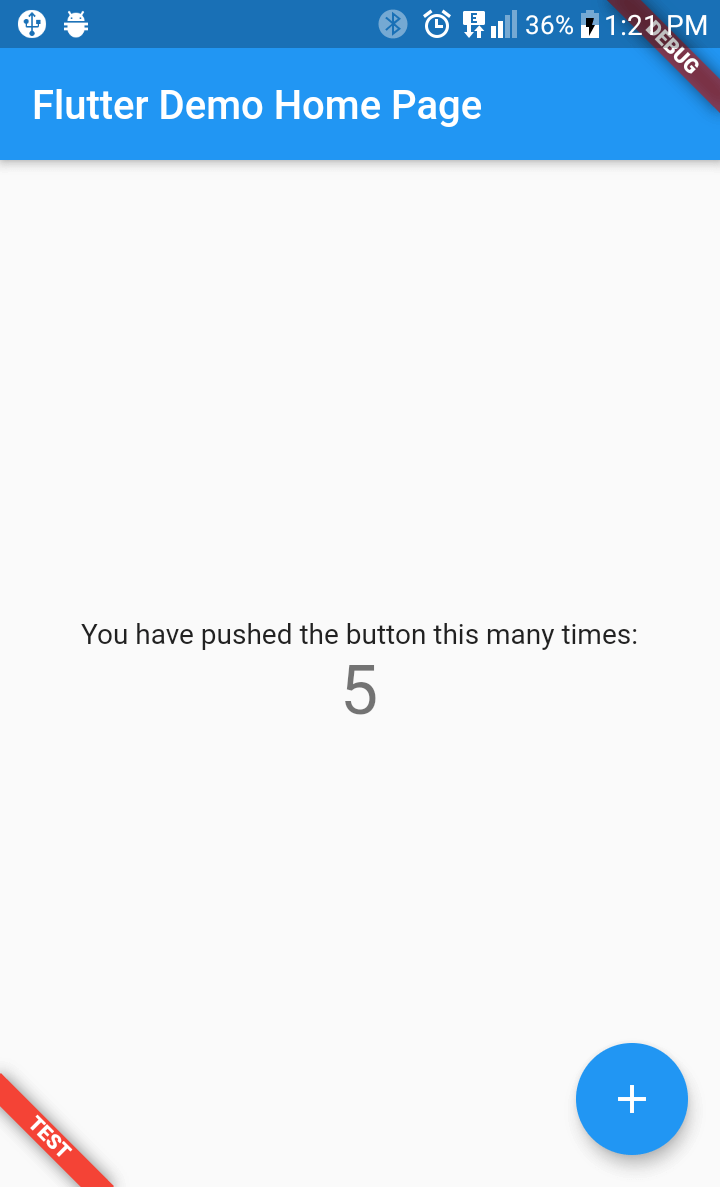
flutter_favor allows you to quickly configure and define dynamic variables for each flavor in your project. The flavors, as well as their names; they are dynamically defined by the developer or development team. In the configuration of a flavor you can set the name of each flavor, as well as the color and location of its banner. When attribute name is undefined or empty, the banner is hidden.

You can also configure the banners independently. The aforementioned attributes are globally configured in FlavorConfig, but can be changed in the FlavorBanner.

Screenshot

PROD DEV TEST
Screenshot Prod Screenshot Dev Screenshot Test

Note By default the banner is shown in BannerLocation.topStart and is visibility only when the attribute name of configuration is defined and not empty.

Getting Started

Adding package
flutter_flavor: ^3.1.4
Importing package
import 'package:flutter_flavor/flutter_flavor.dart';
Configuring
FlavorConfig(
    name: "DEVELOP",
    color: Colors.red,
    location: BannerLocation.bottomStart,
    variables: {
        "counter": 0,
        "baseUrl": "https://www.example.com",
    }
);
Using variables
 int _counter = FlavorConfig.instance.variables["counter"];

Example

Main
import 'package:flutter/material.dart';
import 'package:flutter_flavor/flutter_flavor.dart';

import 'app.dart';

void main() {
  FlavorConfig(
    name: "DEVELOP",
    color: Colors.red,
    location: BannerLocation.topStart,
    variables: {
      "counter": 5,
      "baseUrl": "https://www.example2.com",
    },
  );

  runApp(const MyApp());
}
App
import 'package:flutter/material.dart';
import 'package:flutter_flavor/flutter_flavor.dart';

class MyApp extends StatelessWidget {
  const MyApp({super.key});

  @override
  Widget build(BuildContext context) {
    return FlavorBanner(
      child: MaterialApp(
        title: 'Flutter Demo',
        theme: ThemeData(
          colorScheme: ColorScheme.fromSeed(seedColor: Colors.deepPurple),
          useMaterial3: true,
        ),
        home: const MyHomePage(title: 'Flutter Demo Home Page'),
      ),
    );
  }
}

class MyHomePage extends StatefulWidget {
  const MyHomePage({super.key, required this.title});
  final String title;

  @override
  State<MyHomePage> createState() => _MyHomePageState();
}

class _MyHomePageState extends State<MyHomePage> {
  int _counter = 0;

  void _incrementCounter() {
    setState(() {
      _counter++;
    });
  }

  @override
  Widget build(BuildContext context) {
    return Scaffold(
      appBar: AppBar(
        backgroundColor: Theme.of(context).colorScheme.inversePrimary,
        title: Text(widget.title),
      ),
      body: Center(
        child: Column(
          mainAxisAlignment: MainAxisAlignment.center,
          children: <Widget>[
            const Text(
              'You have pushed the button this many times:',
            ),
            Text(
              '$_counter',
              style: Theme.of(context).textTheme.headlineMedium,
            ),
          ],
        ),
      ),
      floatingActionButton: FloatingActionButton(
        onPressed: _incrementCounter,
        tooltip: 'Increment',
        child: const Icon(Icons.add),
      ),
    );
  }
}

VSCode Configuration

The .vscode folder is created in the workspace, if it does not exist it can be created by hand. Inside that folder a launch.json file is created and the configuration is established inside the file. For more information, visit: https://code.visualstudio.com/docs/editor/debugging and https://go.microsoft.com/fwlink/?linkid=830387

{
  "version": "0.2.0",
  "configurations": [
    {
      "name": "PROD-Flavor",
      "program": "[project-folder]/lib/main_prod.dart",
      "request": "launch",
      "type": "dart"
    },
    {
      "name": "DEV-Flavor",
      "program": "[project-folder]/lib/main_dev.dart",
      "request": "launch",
      "type": "dart"
    }
  ]
}

License

MIT License

Kategorien

Quell-Repository

Projekte, die dieses Paket verwenden