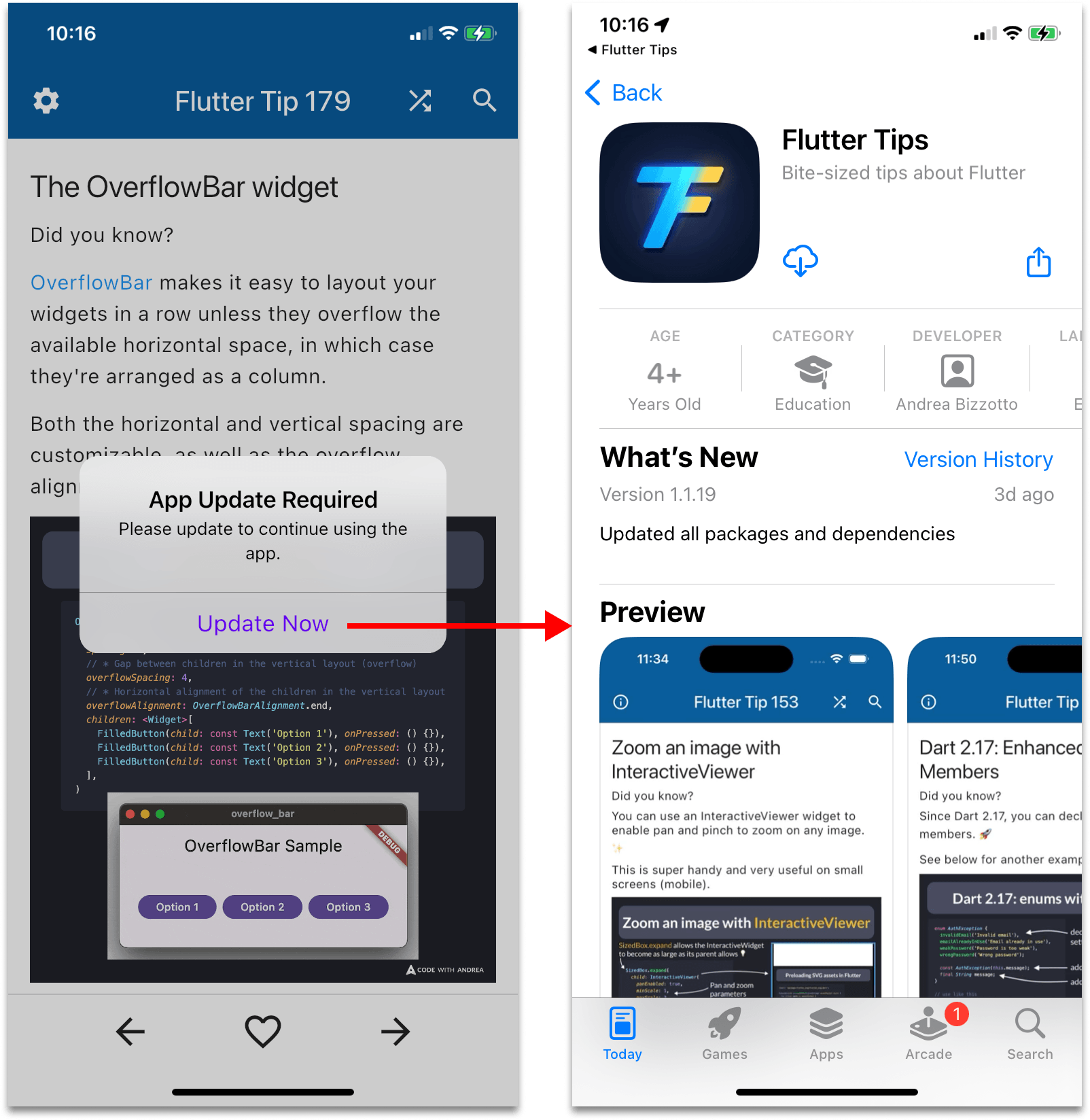
Aus öffentlichen Paketdaten erstellte Orientierung.
Ein Flutter-Paket, das remote-gesteuerte, erzwungene Aktualisierungsanfragen für Android- und iOS-Apps ermöglicht. Es ermöglicht Entwicklern, App-Updates durch Überprüfung einer Remote-Konfiguration (z. B. einen JSON-Endpunkt) beim App-Start zu erzwingen. Falls ein Update erforderlich ist, wird der Benutzer sofort zur Aktualisierung aufgefordert, wodurch sichergestellt wird, dass alle Benutzer die neueste Version verwenden. Das Paket ist leichtgewichtig und lässt sich nahtlos in bestehende Apps integrieren, ohne komplexe Einrichtung.
Anwendungsfälle
Kritische Fehlerbehebungen durchsetzen
Sicherheitsaktualisierungen übertragen
Funktionsgleichheit zwischen Benutzern aufrechterhalten
Steuerung des Zeitpunkts für die Updateverteilung
Die Einhaltung neuer App-Richtlinien sicherstellen
Hauptmerkmale
Remote-Konfiguration über HTTP-Endpunkt
Einfache Integration mit minimalem Code
Unterstützung für Android und iOS
Anpassbare Prompt-Oberfläche
Optionale Verzögerung vor erzwungener Aktualisierung
Geeignet für
Apps, die eine strenge Versionskontrolle erfordern
Unternehmens- oder regulierte Anwendungen
Apps mit häufigen Funktionsfreigaben
Teams, die mehrere App-Versionen verwalten
Hinweise
Stabile Internetverbindung erforderlich
Beruht auf der Verfügbarkeit eines externen Servers
Kann die Benutzererfahrung beeinträchtigen, wenn übermäßig verwendet
Erforderliche ordnungsgemäße Fehlerbehandlung bei fehlgeschlagenen Überprüfungen
Nicht geeignet für Apps ohne Backend-Unterstützung
Original-README
Originaler README-Schnappschuss aus dem verknüpften Quell-Repository. Aktuelle Inhalte finden Sie im Repository.
Force Update Helper
A package for showing a force update prompt that is controlled remotely.
Features
Remote control: control the force update logic remotely with a custom backend, or Firebase Remote Config, or anything that resolves to a Future<String>.
UI-agnostic: the package tells you when to show the update UI, you decide how to show it (localization is up to you).
Small and opinionated: the package is made of only two classes. Use it as is, or fork it to suit your needs.
Getting started
Depend on it:
dependencies:force_update_helper:
Use it by adding a ForceUpdateWidget to your MaterialApp's builder property:
voidmain() {
runApp(constMainApp());
}
final _rootNavigatorKey = GlobalKey<NavigatorState>();
classMainAppextendsStatelessWidget{
constMainApp({super.key});
@overrideWidgetbuild(BuildContext context) {
returnMaterialApp(
navigatorKey: _rootNavigatorKey,
builder: (context, child) {
returnForceUpdateWidget(
navigatorKey: _rootNavigatorKey,
forceUpdateClient: ForceUpdateClient(
// * Real apps should fetch this from an API endpoint or via// * Firebase Remote Config
fetchRequiredVersion: () => Future.value('2.0.0'),
// * Example ID from this app: https://fluttertips.dev/// * To avoid mistakes, store the ID as an environment variable and// * read it with String.fromEnvironment
iosAppStoreId: '6482293361',
),
allowCancel: false,
showForceUpdateAlert: (context, allowCancel) => showAlertDialog(
context: context,
title: 'App Update Required',
content: 'Please update to continue using the app.',
cancelActionText: allowCancel ? 'Later' : null,
defaultActionText: 'Update Now',
),
showStoreListing: (storeUrl) async {
if (awaitcanLaunchUrl(storeUrl)) {
awaitlaunchUrl(
storeUrl,
// * Open app store app directly (or fallback to browser)
mode: LaunchMode.externalApplication,
);
} else {
log('Cannot launch URL: $storeUrl');
}
},
onException: (e, st) {
log(e.toString());
},
child: child!,
);
},
home: constScaffold(
body: Center(
child: Text('Hello World!'),
),
),
);
}
}
Note that in order to show the update dialog, a root navigator key needs to be added to MaterialApp (this is the same technique used by the upgrader package).
How the package works
Unlike the upgrader package, this package does not use the app store APIs to check if a newer version is available.
Instead, it allows you to store the required version remotely (using a custom backend or Firebase Remote Config), and compare it with the current version from your pubspec.yaml.
Here's how you may use this in production:
Submit a new version of your app to the stores
Once it's approved, publish it
Wait for an hour or so, to account for the time it takes for the new version to be visible on all stores/countries
Update the required_version endpoint in your custom backend or via Firebase Remote Config
Once users open the app, the force update logic will kick in and force them to update
The ForceUpdateClient class fetches the required version and compares it with the current version from package_info_plus. Versions are compared using the pub_semver package.
The fetchRequiredVersion callback should fetch the required version from an API endpoint or Firebase Remote Config.
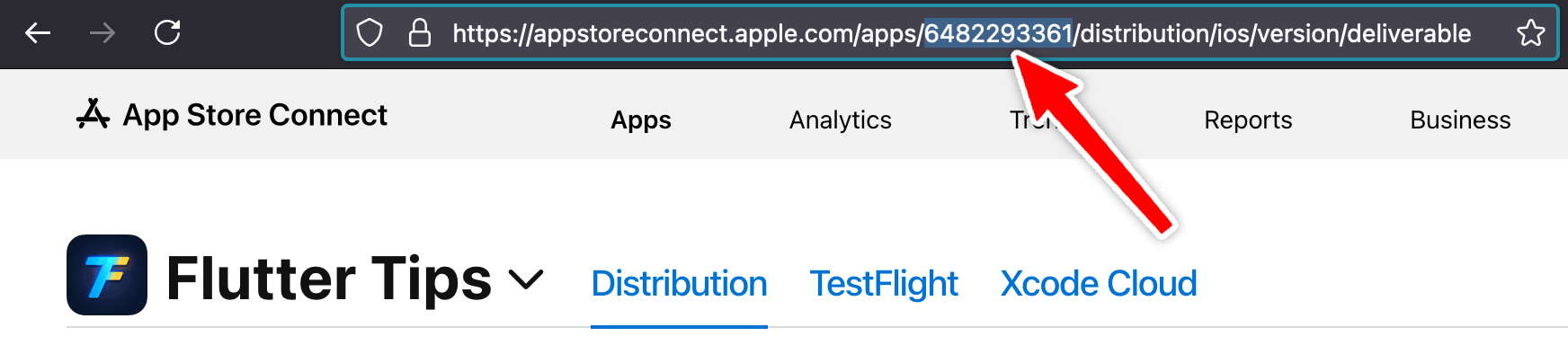
When creating your iOS app in App Store Connect, copy the app ID and use it as the iosAppStoreId, otherwise the force upgrade alert will not show. I recommend storing an APP_STORE_ID as an environment variable that is set with --dart-define or --dart-define-from-file and read with String.fromEnvironment.
The Play Store URL is automatically generated from the package name (which is retrieved with the package_info_plus package)
If you want to make the update optional, pass allowCancel: true to the ForceUpdateWidget and use it to add a cancel button to the alert dialog. This will make the alert dismissable, but the prompt will still show on the next app start.
You can catch and handle any exceptions with the onException handler. Alternatively, omit the onException and handle exceptions globally.
If you use the url_launcher package to open the app store URLs (which is the recommended way), don't forget to add the necessary query intent inside AndroidManifest.xml:
when the app returns to the foreground (common when switching between apps)
Then, the update alert will show if all these conditions are true:
the app is running on iOS or Android (web and desktop are not supported)
the requiredVersion is fetched successfully
the requiredVersion is greater than the currentVersion
(iOS only) the iosAppStoreId is a non-empty string
If the user clicks on "Update Now" and lands on the app store page but does not update the app, the force update alert will show again when returning to the app.
If the update alert shows on Android and the back button is pressed, it will be shown again unless allowCancel is true.
Where to find the iosAppStoreId
Once you have created your app in App Store Connect, you can grab the app ID from the browser URL:
Make sure to set the correct iosAppStoreIdbefore releasing the first version of your app, otherwise users on old version won't be able to update.
Example: fetching a remote config JSON from a GitHub Gist
The example app shows how to fetch some remote config JSON from a RemoteConfigGistClient:
ForceUpdateWidget(
navigatorKey: _rootNavigatorKey,
forceUpdateClient: ForceUpdateClient(
fetchRequiredVersion: () async {
// * Fetch remote config from an API endpoint.// * Alternatively, you can use Firebase Remote Configfinal client = RemoteConfigGistClient(dio: Dio());
final remoteConfig = await client.fetchRemoteConfig();
return remoteConfig.requiredVersion;
},
// * Example ID from this app: https://fluttertips.dev/// * To avoid mistakes, store the ID as an environment variable and// * read it with String.fromEnvironment
iosAppStoreId: '6482293361',
),
allowCancel: false,
showForceUpdateAlert: (context, allowCancel) => showAlertDialog(
context: context,
title: 'App Update Required',
content: 'Please update to continue using the app.',
cancelActionText: allowCancel ? 'Later' : null,
defaultActionText: 'Update Now',
),
showStoreListing: (storeUrl) async {
if (awaitcanLaunchUrl(storeUrl)) {
awaitlaunchUrl(
storeUrl,
// * Open app store app directly (or fallback to browser)
mode: LaunchMode.externalApplication,
);
} else {
log('Cannot launch URL: $storeUrl');
}
},
onException: (e, st) {
log(e.toString());
},
child: child!,
)
The RemoteConfigGistData class can be used to fetch and parse some JSON in this format:
{"config":{"required_version":"2.0.0"}}
Here's the reference RemoteConfigGistData class:
import'dart:convert';
import'package:dio/dio.dart';
classRemoteConfigGistData{
RemoteConfigGistData({requiredthis.requiredVersion});
finalString requiredVersion;
factoryRemoteConfigGistData.fromJson(Map<String, dynamic> json) {
final requiredVersion = json['config']?['required_version'];
if (requiredVersion == null) {
throwFormatException('required_version not found in JSON: $json');
}
returnRemoteConfigGistData(requiredVersion: requiredVersion);
}
}
/// An API client class for fetching a remote config JSON from a GitHub gistclassRemoteConfigGistClient{
constRemoteConfigGistClient({requiredthis.dio});
finalDio dio;
/// Fetch the remote config JSONFuture<RemoteConfigGistData> fetchRemoteConfig() async {
// TODO: Update this with your GitHub usernameconst owner = 'bizz84';
// TODO: Update this with your gist IDsconst gistId = 'e5b8041b35c58a3eba2baa23096d1678';
// TODO: Update this with your gist file nameconst fileName = 'app_name_remote_config.json';
const url =
'https://gist.githubusercontent.com/$owner/$gistId/raw/$fileName';
final response = await dio.get(url);
final jsonData = jsonDecode(response.data);
returnRemoteConfigGistData.fromJson(jsonData);
}
}