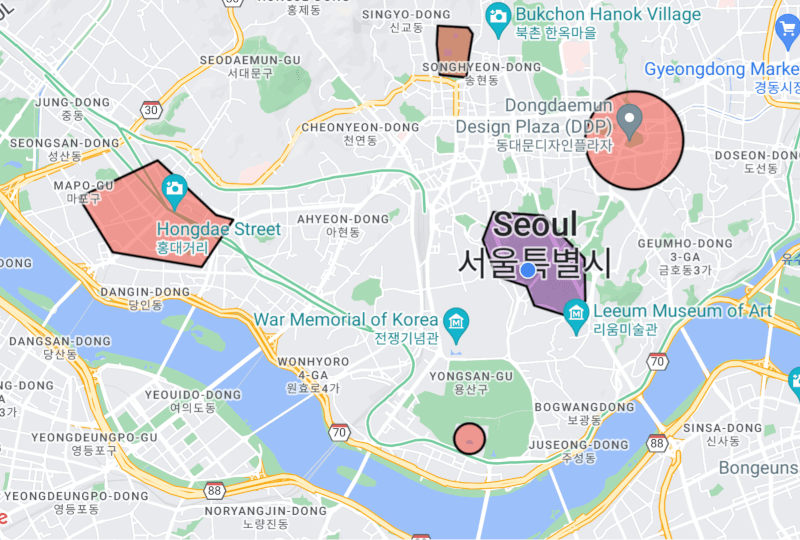
Aus öffentlichen Paketdaten erstellte Orientierung.
Das geofencing_api-Paket ermöglicht Entwicklern die Implementierung von kreisförmigen und polygonbasierten Geofencing-Funktionen auf Android-, iOS- und Webplattformen. Es bietet eine einheitliche Schnittstelle zum Überwachen geografischer Grenzen und zum Auslösen von Ereignissen, wenn Benutzer definierte Regionen betreten oder verlassen. Ideal für ortungsbezogene Anwendungen unterstützt es Echtzeit-Standortverfolgung und Bereichsüberwachung mit minimalem Aufwand. Der Plugin integriert sich nahtlos in Flutter-Anwendungen und nutzt native Geofencing-Funktionen für optimale Leistung und Batterieeffizienz.
Der Batterieverbrauch kann bei aktivem Monitoring steigen
Web-Unterstützung beschränkt auf moderne Browser
Die Polygongenauigkeit hängt von der Gerätegenauigkeit ab
Einschränkungen für Hintergrundausführung auf einigen Plattformen
Original-README
Originaler README-Schnappschuss aus dem verknüpften Quell-Repository. Aktuelle Inhalte finden Sie im Repository.
This plugin is used to implement circular and polygon geofencing service.
[!CAUTION]
It does not use the geofencing api implemented in the platform.
Therefore, battery efficiency cannot be guaranteed.
Instead, this plugin can provide more accurate and real-time geofencing by navigating your location while your app is alive.
Features
Can create a circular type geofence.
Can create a polygon type geofence.
Can listen to geofence status changes in real-time.
<key>NSLocationAlwaysAndWhenInUseUsageDescription</key>
<string>Used to collect location data in the background.</string><key>NSLocationAlwaysUsageDescription</key><string>Used to collect location data in the background.</string><key>UIBackgroundModes</key><array><string>fetch</string><string>location</string></array>
Request location permission. To start the geofencing service, the permission result must be always or whileInUse.
Future<bool> requestLocationPermission({bool background = false}) async {
if (!awaitGeofencing.instance.isLocationServicesEnabled) {
// Location services is disabled.returnfalse;
}
LocationPermission permission =
awaitGeofencing.instance.getLocationPermission();
if (permission == LocationPermission.denied) {
// Android: ACCESS_COARSE_LOCATION or ACCESS_FINE_LOCATION// iOS 12-: NSLocationWhenInUseUsageDescription or NSLocationAlwaysAndWhenInUseUsageDescription// iOS 13+: NSLocationWhenInUseUsageDescription
permission = awaitGeofencing.instance.requestLocationPermission();
}
if (permission == LocationPermission.denied ||
permission == LocationPermission.deniedForever) {
// Location permission has been ${permission.name}.returnfalse;
}
// Web: Only allow whileInUse permission.if (kIsWeb || kIsWasm) {
returntrue;
}
// Android: You must request location permission one more time to access background location.// iOS 12-: You can request always permission through the above request.// iOS 13+: You can only request whileInUse permission through the above request.// When the app enters the background, a prompt will appear asking for always permission.if (Platform.isAndroid &&
background &&
permission == LocationPermission.whileInUse) {
// You need a clear explanation of why your app's feature needs access to background location.// https://developer.android.com/develop/sensors-and-location/location/permissions#request-background-location// Android: ACCESS_BACKGROUND_LOCATION
permission = awaitGeofencing.instance.requestLocationPermission();
if (permission != LocationPermission.always) {
// Location permission must always be granted to collect location in the background.returnfalse;
}
}
returntrue;
}
Set up the geofencing service.
interval: The millisecond interval at which to update the geofence status. This value may be delayed by device platform limitations. The default is 5000.
accuracy: The accuracy of the geofencing service in meters. The default is 100.
statusChangeDelay: The status change delay in milliseconds. GeofenceStatus.enter and GeofenceStatus.exit events may be called frequently when the location is near the boundary of the geofence. If the option value is too large, real-time geofencing is not possible, so use it carefully. The default is 10000.
allowsMockLocation: Whether to allow mock location. The default is false.
printsDebugLog: Whether to print debug logs in plugin. The default is true.