Pakete, Repositories und App-Kategorien suchen

Cover von markdown_widget
Paketdetailsv2.3.2+8

markdown_widget

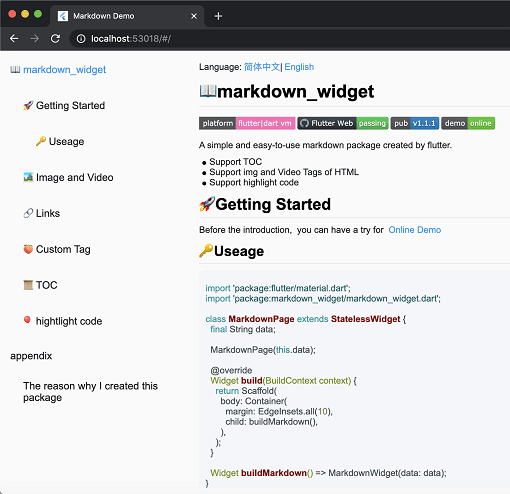
Ein neues Markdown-Paket. Es unterstützt TOC-Funktion, Code-Hervorhebung und alle Plattformen.

AndroidiOSWebmacOSWindowsLinux
30-Tage-Downloads
10.300
Likes
411
Pub-Punkte
160

Paket installieren

flutter pub add markdown_widget

Paketübersicht

Aus öffentlichen Paketdaten erstellte Orientierung.

Ein plattformübergreifendes Markdown-Rendern-Paket für Flutter, das die Erstellung von Inhaltsverzeichnissen, Syntax-Highlighting für Codeblöcke und nahtlose Integration auf Android, iOS, Web, macOS, Windows und Linux unterstützt. Mit Fokus auf Einfachheit und Leistung entwickelt, ermöglicht es Entwicklern, reichhaltigen Markdown-Inhalt mit minimaler Konfiguration anzuzeigen. Das Paket wird aktiv gepflegt und ist für Anwendungen konzipiert, die dynamische Textdarstellung aus Markdown-Quellen erfordern.

Anwendungsfälle

  • Dokumentation innerhalb von Apps rendern
  • Benutzererzeugten Inhalt anzeigen
  • Hilfe- oder FAQ-Bereiche erstellen
  • Dynamische Blogbeiträge generieren
  • Wissensbasen-Schnittstellen erstellen

Hauptmerkmale

  • Tabelleninhaltsunterstützung
  • Syntax-Highlighting
  • Plattformübergreifende Kompatibilität
  • Leichte und schnelle Darstellung
  • Anpassbare Stilisierung
  • Unterstützt alle wichtigen Plattformen

Geeignet für

  • Dokumentations-Apps
  • Lernhilfsmittel
  • inhaltsintensive Anwendungen
  • Entwicklerwerkzeuge
  • Web- und Desktop-Flutter-Anwendungen

Hinweise

  • Erfordert Markdown-Quellformatierung
  • Beschränkt auf grundlegende HTML-Anzeige
  • Könnte benutzerdefinierte Theme-Anpassungen erfordern
  • Nicht geeignet für komplexe Layouts
  • Die Leistung hängt von der Inhaltsgröße ab
  • Keine integrierte Bildladefunktion

Original-README

Originaler README-Schnappschuss aus dem verknüpften Quell-Repository. Aktuelle Inhalte finden Sie im Repository.

Language:简体中文 | English | 日本語

screen

📖markdown_widget

Coverage Status pub package demo

A simple and easy-to-use markdown rendering component.

  • Supports TOC (Table of Contents) function for quick location through Headings
  • Supports code highlighting
  • Supports all platforms

🚀Usage

Before starting, you can try out the online demo by clicking demo

import 'package:flutter/material.dart';
import 'package:markdown_widget/markdown_widget.dart';

class MarkdownPage extends StatelessWidget {
  final String data;

  MarkdownPage(this.data);

  @override
  Widget build(BuildContext context) => Scaffold(body: buildMarkdown());

  Widget buildMarkdown() => MarkdownWidget(data: data);
}

If you want to use your own Column or other list widget, you can use MarkdownGenerator

  Widget buildMarkdown() =>
      Column(children: MarkdownGenerator().buildWidgets(data));

Or use MarkdownBlock

  Widget buildMarkdown() =>
      SingleChildScrollView(child: MarkdownBlock(data: data));

📁 More Examples

For advanced usage examples, check out the example/lib/markdown_custom folder in the repository:

  • video.dart - Custom video tag support
  • latex.dart - LaTeX math formula rendering
  • mermaid.dart - Mermaid diagram support (flowcharts, sequence diagrams, etc.)
  • html_support.dart - HTML tag extension
  • custom_node.dart - Custom node implementation examples

These examples demonstrate how to extend the package with custom tags and features.

🌠Night mode

markdown_widget supports night mode by default. Simply use a different MarkdownConfig to enable it.

  Widget buildMarkdown(BuildContext context) {
    final isDark = Theme.of(context).brightness == Brightness.dark;
    final config = isDark
        ? MarkdownConfig.darkConfig
        : MarkdownConfig.defaultConfig;
    final codeWrapper = (child, text, language) =>
        CodeWrapperWidget(child, text, language);
    return MarkdownWidget(
        data: data,
        config: config.copy(configs: [
        isDark
        ? PreConfig.darkConfig.copy(wrapper: codeWrapper)
        : PreConfig().copy(wrapper: codeWrapper)
    ]));
  }
Default mode Night mode

🔗Link

You can customize the style and click events of links, like this

  Widget buildMarkdown() => MarkdownWidget(
      data: data,
      config: MarkdownConfig(configs: [
        LinkConfig(
          style: TextStyle(
            color: Colors.red,
            decoration: TextDecoration.underline,
          ),
          onTap: (url) {
            ///TODO:on tap
          },
        )
      ]));

📜TOC (Table of Contents) feature

Using the TOC is very simple

  final tocController = TocController();

  Widget buildTocWidget() => TocWidget(controller: tocController);

  Widget buildMarkdown() => MarkdownWidget(data: data, tocController: tocController);

  @override
  Widget build(BuildContext context) {
    return Scaffold(
        body: Row(
          children: <Widget>[
            Expanded(child: buildTocWidget()),
            Expanded(child: buildMarkdown(), flex: 3)
          ],
        ));
  }

🎈Highlighting code

Highlighting code supports multiple themes.

import 'package:flutter_highlight/themes/a11y-light.dart';

  Widget buildMarkdown() => MarkdownWidget(
      data: data,
      config: MarkdownConfig(configs: [
        PreConfig(theme: a11yLightTheme),
      ]));

🧬Select All and Copy

Cross-platform support for Select All and Copy function.

image

🌐Html tag

As the current package only implements the conversion of Markdown tags, it does not support the conversion of HTML tags by default. However, this functionality can be supported through extension. You can refer to the usage in html_support.dart for more details.

Here is the online HTML demo showcase

🧮Latex support

The example also includes simple support for LaTeX, which can be implemented by referring to the implementation in latex.dart

Here is the online latex demo showcase

🔷Mermaid diagram support

The example includes support for Mermaid diagrams, which can render flowcharts, sequence diagrams, state diagrams, and more. Refer to the implementation in mermaid.dart

Features:

  • Multiple diagram types (flowchart, sequence diagram, state diagram, ER diagram, etc.)
  • Theme support (auto light/dark mode)
  • Interactive display modes (code only, diagram only, or both)
  • Fullscreen viewer with pan & zoom support
  • Independent horizontal scrolling for wide diagrams
  • Smart caching and debouncing for optimal performance

Here is the online Mermaid demo showcase

import 'package:markdown_widget/markdown_widget.dart';
import 'markdown_custom/mermaid.dart';

// Basic usage
final isDark = Theme.of(context).brightness == Brightness.dark;
final preConfig = PreConfig(
  wrapper: createMermaidWrapper(
    config: const MermaidConfig(),
    isDark: isDark,
    preConfig: preConfig,
  ),
);

MarkdownWidget(
  data: markdown,
  config: config.copy(configs: [preConfig]),
)

// With custom configuration
final preConfig = PreConfig(
  wrapper: createMermaidWrapper(
    config: MermaidConfig(
      displayMode: MermaidDisplayMode.codeAndDiagram,
      diagramPadding: EdgeInsets.all(16.0),
      showLoadingIndicator: true,
    ),
    isDark: isDark,
    preConfig: preConfig,
  ),
);

🍑Custom tag implementation

By passing a SpanNodeGeneratorWithTag to MarkdownGeneratorConfig, you can add new tags and the corresponding SpanNodes for those tags. You can also use existing tags to override the corresponding SpanNodes.

You can also customize the parsing rules for Markdown strings using InlineSyntax and BlockSyntax, and generate new tags.

You can refer to this issue to learn how to implement a custom tag.

If you have any good ideas or suggestions, or have any issues using this package, please feel free to open a pull request or issue.

🧾Appendix

Here are the other libraries used in markdown_widget

Packages Descriptions
markdown Parsing markdown data
flutter_highlight Code highlighting
highlight Code highlighting
url_launcher Opening links
visibility_detector Listening for visibility of a widget;
scroll_to_index Enabling ListView to jump to an index.

Kategorien

Abhängigkeiten

Abhängigkeiten 6 Einträge

Quell-Repository

Projekte, die dieses Paket verwenden