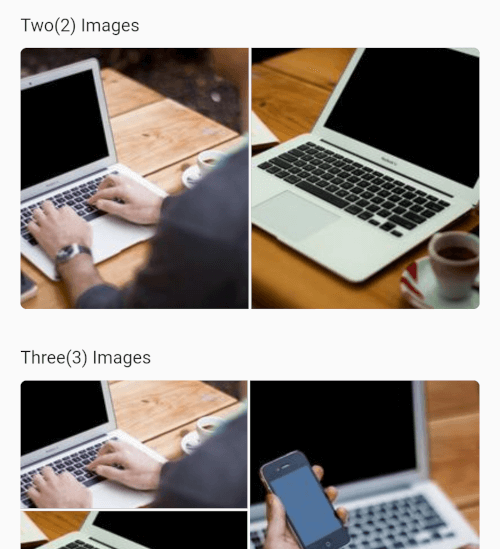
Aus öffentlichen Paketdaten erstellte Orientierung.
Ein flexibles Galerie-Paket zum Anzeigen mehrerer Netzwerk- und Ressourcenbilder in anpassbaren Layouts. Es unterstützt dynamische Gitteranordnungen, die sich an die Anzahl der Bilder anpassen, um eine optimale visuelle Darstellung auf verschiedenen Geräten sicherzustellen. Ideal für Social-Media-Apps oder Bildfreigabeplätformen, verarbeitet es effizient sowohl Remote- als auch lokale Bilder mit reibungsloser Darstellung und responsivem Design. Das Paket ist leichtgewichtig und lässt sich nahtlos in Flutter-Projekte integrieren.
Anwendungsfälle
Soziale-Medien-Feed wird angezeigt
Bildgalerien in Apps
Benutzerprofil-Fotogitter
Mehrfachbildfreigabefunktionen
Responsive Bildlayout-Management
Hauptmerkmale
Adaptive Gitterlayouts
Unterstützung für Netzwerk- und Asset-Bilder
Glatte Bildladung
Reaktives Design
Anpassbare Abstände und Ausrichtung
Geeignet für
Entwickler, die bildintensive Apps erstellen
Soziale-Medien-Anwendungen
Foto-Sharing-Plattformen
Apps, die dynamische Bildgitter erfordern
Flutter-Anfänger erkunden die Bildanzeige
Hinweise
Erforderliche ordnungsgemäße Fehlerbehandlung für defekte Bild-URLs
Möglicherweise ist zusätzlicher Cache zur Leistungsoptimierung bei vielen Bildern erforderlich
Beschränkte Anpassung über die Layoutstruktur hinaus
Nicht für sehr große Bildmengen ohne Paginierung optimiert
Original-README
Originaler README-Schnappschuss aus dem verknüpften Quell-Repository. Aktuelle Inhalte finden Sie im Repository.
multi_image_layout
Flexible Flutter layouts for mixed media grids and fullscreen viewing.
multi_image_layout lets you render single or multiple media items in adaptive
layouts, then open them in a fullscreen viewer with captions, save support, and
media-specific controls.
Features
Adaptive layouts for 1, 2, 3, 4, and 4+ items
Mixed image and video support in the same grid
Fullscreen media viewer with swipe navigation
Zoomable images
Zoomable fullscreen videos
Video autoplay with autoPlay: true by default
Video play/pause, mute, progress bar, elapsed time, and total duration
If you use the save action, add these keys to
ios/Runner/Info.plist:
<key>NSPhotoLibraryAddUsageDescription</key><string>This app saves images and videos to your photo library.</string><key>NSPhotoLibraryUsageDescription</key><string>This app accesses your photo library to save and manage media.</string>
Without these keys, iOS may terminate the app when save is triggered.
If you plan to load remote media, prefer https URLs. If you need http
sources, configure App Transport Security for your app.
Android
If you load remote images or videos, make sure your app has internet access:
If you use the save action, request the appropriate storage or media
permissions for your target Android version. For older Android versions, that
may include:
Permission handling is app-specific, so you should request it from your app
layer before calling the save action. A package like
permission_handler can be used
for that flow.