Verwalten und dauerhaft speichern Sie Einkaufswagen-Daten in Ihrer Flutter-App mit diesem umfassenden Paket. Vereinfachen Sie die lokale Speicherung und verbessern Sie die Einkaufserfahrung für Ihre Benutzer.
Aus öffentlichen Paketdaten erstellte Orientierung.
Ein Flutter-Paket, das eine nahtlose Verwaltung und dauerhafte Speicherung von Warenkorb-Daten über App-Neustarts hinweg ermöglicht. Es vereinfacht die lokale Datenverarbeitung, indem es den Inhalt des Warenkorbs automatisch auf dem Gerätespeicher speichert und sicherstellt, dass Benutzer ihre Auswahl auch nach Schließen der App beibehalten. Ideal für E-Commerce-Anwendungen, verbessert es die Benutzererfahrung durch Erhalt der Warenkorrintegrität. Das Paket unterstützt mehrere Plattformen wie Android, iOS, macOS, Windows und Linux und ist somit vielseitig für plattformübergreifende Entwicklung.
Anwendungsfälle
E-Commerce-Apps mit Benutzerwagen
Offline-Einkaufserlebnisse
Persistierende Produktauswahl
Kreuzgeräte-Warenkorb-Synchronisierung
Benutzer-Sitzungsfortsetzung
Hauptmerkmale
Automatische lokale Persistenz
Plattformübergreifende Kompatibilität
Einfache API für Warenkorb-Operationen
Echtzeit-Aktualisierungen des Warenkorbs
Unterstützung für komplexe Elementdaten
Geeignet für
Mobile E-Commerce-Apps
Einkaufsanwendungen
Apps, die Offline-Daten erfordern
Entwickler, die eine einfache Warenkorbverwaltung suchen
Projekte für mehrere Plattformen
Hinweise
Erforderliche ordnungsgemäße Fehlerbehandlung bei Speicherfehlern
Möglicherweise Anpassung für große Warenkorb-Datensätze erforderlich
Abhängig von der korrekten Initialisierung
Nicht geeignet für cloudbasierte Warenkorb-Synchronisierung
Beschränkt auf lokalen Speicher
Original-README
Originaler README-Schnappschuss aus dem verknüpften Quell-Repository. Aktuelle Inhalte finden Sie im Repository.
Persistent Shopping Cart
Persistent Shopping Cart is a Flutter package that provides a simple and persistent shopping cart functionality for your mobile application. It uses Hive for local storage, making the cart data persist across app sessions.
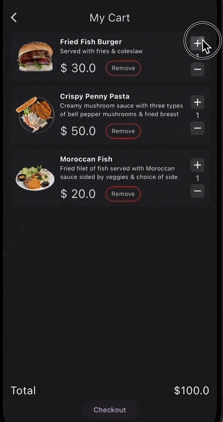
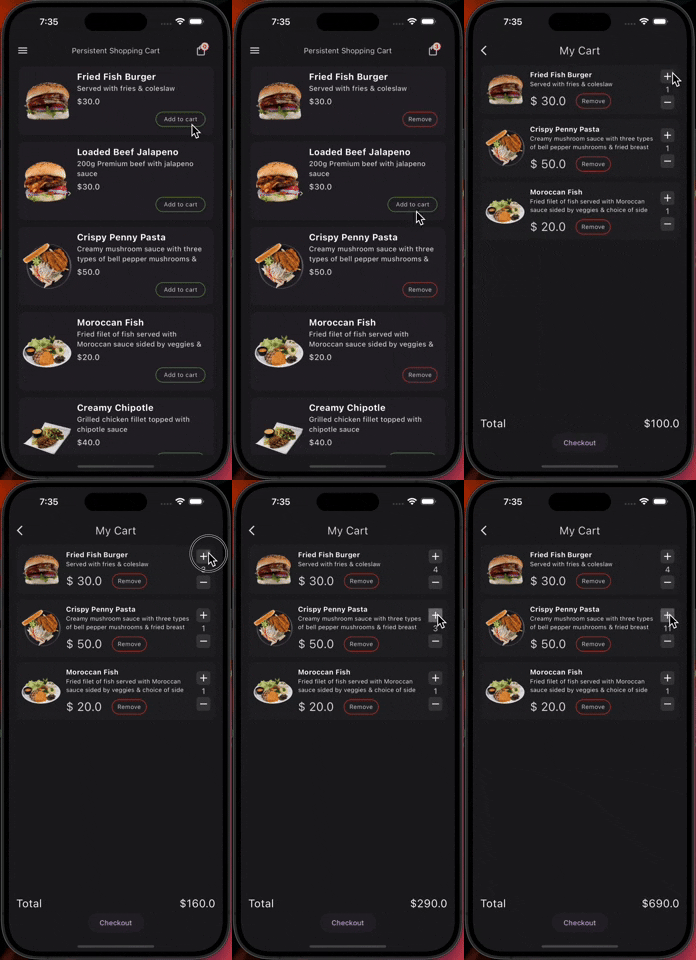
Demo Preview
Features
Initialization: Easily initialize the shopping cart using init() method.
Add to Cart: Add products to the cart with the addToCart method.
Remove from Cart: Remove products from the cart using the removeFromCart method.
Increment/Decrement Quantity: Adjust the quantity of items in the cart with the incrementCartItemQuantity and decrementCartItemQuantity methods.
Calculate Total Price: Get the total price of items in the cart using the calculateTotalPrice method.
Get Cart Item Count: Retrieve the total number of items in the cart with the getCartItemCount method.
Clear Cart: Remove all items from the cart using the clearCart method.
Show Cart Items: Display the cart items using the showCartItems method, providing flexible builders for customizing how the cart is displayed (e.g., ListView, GridView).
Show Cart Item Count Widget: Show a widget displaying the current cart item count using the showCartItemCountWidget method.
Show Total Amount Widget: Display a widget showing the total amount of items in the cart with the showTotalAmountWidget method.
Show and Update Cart Item Widget: Show a widget that dynamically updates based on whether a product is in the cart or not, using the showAndUpdateCartItemWidget method.
Retrieve Cart Data and Total Price: Use getCartData method in the PersistentShoppingCart class to get a list of cart items and the total price.
Start using the shopping cart functionality in your application!
Example Usage
// Add product to the cartawaitPersistentShoppingCart().addToCart(PersistentShoppingCartItem());
// Remove product from the cartawaitPersistentShoppingCart().removeFromCart(productId);
// Increment product quantity in the cartawaitPersistentShoppingCart().incrementCartItemQuantity(productId);
// Decrement product quantity in the cartawaitPersistentShoppingCart().decrementCartItemQuantity(productId);
// Get total price of items in the cartdouble totalPrice = PersistentShoppingCart().calculateTotalPrice();
// Get total number of items in the cartint itemCount = PersistentShoppingCart().getCartItemCount();
// Clear the cartPersistentShoppingCart().clearCart();
// Retrieve cart data and total priceMap<String, dynamic> cartData = PersistentShoppingCart().getCartData();
List<PersistentShoppingCartItem> cartItems = cartData['cartItems'];
double totalPriceFromData = cartData['totalPrice'];
Widgets
Show Cart Items
The showCartItems method now provides flexibility to define how cart items are displayed (e.g., ListView, GridView) using a builder function.
PersistentShoppingCart().showCartItems(
cartItemsBuilder: (BuildContext context, List<PersistentShoppingCartItem> cartItems) {
// no item added to cartif(cartItems.isEmpty){
returnEmptyCartMsgWidget();
}
// Define your custom widget for displaying cart itemsreturnListView.builder(
itemCount: cartItems.length,
itemBuilder: (context, index) {
final item = cartItems[index];
returnListTile(
title: Text(item.name), // Replace with your cart item widget
subtitle: Text('Quantity: ${item.quantity}'),
);
},
);
},
);
Show Cart Item Count Widget
PersistentShoppingCart().showCartItemCountWidget(
  cartItemCountWidgetBuilder: (int itemCount) {
    // Your custom widget displaying the cart item count
  },
);
Show Total Amount Widget
PersistentShoppingCart().showTotalAmountWidget(
  cartTotalAmountWidgetBuilder: (double totalAmount) {
    // Your custom widget displaying the total amount
  },
);