पैकेज, रिपॉज़िटरी और ऐप श्रेणियाँ खोजें

animated_hint_textfield कवर
पैकेज विवरणv1.3.0

animated_hint_textfield

टेक्स्टफील्ड हिंट/लेबल टेक्स्ट को एनिमेट करने के लिए फ्लटर पैकेज, उपयोगकर्ता अनुभव को सुधारने के लिए डायनामिक और आकर्षक ट्रांज़िशन जोड़ता है।

AndroidiOSWebmacOSWindowsLinux
30-दिन डाउनलोड
3.5 हज़ार
लाइक
107
Pub अंक
160

पैकेज इंस्टॉल करें

flutter pub add animated_hint_textfield

पैकेज अवलोकन

सार्वजनिक जानकारी से बना चयन मार्गदर्शन। केवल संदर्भ हेतु।

एक फ्लटर पैकेज जो टेक्स्ट फ़ील्ड हिंट या लेबल टेक्स्ट को एनिमेट करता है, जब फ़ील्ड को फोकस किया जाता है या फोकस खोया जाता है तो सुचारू और डायनामिक ट्रांजिशन बनाता है। उपयोगकर्ता अनुभव को सूक्ष्म एनिमेशन के माध्यम से दृश्य प्रतिक्रिया देकर बढ़ाया जाता है, जिससे इनपुट फ़ील्ड अधिक आकर्षक और सहज हो जाते हैं। आधुनिक UI में जहां सौंदर्य और इंटरैक्टिविटी महत्वपूर्ण होती है, वहां यह आदर्श है। इस पैकेज को एंड्रॉइड, आईओएस, वेब, मैकओएस, विंडोज और लिनक्स जैसे कई प्लेटफ़ॉर्म के लिए समर्थन मिलता है, जिससे उपकरणों के बीच सुसंगत व्यवहार सुनिश्चित होता है।

उपयोग

  • दृश्य प्रतिक्रिया के साथ फॉर्म इनपुट में सुधार
  • आधुनिक और इंटरैक्टिव लॉगिन स्क्रीन बनाना
  • मोबाइल और वेब एप्लिकेशन में UX को बेहतर बनाना
  • टेक्स्ट फ़ील्ड में माइक्रो-इंटरैक्शन जोड़ना
  • दिखावटी रूप से आकर्षक डेटा एंट्री फॉर्म का डिज़ाइन

मुख्य विशेषताएँ

  • चिकन फोकस और ब्लर एनीमेशन
  • कस्टमाइज़ की गई एनीमेशन अवधि और वक्र
  • बहुपлатफॉर्म समर्थन
  • मौजूदा टेक्स्ट फ़ील्ड्स के साथ आसान एकीकरण
  • गतिशील संकेत स्थान और स्केलिंग

इनके लिए उपयुक्त

  • इंटरैक्टिव तत्वों की तलाश में UI/UX डिज़ाइनर
  • प्रोफेशनल फॉर्म बनाने वाले डेवलपर्स
  • उपयोगकर्ता भागीदारी पर ध्यान केंद्रित ऐप्स
  • क्रॉस-प्लेटफॉर्म Flutter प्रोजेक्ट्स
  • हल्के लेकिन प्रभावी एनीमेशन की आवश्यकता वाले परियोजनाएं

विचार योग्य बातें

  • कम शक्तिशाली उपकरणों पर प्रदर्शन प्रभावित हो सकता है
  • एनीमेशन पैरामीटर को ध्यान से ट्यून करने की आवश्यकता है
  • केवल संकेत/लेबल पाठ एनीमेशन तक सीमित
  • जटिल फॉर्म वैधता तर्क के लिए अनुपयुक्त
  • उत्तम परिणाम के लिए सही विजेट हियरार्की पर निर्भर करता है

मूल README

संबंधित सोर्स रिपॉज़िटरी के मूल README का स्नैपशॉट। नवीनतम सामग्री के लिए रिपॉज़िटरी देखें।

pub package pub points

Animated Hint TextField

A Flutter package designed to animate the label/hint text of a textfield, providing suggestive guidance to the user regarding what to input. Try out our example app.


Platform Support

Android iOS MacOS Web Linux Windows
✅ ✅ ✅ ✅ ✅ ✅


Installing

1. Depend on it

Add this to your package's pubspec.yaml file:

dependencies:
  animated_hint_textfield: ^1.0.0
2. Install it

You can install packages from the command line:

with pub:

$ pub get

with Flutter:

$ flutter pub get
3. Import it

Now in your Dart code, you can use:

import 'package:animated_hint_textfield/animated_hint_textfield.dart';


Animations

Currently this package supports 3 animations, more animations will be added in the future.

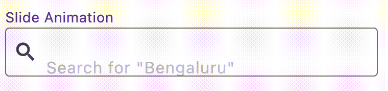
Slide

AnimatedTextField(
  animationType: Animationtype.slide, // Use Animationtype.slide for Slide animations
  decoration: InputDecoration(
    prefixIcon: Icon(Icons.search),
    border: OutlineInputBorder(
      borderSide: BorderSide(color: Colors.red, width: 2,
      ),
      borderRadius: BorderRadius.circular(4),
    ),
    focusedBorder: OutlineInputBorder(
      borderSide: BorderSide(color: Colors.black, width: 2,
      ),
      borderRadius: BorderRadius.circular(4),
    ),
    contentPadding: EdgeInsets.all(12),
  ),
  staticHintText: 'Search for ',
  hintTexts: [
    '"Bengaluru"',
    '"Mumbai"',
    '"Chennai"',
  ],
);

Fade

AnimatedTextField(
  animationType: Animationtype.fade, // Use Animationtype.fade for Fade animations
  decoration: InputDecoration(
    prefixIcon: Icon(Icons.search),
    border: OutlineInputBorder(
      borderSide: BorderSide(color: Colors.red, width: 2,
      ),
      borderRadius: BorderRadius.circular(4),
    ),
    focusedBorder: OutlineInputBorder(
      borderSide: BorderSide(color: Colors.black, width: 2,
      ),
      borderRadius: BorderRadius.circular(4),
    ),
    contentPadding: EdgeInsets.all(12),
  ),
  hintTexts: [
    'Search for "Bengaluru"',
    'Search for "Mumbai"',
    'Search for "Chennai"',
  ],
);

Typer

AnimatedTextField(
  animationType: Animationtype.typer, // Use Animationtype.typer for Type Write Style animations
  hintTextStyle: const TextStyle(
    color: Colors.deepPurple,
    overflow: TextOverflow.ellipsis,
  ),
  hintTexts: const [
    'How is the weather today?',
    'Will it rain today?',
    'What is the temperature',
  ],
  decoration: InputDecoration(
    suffixIcon: const Icon(Icons.search),
    filled: true,
    border: OutlineInputBorder(
      borderSide: const BorderSide(color: Colors.red, width: 2),
      borderRadius: BorderRadius.circular(25),
    ),
    focusedBorder: OutlineInputBorder(
      borderSide: const BorderSide(color: Colors.black, width: 2),
      borderRadius: BorderRadius.circular(25),
    ),
    contentPadding: const EdgeInsets.all(12),
  ),
);
💡 Tip

Use staticHintText when part of the hint should stay fixed while only the animated part changes:

AnimatedTextField(
  staticHintText: 'Search for ',
  hintTexts: const ['Bengaluru', 'Mumbai', 'Chennai'],
);

For suffix-style hints, set staticHintTextPosition:

AnimatedTextField(
  staticHintText: ' nearby',
  staticHintTextPosition: StaticHintTextPosition.suffix,
  hintTexts: const ['Cafe', 'Hotel', 'Restaurant'],
);

By default, the animated hint text can span multiple lines if the text is long. If you want to keep the hint on a single line and show overflow with ellipses (...), set the overflow property in hintTextStyle:

hintTextStyle: TextStyle(
  overflow: TextOverflow.ellipsis,
),

Contributors


Deekshith Shetty

Torregrossa François

श्रेणियाँ

निर्भरताएँ

निर्भरता सूची 1 आइटम

सोर्स रिपॉज़िटरी

इस पैकेज का उपयोग करने वाले प्रोजेक्ट

अभी कोई डेटा उपलब्ध नहीं है।