पैकेज, रिपॉज़िटरी और ऐप श्रेणियाँ खोजें

ansicolor कवर
पैकेज विवरणv2.0.3

ansicolor

अपने टर्मिनल लॉग में कुछ रंग जोड़ना चाहते हैं? `ansicolor` एक xterm-256 रंग समर्थन लाइब्रेरी है जो आपके टेक्स्ट के फॉरग्राउंड और बैकग्राउंड रंग को बदलने की अनुमति देती है।

AndroidiOSWebmacOSWindowsLinux
30-दिन डाउनलोड
32.7 लाख
लाइक
171
Pub अंक
160

पैकेज इंस्टॉल करें

flutter pub add ansicolor

पैकेज अवलोकन

सार्वजनिक जानकारी से बना चयन मार्गदर्शन। केवल संदर्भ हेतु।

ansicolor एक Dart पुस्तकालय है जो टर्मिनल आउटपुट के लिए xterm-256 रंग समर्थन प्रदान करता है, जिससे विकासकर्ता कंसोल लॉग में टेक्स्ट फॉरेग्राउंड और बैकग्राउंड रंग को कस्टमाइज़ कर सकते हैं। यह विभिन्न प्लेटफॉर्म पर Flutter एप्लिकेशन के साथ बिना किसी दिक्कत के एकीकृत होता है, डिबग दृश्यता और लॉग पढ़ने में आसानी बढ़ाता है। यह पैकेज विकासकर्ताओं के लिए आदर्श है जो बाहरी उपकरणों के बिना अपने टर्मिनल आउटपुट में दृश्य अंतर जोड़ना चाहते हैं। सरल वाक्य रचना के साथ, यह टर्मिनल में विस्तृत रंग और स्वरूपण विकल्प समर्थित करता है।

उपयोग

  • टर्मिनल डीबग आउटपुट को बढ़ाएं
  • रंग-कोडिंग लॉग संदेश
  • CLI टूल की पठनीयता में सुधार करना
  • कंसोल एप्लिकेशन में विजुअल फीडबैक जोड़ना
  • कमांड-लाइन इंटरफेस के दिखावट को कस्टमाइज़ करें

मुख्य विशेषताएँ

  • xterm-256 रंगों का समर्थन करता है
  • उपयोग में आसान रंग स्वरूपण
  • क्रॉस-प्लेटफॉर्म टर्मिनल समर्थन
  • फ़ॉरग्राउंड/बैकग्राउंड रंगों के लिए सरल API
  • हल्का और निर्भरता-मुक्त

इनके लिए उपयुक्त

  • CLI टूल बनाने वाले डेवलपर्स
  • कंसोल लॉगिंग के साथ फ्लटर ऐप्स
  • दृश्य संकेतों की आवश्यकता वाले डिबगिंग पर्यावरण
  • टीम लॉग स्पष्टता में सुधार कर रही है
  • शैक्षिक या प्रशिक्षण परियोजनाएँ

विचार योग्य बातें

  • केवल टर्मिनल आउटपुट तक सीमित
  • UI रेंडरिंग के लिए उपयुक्त नहीं
  • ANSI रंगों का समर्थन करने वाले टर्मिनल की आवश्यकता है
  • सभी टर्मिनल्स पर संगत रूप से नहीं दिखाई देगा
  • कोड के अलावा कोई रनटाइम रंग कस्टमाइजेशन नहीं है

मूल README

संबंधित सोर्स रिपॉज़िटरी के मूल README का स्नैपशॉट। नवीनतम सामग्री के लिए रिपॉज़िटरी देखें।

ANSI / Xterm 256 color library for Dart

Feel like you're missing some color in your terminal programs? Use AnsiPen to add ANSI color codes to your log messages.

Easy to disable for production, just set color_disabled = true and all codes will be empty - no re-writing debug messages.

Note: color_disabled is a global variable for all pen colors.

Example

Note: Be mindful of contrasting colors. If you set "bright white" foreground and don't adjust the background, you'll have a bad time with lighter terminals.

Foreground to bright white with default background:

AnsiPen pen = AnsiPen()..white(bold: true);
print(pen("Bright white foreground") + " this text is default fg/bg");

Background as a peach, foreground as white:

AnsiPen pen = AnsiPen()..white()..rgb(r: 1.0, g: 0.8, b: 0.2, bg: true);
print(pen("White foreground with a peach background"));

Note

If color isn't working for you; try setting ansiColorDisabled = false;. We're relying on the stdio object to inform us of ANSI terminal support. Sometimes this is wrong.

Prior versions of this library just turned on color by default.

Rainbow Demo

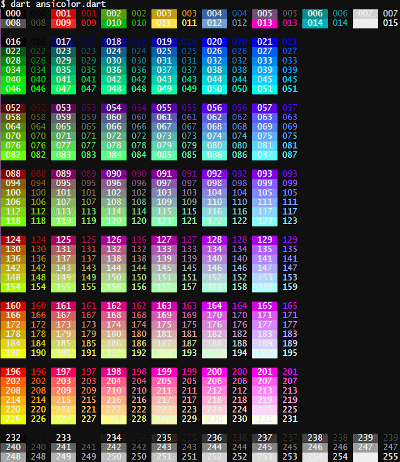
If you want a specific color, you can call the xterm() with the index listed in the rainbow below. To show the rainbow on your own terminal, pub run examples/ansicolor.dart

alt tag

श्रेणियाँ

सोर्स रिपॉज़िटरी

इस पैकेज का उपयोग करने वाले प्रोजेक्ट

रैंकिंग